Slaving a second amp or power amp
5
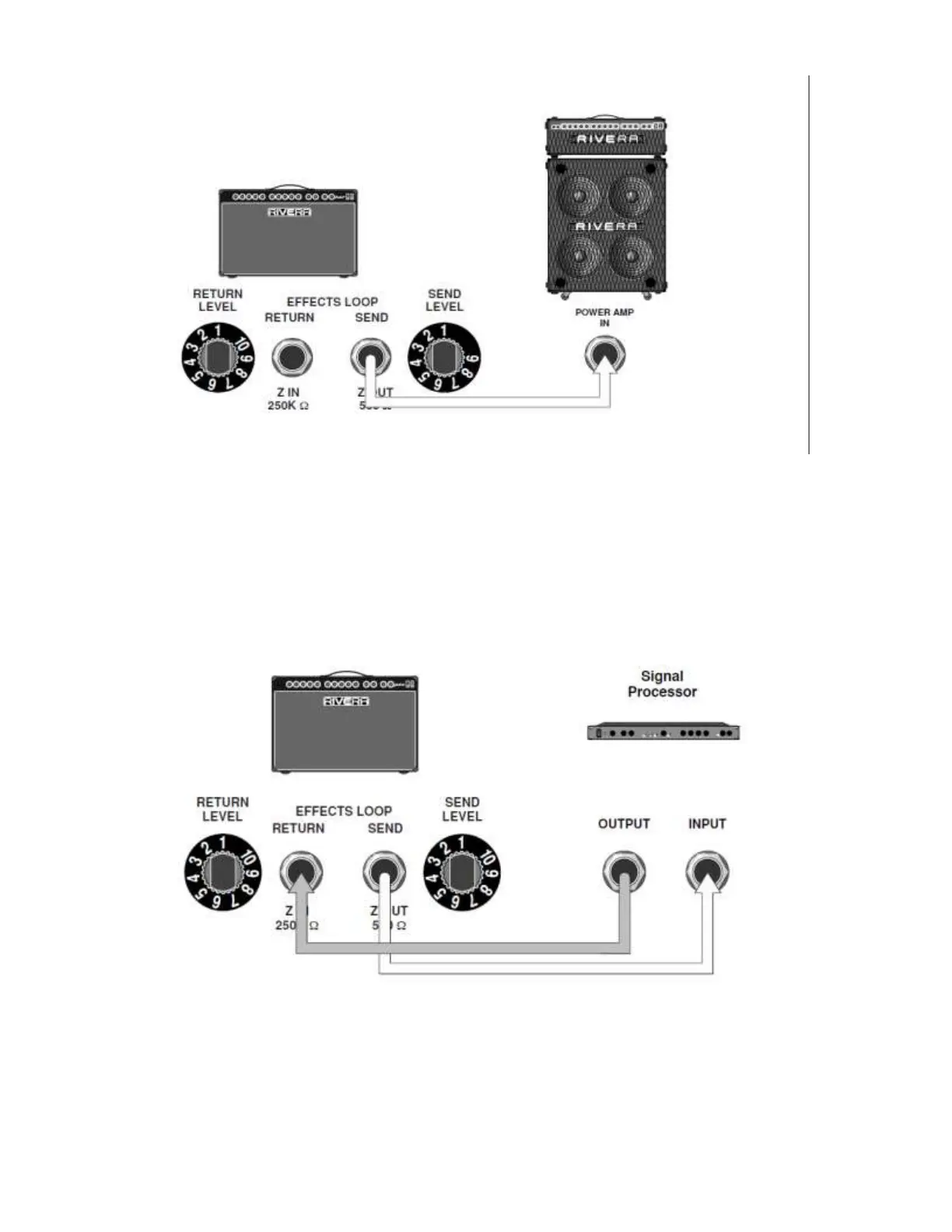
Connect a shielded cord from your Sedona’s Effects Loop Send to the power amp input or Effects
Loop Return on a second amp. All volume and tone changes made on the Sedona will affect what
comes out of the second amp.
Caution: Never use the speaker outputs as line outputs. Their power level is extremely high and can
cause tremendous damage to another amp’s input. If you don’t have any effects patched into the
Sedona’s Effects Loop, you can use its Send jack instead of the Line Out. The Send Level knob
then acts as a variable output level.
987654321
__10987
654321
_
_10987654321
765432
1
Placing a signal processor in the effects loop
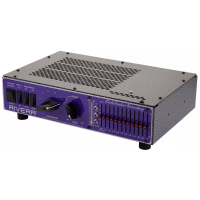
Using shielded cords, connect the Effects Loop Send to the processor’s input, and the processor’s
output to the Effects Loop Return. Adjust the mixture of effect/non-effect sounds at the signal
processor, and set the levels at the amp and processor for lowest distortion. If you use multiple
signal processors, connect them in series (processor 1’s output to processor 2’s input, etc.), and
patch the Sedona’s Send to the first processor’s input and the Sedona’s Return to the last


 To Next Page