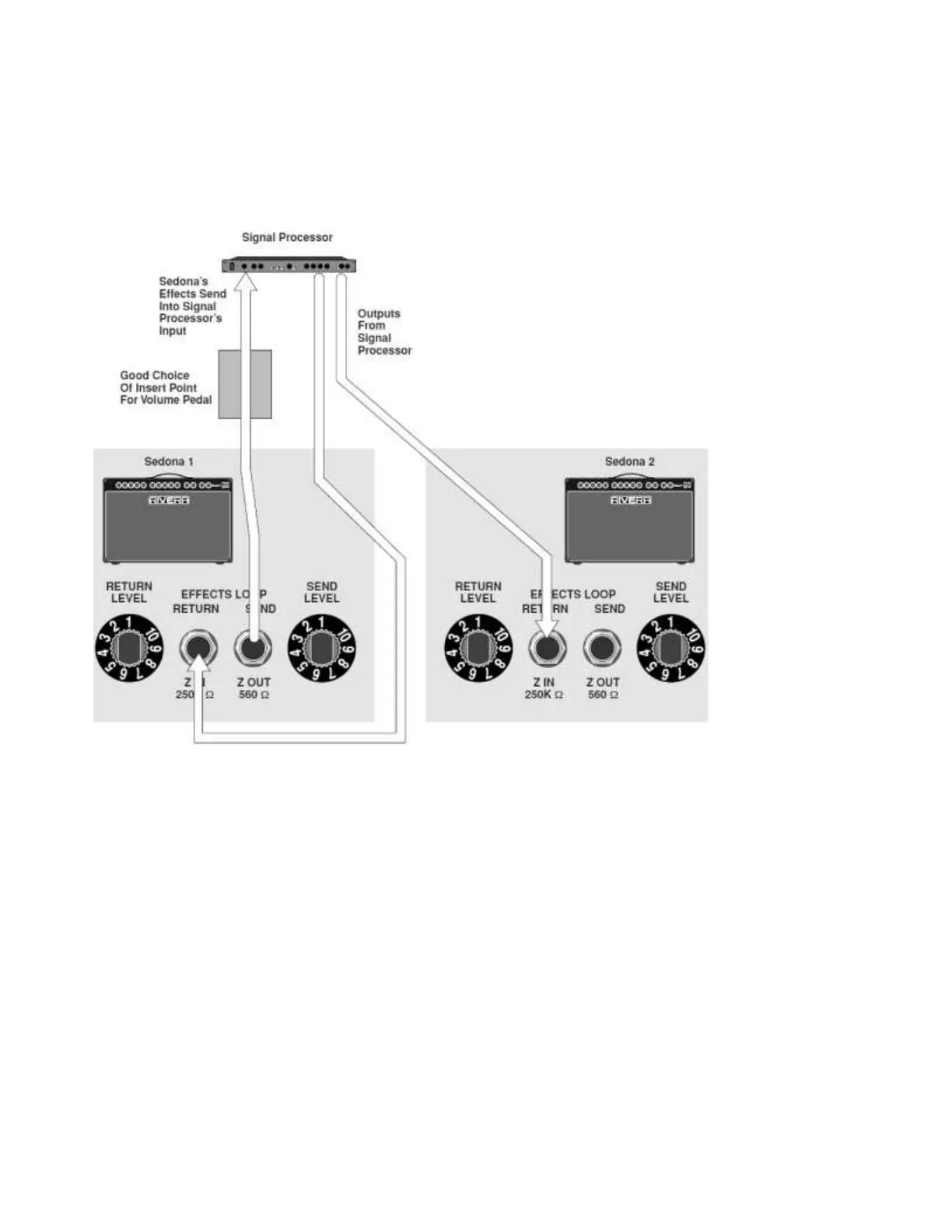
processor’s output. If the processor has stereo outputs, you can connect one to the Effects Loop
Return of a second amp.
Sending a direct signal to P.A. or recording gear
Using a shielded cord with an ¼ jack, connect the Sedona’s Direct Output to the line input or
channel input of a mixer. Caution: Never use the speaker output to connect to audio inputs.
654321
__10987654321
__1098
__10987654321
__10987
654321
_10987654321
Running two Sedonas in stereo
When you run two Sedonas in stereo, you can place a stereo signal processor (reverb, delay, etc.) in
the line between the first Sedona’s Effects Loop Send and the second Sedona’s Effects Loop
Return. Do not forget to include a return from the signal processor to the first Sedona’s Effects
Loop Return. Set the first Sedona’s Effects Send and Return levels and the signal processor's input
and output levels for best signal-to-noise ratio and best tone. In addition, set your effects/dry signal
blend in the signal processor. If you want to use a volume pedal, the line between the first Sedona’s
Effects Loop Send and the signal processor’s input is an excellent location. Always use high-quality
shielded cables for these connections.
C A R E & TR O U B L E S H O O T I N G
Chances are, you bought your RIVERA amp to make your guitar sound great, not to improve your
skills with electronics. What we’re saying is, “If something ever goes wrong with your amp, don’t
try to fix it yourself.” There are some potentially lethal high voltages inside the amp, plus if you do
something that causes even more damage than when you started out, the person who does the real


 To Next Page