Walk Mode
Press and hold the (down) button to start the walking mode. This feature will operate the
motor at a relatively low speed to assist you in walking the bike.
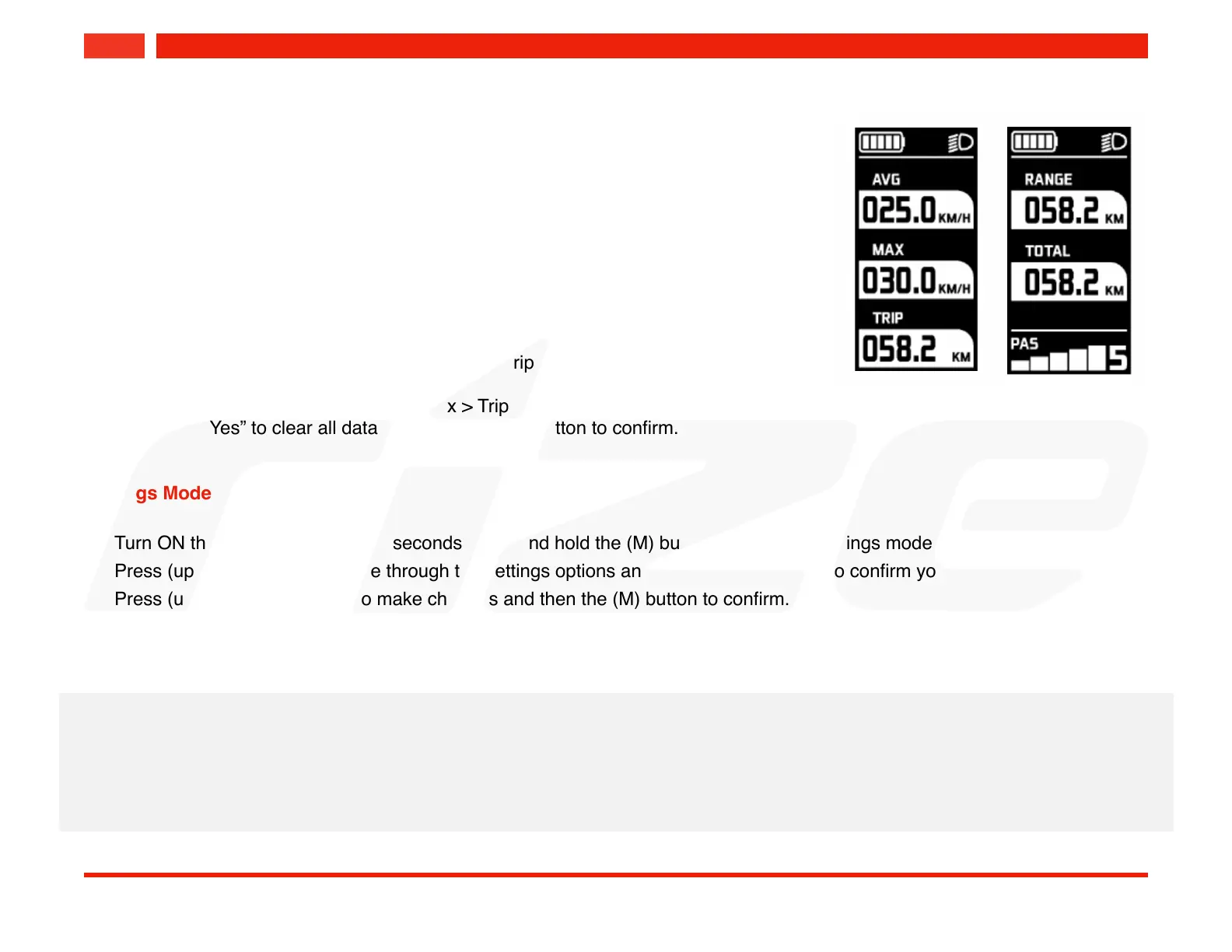
Data Mode Display
Press and hold the (M) button to change the data mode display. Press again to change
to the next mode. The mode sequence:
Average Speed > Max Speed > Single Trip > Total Trip
To clear data (trip reset), go to the Avg > Max > Trip mode and press and hold the (M)
button. Select “Yes” to clear all data and press the (M) button to confirm.
Settings Mode
-
Turn ON the power and within 10 seconds press and hold the (M) button to enter the settings mode.
-
Press (up) or (down) to navigate through the settings options and press the (M) button to confirm your selection.
-
Press (up) or (down) buttons to make changes and then the (M) button to confirm.
-
To exit the settings mode, press and hold the (M) button.
The settings option:
1. Unit = KM / Miles. Switch speed and trip mode to kilometers or miles.
2. BLG = Backlight brightness (1 - 3)
3. Light = Taillight flashing mode (mode 0 disabled, mode 1 enabled)!
*Only applicable on integrate taillight.


 To Next Page