14
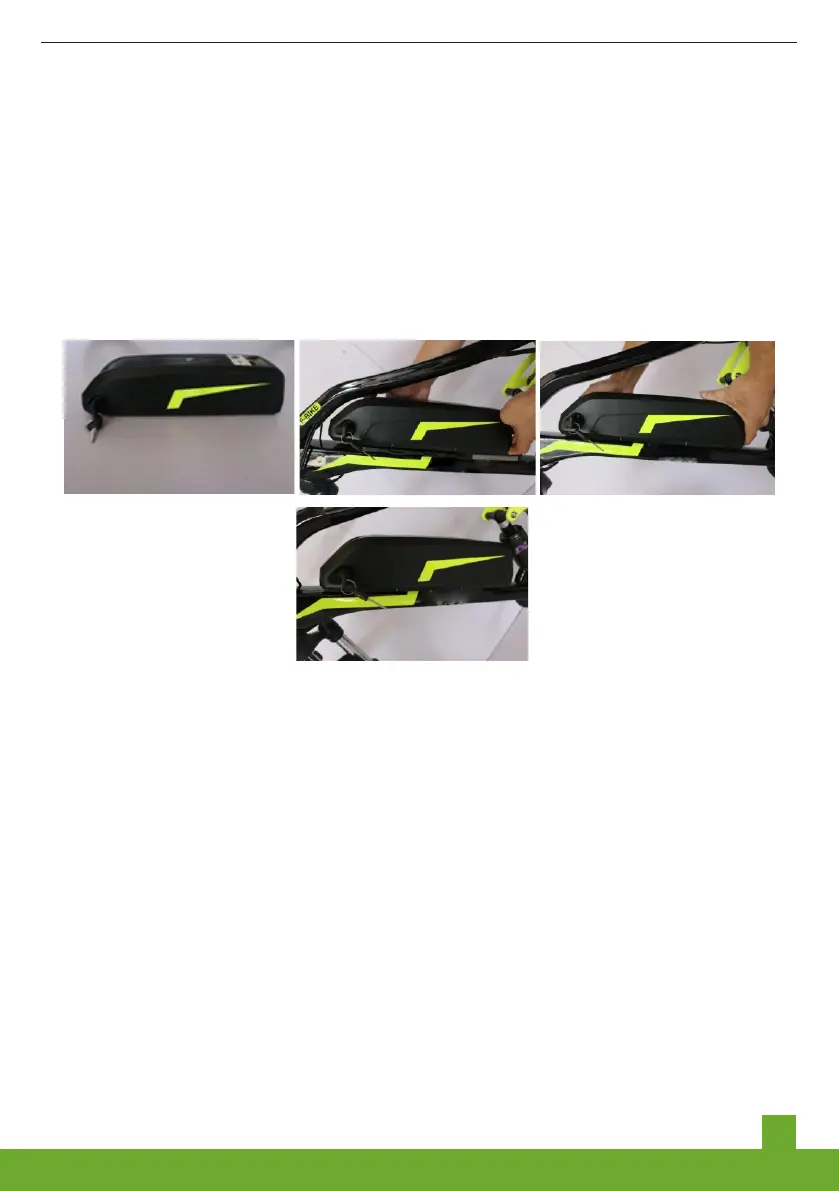
6. Installaton of battery: After openng the battery package, the drecton of the keyhole
s upward.The battery case s fixed on the lower tube. There s a card poston movng up
and down between the battery case and the base.Once you find the card poston, stck
the battery onto the base and squeeze n the downward drecton.Lock the key n the
drecton of the "LOCK" and fix the battery case.
Unplug the key and keep t.
Indcaton on the battery pack: "O" s the OFF state, and "-" s the ON state.
7. Remove the battery: Use the key to nsert the keyhole and rotate t to OPEN to unlock
t. Use the battery case to pull the battery up and forward to remove the battery. Then
hold the battery case wth both hands and pull the battery upwards to remove the battery.
MAINTENANCE
We recommend you to vst the dealer after one month of purchase. It s advsed to
perform the first perodc mantenance after 1 month of ntal use and a second
mantenance after 2 months of usage and once n 2 months followng. Regular
nspectons can avod unnecessary damage and repar costs afterwards. Keep your e-
bke n neat condton and avod settlng of dust, greasng the necessary parts are very
mportant and do make sure, you never mss a perodc mantenance wth your dealer.
Ths wll enhance the usablty. Here are a few tps for your reference.
•Check f the hanger fixng screws are loose or they fell off. Check f the fixng screws of
the battery cases’ base are loose.
•Check f the battery s charged accordng to the correct procedure n the manual and
stored n a place wthn the permssble temperature.
•Do not let the drt enter the gap between sensor and bottom bracket (Mddle of the Pedal
arms). Clean t regularly.


 To Next Page