Use Instruction
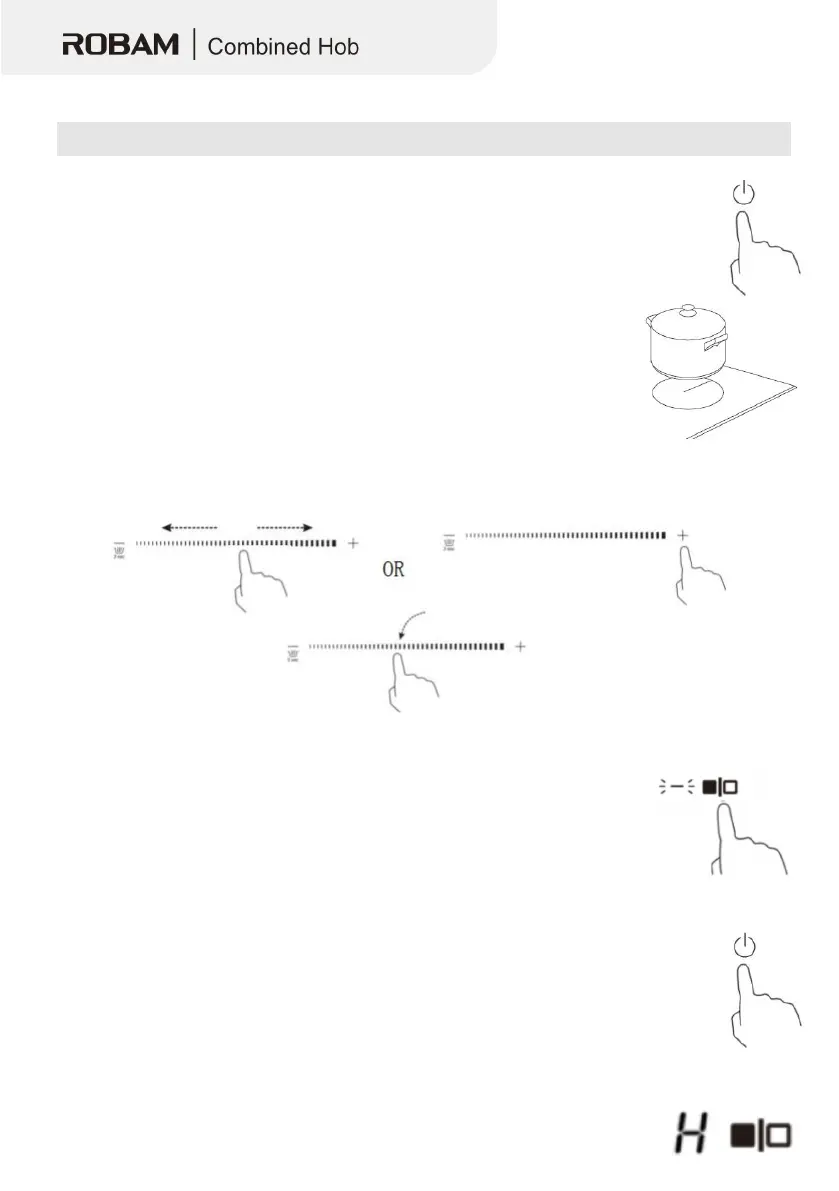
1. Touch the ON/OFF control.
• After power on, the buzzer beeps once, all displays show “–“ or “– –“, indicating
that the induction hob has entered the state of standby mode.
2. Put a suitable pan on the cooking zone that you hope to use.
• Make sure the bottom of the pan and the surface of the cooking zone
3. Touching the heating zone selection control, and the indicator next to the key will flash.
4. Set a power level by touching the “-”, “+”, or slide along the “—”control,
or just touch any point of the “—”.
When you have finished cooking
1. Turn the whole cooktop off by touching the ON/OFF control.
2. Beware of hot surfaces
• “H” showing means the cooking zone is hot to touch. It will disappear


 To Next Page