Need help?
Do you have a question about the Robam ZQB400-S106 and is the answer not in the manual?
Explains harm levels (Danger, Warning, Notice) and behavioral signs.
Instructions on handling plugs, sockets, and avoiding electric shock.
Advisories on hot surfaces, flammable materials, and oven operation.
Introduces ROBAM's expertise and the oven's design concepts.
Guidance on packaging disposal and child safety.
Highlights features like touch manipulation, multi-function modes, and safety.
Lists specifications like voltage, power, capacity, and dimensions.
Labels and identifies various parts of the steam oven.
Details the items that come with the steam oven.
Provides required dimensions for full and semi-insertion into cabinets.
Guidelines for cabinet surface, air circulation, and unit fixing.
Instructions for electrical connection, socket usage, and grounding.
Identifies and explains control panel buttons and knobs.
Guidance on initial setup, cleaning, and filling the water tank.
Steps for powering on the unit and entering standby mode.
How to set the clock time on the appliance.
Procedure to start the oven and choose a cooking mode.
Instructions for adjusting cooking time and temperature.
How to initiate cooking after settings are made.
Steps for setting a delayed start for cooking.
How to use the interior light and power off the unit.
Details on different menu modes with default settings.
Lists common problems, their causes, and solutions.
Advisories on water tank, cleaning, and unauthorized disassembly.
Recommendations for cleaning the inner container, door, and heating plate.
Instructions for correctly installing the door seal.
Visual representation of the oven's electrical system.
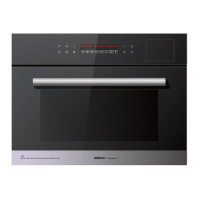
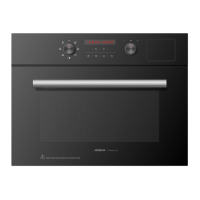
This document describes the ROBAM ZQB400-S106 Steam Oven, a household appliance designed for various cooking needs, primarily focusing on steaming. It is a Class I utensil, meaning it must be grounded during use, and is not suitable for plateau regions.
The steam oven features a sleek glass panel with one-touch manipulation, making it user-friendly. It offers multiple cooking modes, providing diverse steaming choices to accommodate different types of food and culinary preferences. An intelligent water level detection technology is integrated to ensure accurate water judgment for efficient water use, preventing issues related to insufficient or excessive water. For added convenience, the appliance includes an intelligent delay function, allowing users to pre-set cooking times. A humanized chamber lighting design enables users to check the food status inside the oven without opening the door, preserving heat and steam. Safety features such as an electromagnetic lock and over-temperature protection are incorporated to ensure safer operation.
Before using the steam oven, it is crucial to follow specific instructions. If steaming greasy food in a vessel with holes, a steam plate without holes should be inserted at the first layer of the rest rack to prevent grease from running into the chamber, which could make cleaning difficult. For water tank installation and filling, users should press the designated icon to pop out the water tank when the appliance is on. The tank should be checked for cleanliness, and any abnormal odor or dirt should be cleaned. Only cold water should be used to fill the tank up to the "Max water level" mark, as hot water can cause tank deformation or damage. If the appliance detects a lack of water, a specific icon will flash, and the unit will beep to alert the user.
To operate the steam oven, first plug it in. A sound will be heard, and indicator lights will illuminate, with the display showing "12:00" and a specific button flashing, indicating standby mode. If no operation occurs for a few minutes, the unit will switch off, and all indicators except the power button will turn off. To adjust the time, press and hold the time button in standby mode; the hour indicator will flash, allowing adjustment with the right knob. Pressing the time button again will make the minute indicator flash for adjustment. The setting will be automatically entered after a few seconds or by pressing the enter/pause button. The default time is 12:00, and it will revert to this if power is disconnected for a few seconds, requiring a reset. To start the appliance, press and hold the power button. Users can then select a cooking mode by rotating the left knob. The default temperature and time for the selected mode will be displayed. The cooking temperature can be adjusted by pressing the temperature button, which makes the temperature display flash, and then rotating the right knob. Similarly, the cooking time can be adjusted by pressing the time button and rotating the right knob. If no temperature or time adjustment is needed, pressing the enter/pause button directly starts the cooking process. Users can refer to a cooking reference table or adjust settings based on personal taste and experience. Once the cooking mode is set, pressing the enter/pause button starts the process, and the display panel will show the real-time temperature and a countdown. A beep will sound when cooking is finished.
The steam oven also features a delay function. To use it, select the cooking mode first, then press and hold the delay button. The hour setting will activate, allowing adjustment with the right knob. Pressing the delay button again will activate the minute setting for adjustment. Pressing the enter/pause button starts the delay function, and the unit will begin cooking automatically when the pre-set time is reached. The delay function can be canceled by pressing the enter/pause button or pressing and holding the delay button. It's important to ensure the displayed time is accurate before using this function.
A lighting function is available by pressing a specific button when the unit is powered on. Pressing it again switches off the light, which also turns off automatically after one minute of no interaction. The unit can be powered off by pressing and holding the power button at any state. It will also power off automatically after a few minutes of inactivity in a non-working state or after a program ends. The fan will continue to operate for some time after power-off to extend the unit's lifespan.
Maintenance and care are crucial for the longevity of the steam oven. Before any cleaning, the power supply must be disconnected. After each use, the inner container should be cleaned with a cloth when cool, and the door should be opened to air dry. The water tank should be emptied to prevent abnormal odors, and the drip tray should be cleaned to avoid water overflow. Weekly cleaning is recommended for the inner container using a nylon brush or mild detergent to remove dirt, avoiding steel wool to prevent surface damage. The inner container should be kept dry. The door should also be cleaned with mild detergent, avoiding steel wool. For the heating plate, a descaling agent or white vinegar can be placed on it, heated for 10-20 minutes using any function, and then the dirty water removed once it cools down. The door seal can be removed for cleaning and reinstalled by aligning the half circles at the upper and bottom areas of the front panel and pressing them tightly, ensuring it lies flat without wrinkles or gaps.
In case of malfunctions, a troubleshooting guide is provided. Common issues include the steam oven not starting, display panel not coming up, light not coming on, gas or water leaks, display problems, water tank not popping out, and error codes. Solutions range from checking power connections and ensuring the door is closed to adding more water or contacting qualified personnel for repair. Users are explicitly warned not to disassemble the unit for repair themselves. During cleaning, the water tank inlet should not be blocked with foreign material.
 General
| Model | ZQB400-S106 |
|---|---|
| Category | Oven |
| Capacity | 40L |
| Control Type | Touch Control |
| Steam Technology | Yes |
| Water Tank Capacity | 1.2L |
| Timer | Yes |
| Material | Stainless Steel |
| Heating Method | Convection |
| Power | 2100W |

 To Next Page