b Euclidean Rhythm Generator
Switch to this mode by holding down the t shift button
while pressing the b euclidean rhythm generator button.
The Euclidean rhythm generator generates patterns on principle, which
Euclid described for the rst time around 300 B.C.
The generator overwrites the current track with the generated pattern - this
means that you can then adapt the pattern to your own needs.
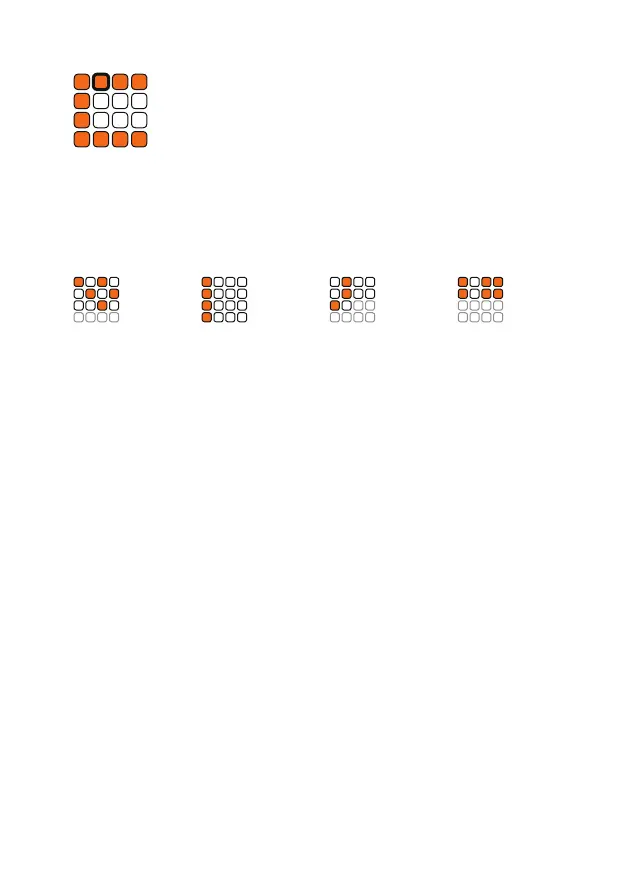
The algorithm uses the parameters steps, oset and length to arrange the
steps. In the illustration above you can see how these parameters change
the patterns. The settings can be selected via the white buttons 1-3.
Steps
Press the rst white button and set the number of steps from 1-16 with the
orange buttons.
Oset
Press the second white button and set the number of the oset from 1-16
with the orange keys.
Length
Press the thrid white button and use the orange keys to set the length of
the pattern from 1-16.
Pattern View
Press the fourth white button to see how the algorithm changed your
pattern.
Press the t shift button to get back to the track selection.
Steps 5
Oset 3
Length 12
Steps 4
Oset 1
Length 16
Steps 3
Oset 2
Length 10
Steps 6
Oset 1
Length 8


 To Next Page