4-5
4 5
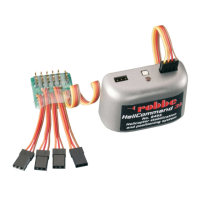
HeliCommand 3A No. 8493
• With “auto-pilot” function, stabilises all horizontal control movements:
inclination (tilt), speed, position
• Auxiliary „pilot“ channel for adjusting stabilisation effect and switching
between horizontal mode and position mode
• Integral heading-lock gyro, swashplate mixer and automatic trim
• Second auxiliary channel (“AUX channel”) for gyro gain and mode
(normal/heading lock); optionally for automatic trim.
• Can be confi gured without connection to a PC by simple learning procedure,
for almost all rotor head linkage types with up to 3 servos
• Fail-safe if radio link fails (PPM / FM only): switches to position stabilisation,
collective pitch to ‘hold’.
• Suitable for internal-combustion and electric-powered helicopters
• Can be used indoors and in the open air
• PC adaptor available as accessory for supplementary settings, including:
setup as necessary for HR4-linkage, automatic trim option, freewheel
function for forward fl ight, optimised settings for auto-pilot and tail rotor gyro.
HeliCommand 3D No. 8494
• Includes all the features of the basic “3A” version, plus:
• Horizontal stabilisation for inverted fl ying
• Expanded set-up facilities via PC adaptor (No. 84942000) (additional Expert
settings for optimising 3D mode and control characteristics).
HeliCommand RIGID No. 8495
• Includes all the features of the HeliCommand 3A and 3D, plus:
• RIGID mode for stabilising fl ybar-less rotor heads, highly effective in pre
venting ballooning and tuck-under at high speed and in gusty conditions.
• Eliminates the need for aileron (roll-axis) and elevator (pitch-axis) trim
functions.
• RIGID mode stabilises fl ybar-less helicopters (two or more rotor blades) as
well as conventional fl ybar-equipped helicopters.
• The pilot channel can be used to select: horizontal mode, position mode,
RIGID mode.
• RIGID and horizontal modes even function without visual contact
between the optical sensor and the ground, i.e. no opening is required in the
helicopter fuselage if you do not need to use position mode.
• Electronic linearisation to compensate for mechanical irregularities
(angular offset) when using the H4 swashplate linkage.
• The PC adaptor (No. 84942000) is required for setting Rigid mode.
Without the PC adaptor the HeliCommand 3D makes use of the parameters
which are pre-set at the factory.
6-7
6 7
Index
LED Display 8
Description of facilities 9
Pilot channel 10
Tail rotor gyro 11
Automatic trim 12
Fail-safe 12
The upgrade versions of HeliCommand 13
Brief instructions - the essentials 14
Installation 16
Electrical earth 17
On-board location 17
Mounting the unit on the tail boom 18
Notes regarding internal combustion engines 19
Setting up 22
Electric-powered helicopter 22
Factory reset 22
Setting up the transmitter 22
Calibrating (learning) the transmitter neutral points 22
Confi guring the HeliCommand 23
Setting up the HeliCommand RIGID 26
First fl ight 28
Test-fl ying 28
Internal-combustion helicopters: vibration test 28
Trimming 30
Tips for fl ying 32
Take-off and landing 32
Hovering 32
Control travels 32
Effect of the opto-sensor 33
In darkness, or when overfl ying optically smooth surfaces 33
Indoor fl ying 33
Checking the contrast 33
Versions and applications 34
HeliCommand 3A 34
HeliCommand 3D and above 34
3D manoeuvres 34
HeliCommand RIGID 34
Notes 35
For skilful pilots: differences in handling 35
Range of applications 35
Safety measures 36
We recommend 36
Liability exclusion 37
Guarantee 37
Fault-fi nding 38
Specifi cation 40
Set contents 40
Accessories 41
Service 41
Imprint 41




 To Next Page