11
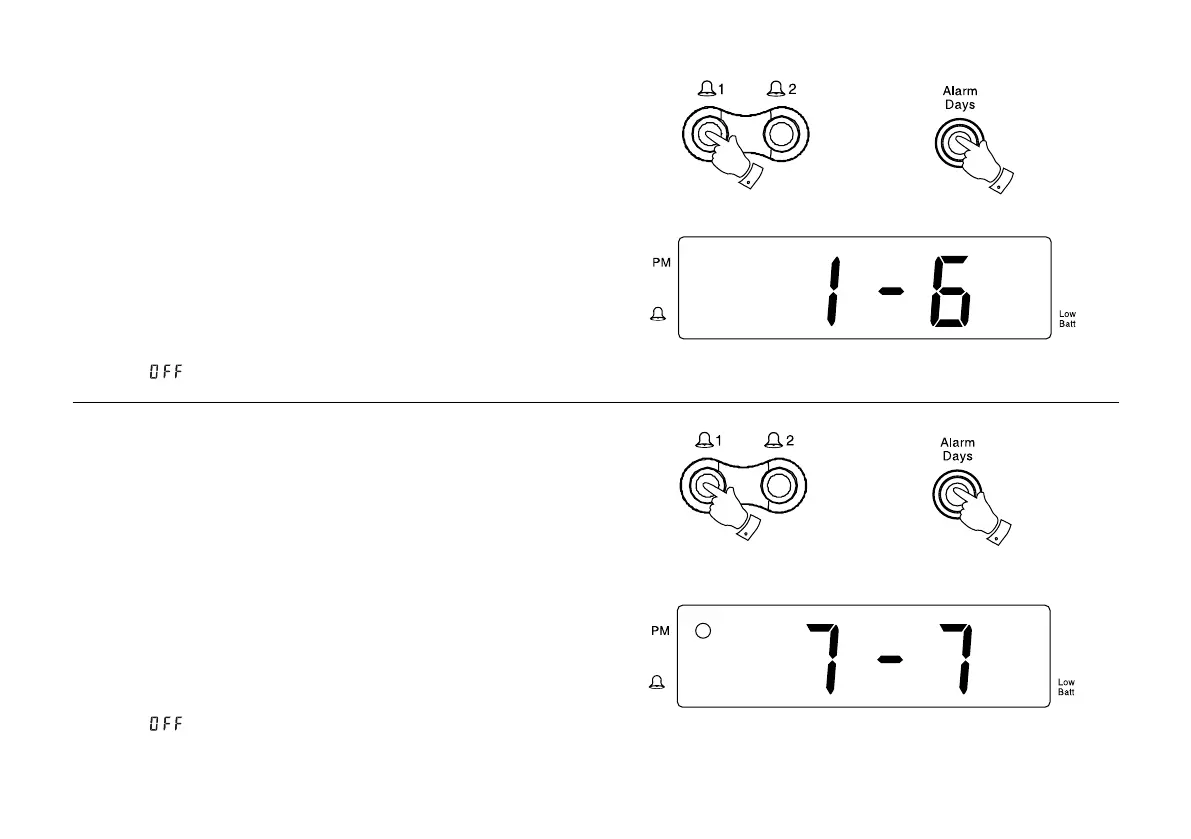
Monday to Saturday alarm
1. Press and hold down the Alarm 1 or Alarm 2 buttons (depending
on which alarm you wish to set day for).
2. Whilst holding down
Alarm 1 or Alarm 2 buttons repeatedly press
and release the Alarm days buttonuntildisplayshows1-6.
3. The alarm will sound on Monday to Saturday at the preset time for
1 hour. To switch off the alarm until the next day press the On/off
button.
4. To switch off the alarms permanently press and hold down the
Alarm
1 or Alarm 2 button. Whilst holding down the Alarm 1 or Alarm 2
button repeatedly press the Alarm mode button until the display
shows .
Sunday only alarm
1. Press and hold down the Alarm 1 or Alarm 2 buttons (depending
on which alarm you wish to set day for).
2. Whilst holding down
Alarm 1 or Alarm 2 buttons repeatedly press
and release the Alarm days buttonuntildisplayshows7-7.
3. The alarm will sound every Sunday at the preset time for 1 hour. To
switch off the alarm until the next Sunday press the On/off button.
4. To switch off the alarms permanently press and hold down the
Alarm
1 or Alarm 2 button. Whilst holding down the Alarm 1 or Alarm 2
button repeatedly press the Alarm mode button until the display
shows .
1
2
1
2



 To Next Page