Need help?
Do you have a question about the Roberts ecologic 4 and is the answer not in the manual?
Displays scrolling text messages such as artist/track name, phone in number.
Displays the type of station being listened to e.g. Pop, Classic, News etc.
Displays the name of DAB multiplex to which the current station belongs.
Displays current the time and date.
Displays the frequency of the DAB multiplex for the station listened to.
Displays the digital bit rate & audio type for the station being listened to.
Displays the signal error for the station being listend to.
Most listened-to stations move to top of list and are marked with a heart symbol.
Radio selects stations in alphanumeric order (0..9..A..Z).
When active, display shows only stations that a signal can be found for.
Deletes DAB stations from the list that can no longer be received.
Displays scrolling text messages such as artist/track name, phone in number.
Displays type of station being listened to e.g. Pop, Classic, News etc.
Displays current time and date.
Displays frequency of the station being listened to.
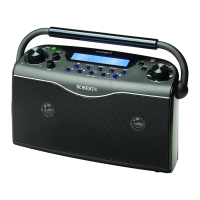
 General
| Radio type | Portable |
|---|---|
| Tuner type | - |
| FM band range | 87.5 - 108 MHz |
| Supported radio bands | DAB, DAB+, FM |
| Radio Data System (RDS) | Yes |
| Preset stations quantity | 20 |
| RMS rated power | 3 W |
| Number of built-in speakers | 2 |
| Display type | LCD |
| Headphone outputs | 1 |
| Headphone connectivity | 3.5 mm |
| MP3 playback | No |
| Product color | Black |
| Volume control | Rotary |
| Input voltage | 230 V |
| Apple docking compatibility | Not supported |
| Battery life (max) | 150 h |
| Number of batteries supported | 6 |
| AC input frequency | 50 Hz |
| Cables included | AC |
 Weight and Dimensions
| Depth | 95 mm |
|---|---|
| Width | 300 mm |
| Height | 180 mm |
| Weight | 2000 g |

 To Next Page