EasyManua.ls Logo

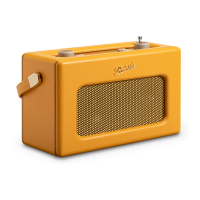
Roberts Vintage - User Manual

Roberts Vintage
28 pages
Print Icon
To Next Page IconTo Next Page
Loading...
DAB / FM RDS Digital Radio with built-in battery charger
Please read this manual before use
ROBERTS
Enjoy Listening
Question and Answer IconNeed help?

Do you have a question about the Roberts Vintage and is the answer not in the manual?

Summary

Radio Controls Overview

Top Panel Controls

Identifies all controls located on the top surface of the radio.

Alkaline Battery Operation

Rechargeable Battery Operation

Using the AC Adaptor

Operating Your Radio - DAB

Selecting a Station - DAB

Display Modes - DAB

Finding New DAB Stations

Manual Tuning - DAB

Signal Strength Display - DAB

Dynamic Range Control (DRC) - DAB

Operating Your Radio - FM Search Tuning

Manual Tuning - FM

Display Modes - FM

Favourite Button Setup

Recalling Your Favourite Station

Preset Stations - DAB and FM

System Reset Procedure

Battery Information and Usage

Battery Safety and Disposal

Technical Specifications

Summary

Radio Controls Overview

Top Panel Controls

Identifies all controls located on the top surface of the radio.

Alkaline Battery Operation

Rechargeable Battery Operation

Using the AC Adaptor

Operating Your Radio - DAB

Selecting a Station - DAB

Display Modes - DAB

Finding New DAB Stations

Manual Tuning - DAB

Signal Strength Display - DAB

Dynamic Range Control (DRC) - DAB

Operating Your Radio - FM Search Tuning

Manual Tuning - FM

Display Modes - FM

Favourite Button Setup

Recalling Your Favourite Station

Preset Stations - DAB and FM

System Reset Procedure

Battery Information and Usage

Battery Safety and Disposal

Technical Specifications

Roberts Vintage Specifications

General IconGeneral
BrandRoberts
ModelVintage
CategoryRadio
LanguageEnglish

Related product manuals