EasyManua.ls Logo

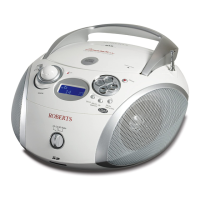
Roberts ZoomBox - User Manual

Roberts ZoomBox
32 pages
Print Icon
To Next Page IconTo Next Page
Loading...
DAB / FM RDS digital radio and CD / SD player
with MP3 / WMA and LCD Zoom
Please read this manual before use
ROBERTS
Enjoy Listening
Question and Answer IconNeed help?

Do you have a question about the Roberts ZoomBox and is the answer not in the manual?

Roberts ZoomBox Specifications

General IconGeneral
SpeakersYes
Headphone SocketYes
DisplayLCD
Presets20
Headphone Jack3.5mm
TypeDAB/FM Radio
Power SupplyMains or Battery
Frequency RangeDAB/FM
Battery Type4 x LR14

Summary

Controls (Front)

Controls (Top)

Playback and Navigation Buttons

Buttons for playback, tuning, and selecting tracks/stations.

Display and Mode Adjustment

LCD display, volume, mode/info, and zoom buttons.

Media and Audio Interface

CD compartment, headphone socket, and bass boost.

Controls (Left Side)

Handle and Power Socket

Carrying handle and AC power input port.

Controls (Right Side)

Band Selection and Battery Compartment

Switch for DAB/FM and compartment for batteries.

Aerial Assembly and Usage

Battery Operation

Mains Operation

Operating Radio - DAB Mode

Selecting DAB Stations

DAB Secondary Services

DAB Display Modes

Scrolling Text and Programme Type

Shows dynamic text messages and station genre.

Station Identification and Time

Displays multiplex name and current time.

Frequency and Technical Data

Shows tuned frequency and other technical details.

DAB Display Modes (Continued)

Bit Rate Display

Shows the digital data transmission rate.

Signal Error Display

Indicates the quality of the received signal.

Finding New DAB Stations

Manual DAB Tuning

DAB Dynamic Range Control (DRC)

Search Tuning FM Radio

Manual FM Tuning

FM Display Modes

FM RDS Text and Programme Type

Displays RDS text messages and station genre.

FM Time and Frequency Display

Shows current time and tuned FM station frequency.

FM Stereo;Mono Setting

Presetting Radio Stations

Recalling Preset Stations

Compact Disc (CD) Usage

MP3;WMA CD Playback Mode

Inserting a CD

Playing a CD

Selecting Tracks on CD

CD Track Search Function

CD Repeat Mode

CD Random Play

CD Intro Mode

Creating Playlists (CD & SD)

Checking and Editing Playlists

Erasing Playlists

Using SD Cards

Inserting and Removing SD Cards

Software Version

Zoom Display Function

Deep Bass Boost

System Reset Procedure

Headphone Socket

Mains Supply Connection

General Precautions

Technical Specifications

Circuit Features

Product Guarantee Information

Related product manuals