If you need any further advice, please call our Technical Helpline on :-
020 8758 0338 (Mon-Fri)
8
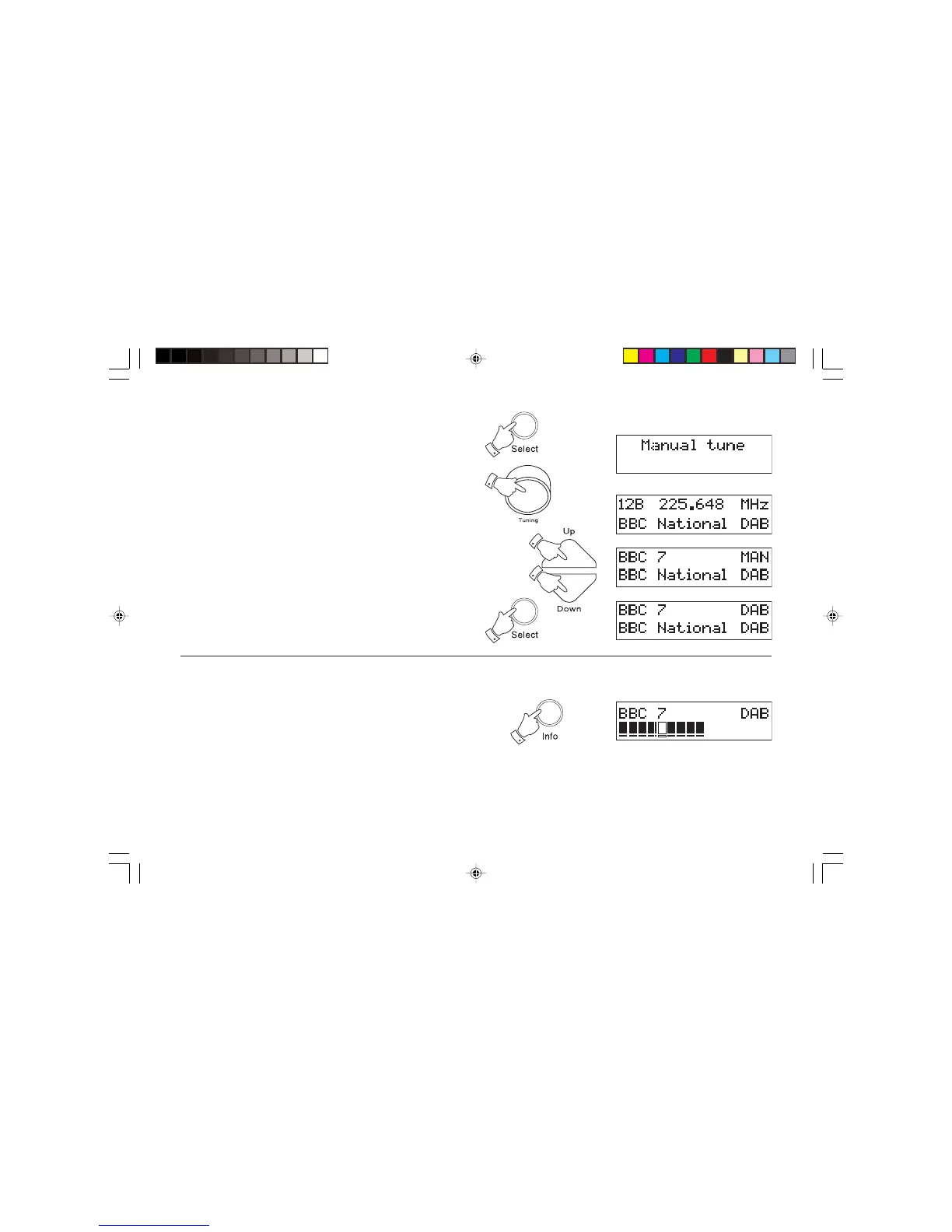
Manual Tuning - DAB
Manual tuning allows you to tune directly to the various band III DAB
channels. UK DAB stations are currently located in the range 11B to 12D.
1. Press and hold down the Select button until the display shows
Manual tune. Release the Select button.
2. Rotate the Tuning control or press the Up or Down buttons to
select the required DAB channel.
3. Press and release the Select button to select the channel.
4. Rotate the Tuning control or press the Up or Down buttons to
select the stations contained within the Multiplex (group of stations)
for the selected DAB channel.
5. Press and release the Select button to return to normal tuning
mode.
Signal strength display - DAB
1. Repeatedly press and release the Info button until the lower line of
the display shows signal strength.
2. Your radio can now be positioned for best reception using the signal
strength display as guide. Move your radio around and position your
radio so as to give maximum number of black rectangles on signal
strength display.
3. The clear unfilled rectangle indicates minimum signal level required
for satisfactory reception.
rd-3 instruction book.pmd 7/9/2003, 11:06 AM9


 To Next Page