
 Need help?
Do you have a question about the Roberts RD-8 and is the answer not in the manual?
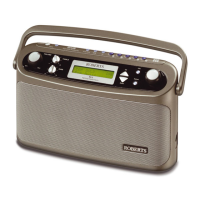
Details the On/Off, BAND, PAUSEplus, Info, Auto Tune buttons, aerial, presets, and LCD display on the top panel.
Describes the Headphone socket, Tone, Volume, Rotary Tuning controls, mains input, bass boost, and battery compartment.
Instructions for inserting and removing LR20 (D size) batteries for radio power.
Steps to connect and operate the radio using the AC mains power supply.
How the radio performs an automatic scan for DAB channels upon first use.
Guide to scrolling through and selecting available DAB stations using the tuning control.
Explains the six different display modes available for DAB radio stations.
Procedures for scanning and finding new DAB stations.
Instructions for manually tuning to specific DAB channels and multiplexes.
How to use the signal strength display to optimize DAB reception.
How to pause and resume live DAB radio broadcasts without missing content.
Details on setting the memory duration for the Pause Plus feature.
Steps for automatically scanning and tuning FM stations using the Auto Tune button.
Guide to manually tuning FM stations by rotating the tuning control.
Explains the various display modes available for FM radio stations.
How to switch between stereo and mono audio modes for FM reception.
Instructions for storing favorite stations into memory presets for DAB and FM.
How to recall stored stations from DAB and FM presets.
Procedure to reset the radio to factory defaults, erasing all settings and stations.
Information on the 3.5mm headphone socket and its function.
Details on how the radio's display backlight operates.
Safety and usage advice, including environmental conditions and band recommendations.
Technical details of the radio, including power, battery life, and frequency coverage.
Information on connecting the radio to the mains supply.
Guidance on replacing the radio's fuse with the correct type.
Details of the product's warranty period, coverage, and claim procedure.













 To Next Page
 General