
 Need help?
Do you have a question about the Roberts SOUND RD-78 and is the answer not in the manual?
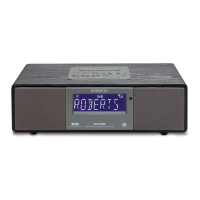
Details of all buttons, dials, and the display on the front of the radio.
Description of rear panel sockets including aerial, DC in, optical, aux, line out, and headphone.
How to switch the radio on and operate it in DAB digital radio mode.
How to tune and select available DAB radio stations.
How to identify and tune into secondary DAB radio services.
Explains the seven different display modes available for DAB stations.
How to perform an auto scan to find new DAB stations.
Procedure for manually tuning to specific DAB channels and frequencies.
Using the signal strength display to optimize aerial positioning for DAB.
Configuring the order in which DAB stations are listed.
How to delete DAB stations that are no longer receivable.
Adjusting DRC settings to improve audio clarity in noisy environments.
How to tune to stations and use auto-tune in FM mode.
Procedure for manually tuning to FM stations with 50kHz frequency steps.
Details on display modes for FM band, including scrolling text and RDS info.
How to save and recall favorite stations using the 5 memory presets.
How to set and recall a single preferred station for quick access.
Guide to setting specific alarm times, including 24-hour format and date.
Configuring alarm days (once, daily, weekdays, weekends) and alarm modes (DAB, FM, Buzzer).
How to turn alarms on or off and view their status.
How to cancel a sounding alarm and configure snooze time settings.
How to set the radio to automatically turn off after a specified time.
Procedure to reset the radio to factory default settings, erasing presets.
How to check the current software version of the radio.
Switching between time-only and time-and-date display modes in standby.
Connecting the radio to external devices via optical and line out sockets.
How to connect and use external audio devices via the 3.5mm Aux In socket.
Connecting headphones to the 3.5mm socket and automatic muting of speakers.
Details on power requirements, frequency coverage, loudspeaker, output power, and sockets.
Important warnings about heat, moisture, placement, and recommended band usage.
Details of the 12-month guarantee, exclusions, and claim procedure.
 General
| Display | LCD |
|---|---|
| Power Source | Mains / Battery |
| Speaker | Built-in |
| Headphone Socket | Yes |
| Headphone Jack | 3.5 mm |
| Bands | DAB/DAB+/FM |











 To Next Page