
 Need help?
Do you have a question about the Roberts solarDAB 2 and is the answer not in the manual?
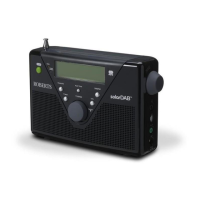
Controls station selection by rotating the dial.
Selects stored favorite radio stations.
Stores and recalls a single favorite station.
Powers the radio on and off.
Antenna for receiving radio signals.
Shows the level of solar energy received.
Indicates battery charging status or low power.
Shows station information, time, and menus.
Automatically scans for radio stations.
Selects between DAB and FM radio modes.
Cycles through display information options.
Outputs audio from the radio.
Adjusts the audio output volume.
Connects headphones, mutes internal speaker.
For connecting to a computer for software updates.
Connects external audio sources.
For connecting the mains adaptor.
Houses the radio's batteries.
Steps for inserting NiMH/NiCad batteries.
Explains the green light for charging status.
Emphasizes setting the switch to NiMH/NiCad.
Describes low battery indication and auto-shutoff.
Recommends removing batteries for long periods.
Warns against exposing batteries to excessive heat.
Steps for inserting alkaline batteries.
Emphasizes setting the switch to Alkaline.
Describes low battery indication and auto-shutoff.
Recommends removing batteries for long periods.
Suggests AC adaptor for economy, batteries for portability.
Steps to connect the adaptor to the radio and mains.
Explains how the adaptor disconnects batteries.
Advises disconnecting the adaptor when not in use.
Notes the need for the mains socket to remain accessible.
Radio does not need to be switched on for solar charging.
Advice on positioning the radio for best solar reception.
Using the indicator to gauge solar energy level.
Best performance with direct, unobstructed sunlight.
Warns against using sun-lamps for charging.
Instruction to extend the telescopic aerial.
How to turn the radio on and initial display.
Explains the automatic scan for DAB stations.
Describes the bar-graph showing scan progress.
How the first station is selected after scanning.
What the display shows if no stations are found.
Advice on relocating the radio for better reception.
How the selected station name appears on screen.
Using the tuning control to find desired stations.
Pressing the tuning control to select a station.
Setting the audio volume level.
Advice for 'No DAB station' message.
Displays artist/track name, phone numbers, etc.
Shows the station's genre (e.g., Pop, News).
Displays the name of the DAB multiplex.
Shows the current time and date.
Displays the DAB multiplex frequency.
Shows digital bit rate and audio format.
Visual representation of signal quality.
Using the Auto Tune button to find new stations.
How to find and switch to secondary radio services.
Steps to manually tune to DAB channels.
Using the Info button and positioning to maximize signal strength.
Explains DRC for improving sound in noisy environments.
Steps to select DRC settings (0, 1/2, 1).
States DRC has no effect if broadcast doesn't support it.
Removing unavailable stations from the DAB list.
How stations appear with a question mark.
Steps to prune stations using Info and Tuning controls.
Option to highlight 'No' to not prune stations.
Advice to search for new stations after relocation.
How to switch to FM mode using DAB/FM button.
Using Auto Tune to find stations by increasing frequency.
How frequency and station name are shown.
Holding Auto Tune to scan by decreasing frequency.
How scanning continues from opposite end of waveband.
Advice on repositioning aerial for better reception.
Suggests switching to Mono reception for noisy broadcasts.
Steps to ensure FM mode is active.
Using the Tuning control to step through frequencies.
How tuning wraps around the FM band.
Adjusting the audio level.
How to turn the radio off using the On/Off button.
Tips for poor reception and background hiss.
Displays artist/track name, phone numbers, etc.
Shows the station's genre (e.g., Pop, News).
Shows the current time and date.
Displays the FM station frequency.
Shows the audio type (e.g., Mono).
Explains display messages for missing text/program type.
Steps to store a preferred station using the Favourite button.
How to instantly tune to the stored favourite station.
Steps to mark stations as presets using the Preset button.
How to remove a station from the preset list.
Activating the view to show only preset stations.
Selecting a preset station from the filtered list.
Returning to the full station list view.
How the radio scans for FM broadcasts.
Setting scan sensitivity for local or distant signals.
Steps to access FM settings using Info button.
Selecting between 'Local' and 'Distant' scan zones.
Setting remains until changed or reset.
For weak signals, forces mono to reduce hiss.
Returns the radio to automatic stereo/mono selection.
Steps to display the radio's software version number.
Restores factory defaults to fix issues.
Clarifies presets and station lists are erased.
Clears old DAB stations after moving to a new area.
Step-by-step guide to initiating a factory reset.
Radio automatically rescans for DAB stations after reset.
Advice for reset due to electrostatic discharge.
How to connect headphones and mute the speaker.
Advice to set volume low before connecting headphones.
Warning about excessive sound pressure causing hearing loss.
Steps to connect and use external audio devices.
How to exit Auxiliary Input mode.
Discusses mains adaptor, rechargeable, and alkaline batteries.
Importance of setting the switch correctly for battery type.
Warnings against mixing old/new or different types of batteries.
Advice on charging NiMH/NiCad batteries correctly.
Suggests 2500mAh capacity for up to 20 hours playback.
Steps for installing batteries and starting charge.
Explains battery light behavior when low.
Charging suspends when radio is on, resumes when off.
Advice on charging and storing batteries for long periods.
Notes long life of rechargeable batteries with care.
Warnings about leakage, overheating, disposal, and handling.
Specific safety guidelines for handling batteries.
Backlight is on for 12 seconds when buttons pressed on battery power.
Backlight stays on when powered by AC mains adapter.
Information on software updates via the Roberts Radio website.
Avoid water, steam, sand, and excessive heat.
Recommends DAB band for better quality and less interference.
Avoid covering ventilation openings for proper airflow.
Do not place naked flame sources on the product.
Avoid extreme temperatures or direct sunlight in cars.
Clarifies normal solar panel use (e.g., windowsill) is safe.
Details mains voltage and battery type (AA).
Estimated listening time with alkaline cells.
Continuous play under adequate sunlight.
Lists FM and DAB frequency ranges.
Specifies the loudspeaker diameter (63mm).
States the radio's output power (1 Watt).
Details headphone and auxiliary socket sizes (3.5mm).
Confirms telescopic aerial for FM and DAB.
12-month warranty against faulty workmanship.
Lists items not covered (incorrect use, damage, serial numbers).
Procedure for making a claim through the dealer.
Information for repairs outside the warranty period.
Statement that guarantees do not affect consumer rights.
 General
| Type | DAB/DAB+/FM Radio |
|---|---|
| Display | LCD |
| Battery Life | Up to 27 hours |
| Headphone Socket | 3.5 mm |
| Bands | DAB, DAB+, FM |
| Power Source | Battery, Mains, Solar |
| Presets | 20 |











 To Next Page
