6
Setting the tracking force cont.
9. When you have balanced the tone-arm, place it so that it is again secured
on its rest using the securing clip.
10. Carefully replace the stylus cover.
11. Keeping the counterweight in place, rotate the scale on the front of the
counterweight so that it reads zero.
12. We recommend that a tracking force of 3.0 grams is used for the supplied
cartridge. The tracking force should not exceed 4.0 grams.
The counterweight adjusts the tracking force by 3.0 grams for one complete
revolution. Therefore the scale on the counterweight will read zero when
the tone-arm is balanced and also when the tracking force is set to 3.0
grams.
13. Rotate the counterweight and scale together (clockwise, viewed from the
rear) so that the counterweight moves further towards the tone-arm pivot
and so that the scale then reads the desired tracking force.
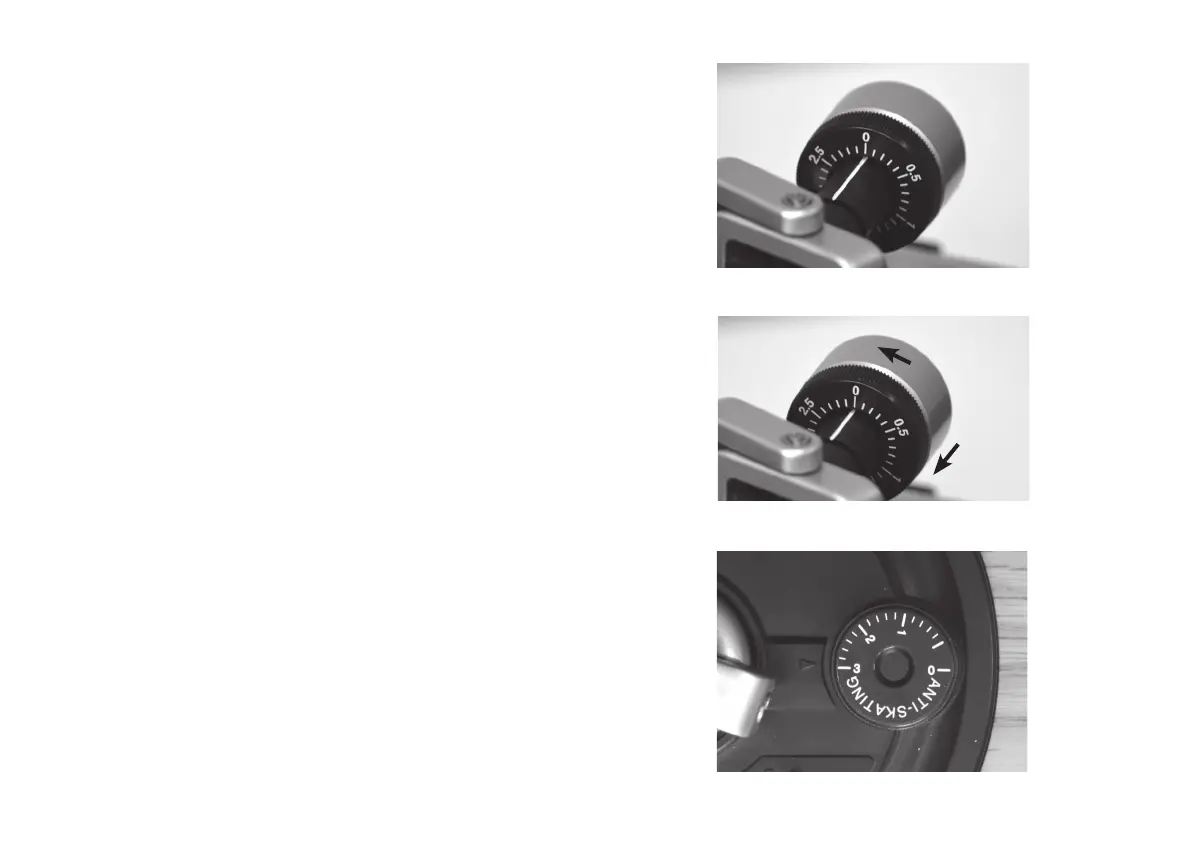
Please see the photos to the right showing the counterweight setting
whenrstbalancedandthenaftersettingthetrackingforce.Notethatthe
counterweight is closer to the tone-arm pivot after setting the tracking force.
14. Adjust the anti-skating control next to the tone-arm pivot so that it also reads
3.0 grams. Note that this adjustment should normally be set to match the
chosen tracking force.
Note:Incorrect trackingforcecanhavea signicanteffectonthequalityof
audio when playing records. If the tracking force is set too low or too high then
excessive wear to the stylus or damage to the surface of the record may be
caused.
Anti-skating control set to 3.0 grams
Scale set to zero after balancing the tone-arm
Scale reads zero after setting to 3.0 grams


 To Next Page