Internet Radio
22
6HOHFWLQJDUDGLRVWDWLRQE\ORFDWLRQ
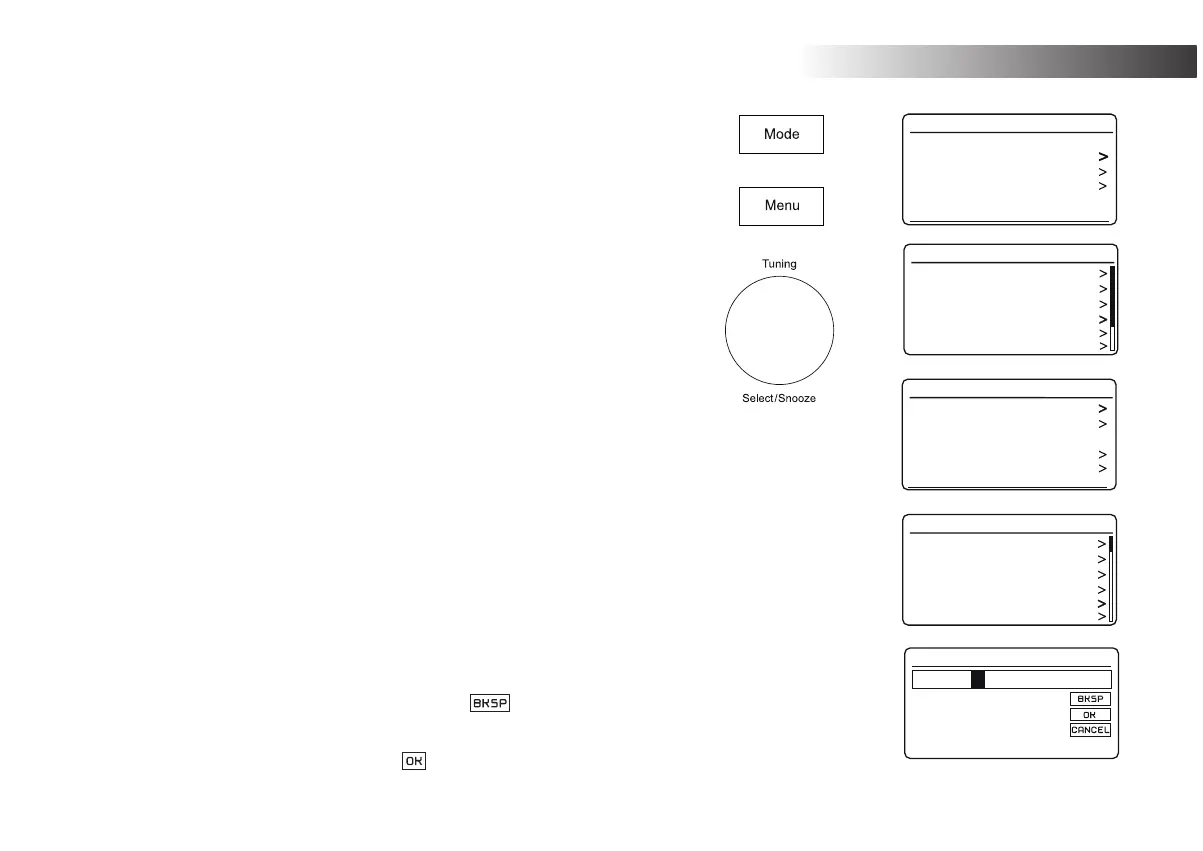
1. Press On/Standby to switch on the radio. Press Mode until Internet Radio is
selected.
2. Press Menu.
3. Choose 'Station list', 'Stations', 'Location', and then scroll the list of continents
then countries in either direction. Choose a radio category.
Note that the menu may offer one or more local selections based upon the
country in which the radio is being used, according to your internet IP address
('United Kingdom' and 'BBC' stations, for example).
4. Highlight your chosen radio station or Podcast. Press Tuning.
If the radio is unable to connect to a particular radio station this may be for one
of the reasons explained in 'troubleshooting' page 67.
6HOHFWLQJDUDGLRVWDWLRQE\*HQUH
1. Press Menu. Choose 'Station list', 'Stations', 'Genre', and then scroll the list of
content types in either direction. Choose the desired genre.
2. Choose either 'All Stations' or a list of countries.
3. Highlight your chosen radio station. Press Tuning.
6HDUFKLQJIRUDUDGLRVWDWLRQE\QDPH
1. Press Menu.
2. Choose 'Station list', 'Stations' then 'Search Stations'.
3. To enter the search word(s) rotate Tuning to highlight each character for the
search in turn, and press Tuning to enter. If you make an error rotate the
control or use Info to access the delete character '
' on the screen and
then press Tuning. Rotate the control or press Info again to go back to the
FKDUDFWHUVHOHFWLRQ$IWHUWKH¿QDOFKDUDFWHURIWKHVHDUFKKDVEHHQHQWHUHG
use Info and then Tuning to highlight the ' ' symbol on the screen and then
SUHVVWKHFRQWUROWR¿QLVK
Last listened
Station list
System settings
Main menu
Internet radio
My Favourites
Local United Kingdom
BBC
Stations
Podcasts
My Added Stations
Internet radio
Location
Genre
Search stations
Popular stations
New stations
Stations
Alternative
Ambient
Big Band
Bluegrass
Blues
Business news
Genre
Stations
0 1 2 3 4 5 6 7
ROCK 100
8 9 2
A B C D E
F G H I J K L M
N O P Q R S T U
V W X Y Z


 To Next Page