48
FM Radio
2SHUDWLQJ\RXUUDGLRLQ)0PRGH
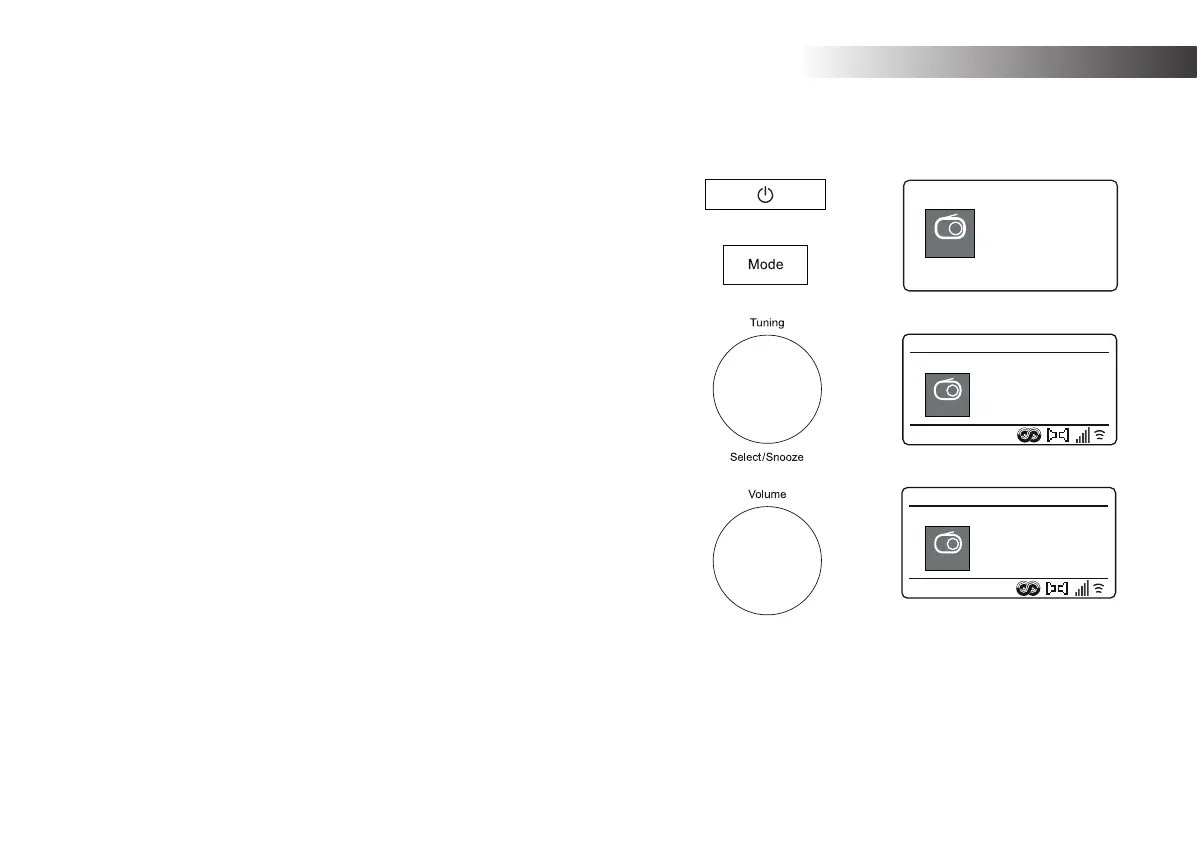
1. Carefully extend the telescopic aerial and press On/Standby to switch on
the radio.
2. Press Mode as needed to select the FM Radio mode.
3. Rotate Tuning in a clockwise direction. The displayed frequency will
increase. Press Tuning to carry out an auto-tune. Your radio will scan up
the FM band from the currently displayed frequency and will stop scanning
ZKHQLW¿QGVDVWDWLRQRIVXI¿FLHQWVWUHQJWK
4. The display will show the frequency of the signal which has been found.
If RDS information is available, after a few seconds the display will show
the radio station name.
If you only hear hiss or interference, simply press Tuning to scan further.
Your radio may have found a spurious interference signal.
7R¿QGPRUH)0VWDWLRQVSUHVVTuning to repeat the scan operation. To
scan down in frequency, rotate Tuning LQDQDQWLFORFNZLVHGLUHFWLRQ¿UVW
and then press the control. Your radio will scan down the FM band from
WKHFXUUHQWO\GLVSOD\HGIUHTXHQF\DQGZLOOVWRSVFDQQLQJZKHQLW¿QGVD
VLJQDORIVXI¿FLHQWVWUHQJWK
6. When the end of the waveband is reached your radio will recommence
tuning from the opposite end of the waveband.
7. Use the Volume control to adjust the sound level as needed.
0DQXDOWXQLQJ
1. Rotate Tuning to tune to a station. The frequency will change in steps of
50kHz.
2. Adjust the volume.
FM
radio
FM
FM
12:34
103.40MHz
FM
FM
12:34
Heart FM
FM
Heart FM - The
Best Variety Of
Hits
FM Radio


 To Next Page