From NORMAL TIME, press (E) three (3) times to enter the Countdown Timer (CDT) Mode. The
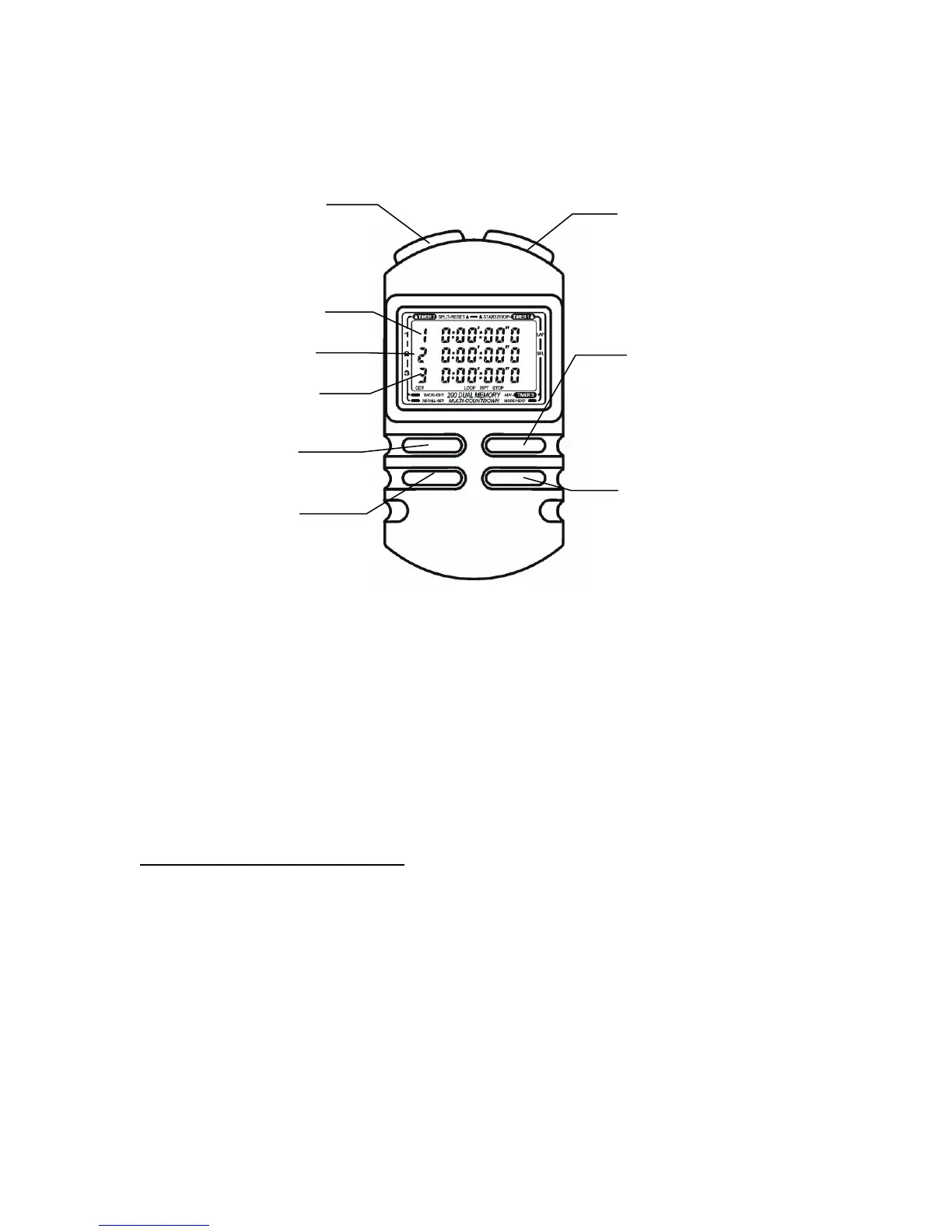
“Countdown” prompt will appear for two (2) seconds. The display will appear as illustrated below:
(D) Backlight
(F) Set CDT
Countdown #3
Countdown #2
Countdown #1
B
Reset CDT
(E) Mode/Select Digit
(C) Advance Digit,
Select CDT
Optio
ns
(A) Start/Stop
CDT
Countdown Timer Functions and Options
¾ You may load (or preset) up to three (3) times into the Countdown Timer (CDT)
¾ Each CDT can be set to stop (“STOP”) at the completion of the preset time or to repeat (“RPT”) the
countdown at the completion of the preset time.
¾ Times from 1/10 second to 24 hours can be entered. The CDT has a resolution of 1/10 second.
¾ There is a “LOOP” option, which allows the CDT to automatically sequence through each countdown
t
ime upon completion of the previous, preset time. Do not use “LOOP” for single timer operation.
How to Set Up the Countdown Timer(s)
You may configure the SC-888 to countdown in several different ways.
With the CDT in stopped position (“RUN” does not appear), press and hold (F) for two (2) seconds. “SEP”
or “LOOP” appears flashing. Press (C) to choose either “SEP” (all timers count down on their own), or
“LOOP” (CDT sequences through each preset time).
Press (E), “STOP” or “RPT” (repeat) indicator flashes. Press (C) to select countdown STOP or countdown
REPEAT.
Press (E), CDT #1 hours appear flashing. Press or hold (C) to advance CDT # 1 hours.
Continue to press (E) to sequence through and (C) to advance.


 To Next Page
 Loading...