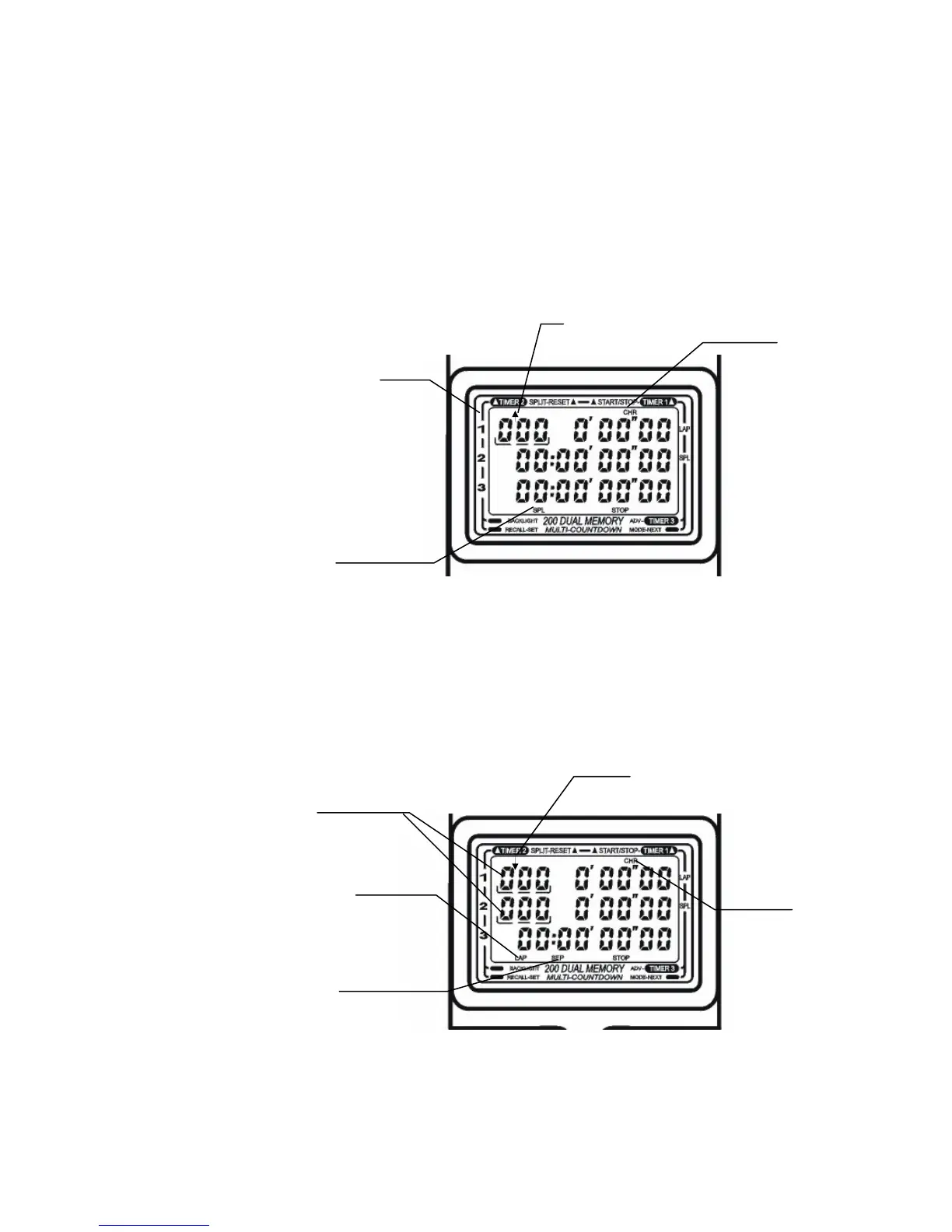
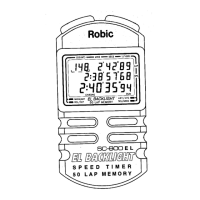
Prior to starting the chronograph, you can confirm how the Chrono is set-up by checking the display in the
Reset (all zeros) position. There are indicators visible for each of the various timing options available.
Recall Direction: UP ⇑ or Down ⇓ will appear above top row on the far left.
Lap or
Split: “LAP” or “SPL” will appear below the bottom row.
Single, Double or Triple:
Lap Counter (s) with brackets below, will appear on the left side of each row.
(1
) To
p row only Single. (2) Top and middle rows are Double. (3) All three rows are Trip
le.
Independent or Simultaneous Start: “SEP” indicator will appear below the bottom row when each timer
is started on its own. “SEP” disappears if each timer is started at the same time.
Please refer to the following examples of determining how the Chronograph is set-up.
Single Chronograph – Split Mode
Split
Indicator
Recall: Up
Chrono
Indicator
Single Lap Counter
Double Chronograph – Lap Mode
Separate Starts
Chrono
Indicator
Two Lap
Counters
Recall: Down
“SEP”
Indicator
Lap Indicator



 To Next Page