11
1. Switch off the ESC, turn on the transmitter, set the direction of throttle channel to ”REV”, set the “EPA/ATV”
value of throttle channel to “100%”, and disable the ABS function of your transmitter.
2. Hold the “SET” key and then switch on the ESC, and release the “SET” key as soon as possible when the red
LED begins to flash.
Note: If you don’t release the “SET” key as soon as the red LED begins to flash, the ESC will enter the program
mode, in such a case, please switch off the ESC and re-calibrate the throttle range again from step A to step
D.
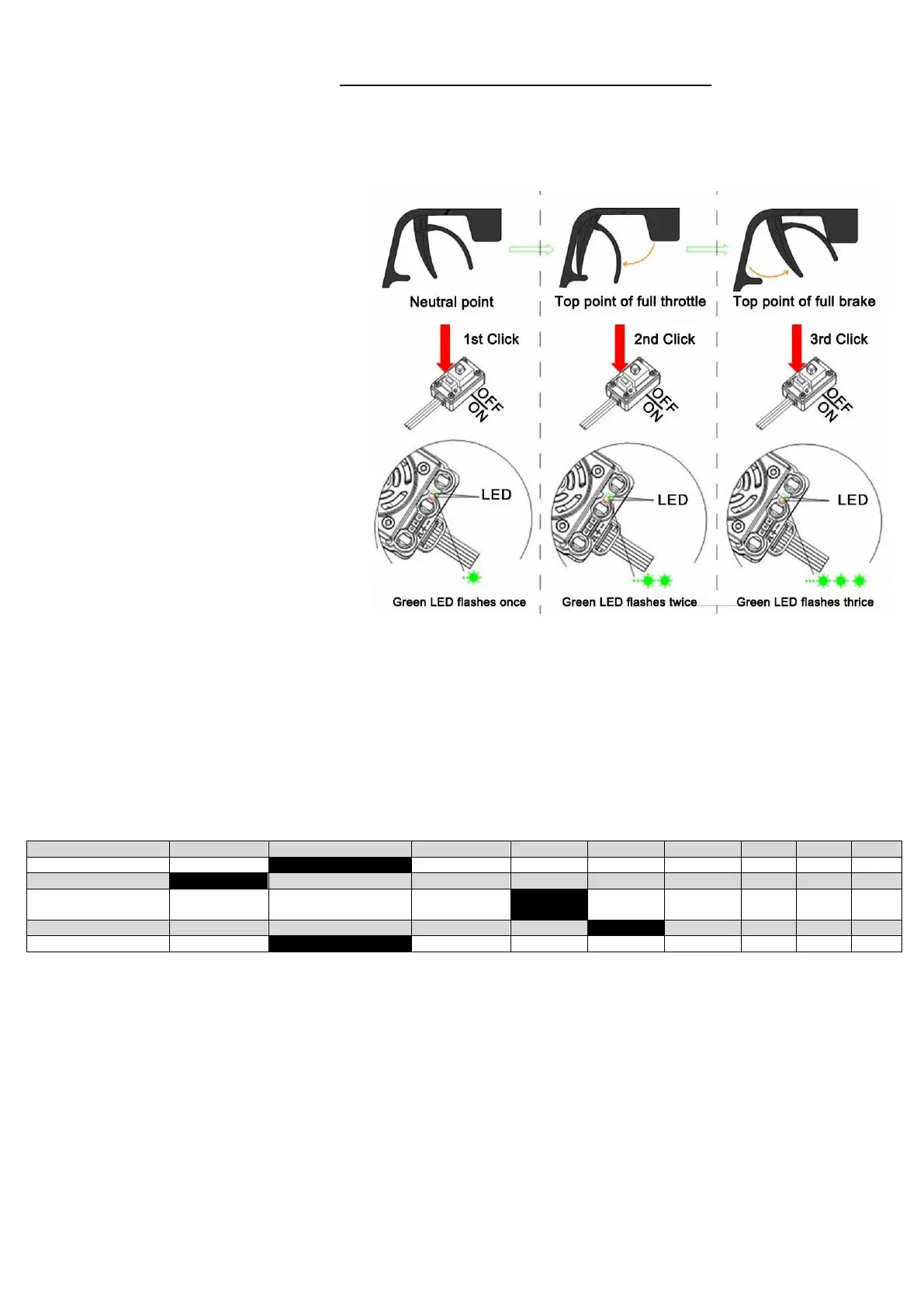
3. Set the 3 points according to the steps
shown in the pictures on the right side.
1) The neutral point
Move the throttle stick at the neutral
point, and then click the SET key, the
green LED flashes 1 time.
2) The end point of forward direction
Move the throttle stick at the end point of
forward direction, and then click the SET
key, the green LED flashes 2 times.
3) The end point of backward
direction
Move the throttle stick at the end point of
backward direction, and then click the
SET key, the green LED flashes 3 times..
4. Throttle range is calibrated; motor can
be started after 3 seconds
Check LED Status In Normal Running
• When the throttle stick is in the neutral
range, neither the Red LED nor the Green
LED lights up.
• When the car moves forward, the Red LED solidly lights; the Green LED also lights up when the throttle stick is
at the top position (100% throttle).
• When the car brakes, the Red LED solidly lights; the Green LED also lights up when the throttle stick is at the
bottom position and the maximum brake force is set to 100%.
• When the car reverses, the Red LED solidly lights.
Programmable Items List
The black highlighted fields show the values of the factory setting:
Explanation of programmable items:
1. Running Mode
In “Forward with Brake” mode, the car can go forward and brake, but cannot go backward, this mode is suitable
for competition; “Forward/Reverse with Brake” mode provides backward function, which is suitable for daily
training.
Note: “Forward/Reverse with Brake” mode uses “Double-click” method to make the car go backward.
When you move the throttle stick from forward zone to backward zone for the first time (The 1
st
“click”), the ESC
begins to brake the motor, the motor speeds down but it is still running, not completely stopped, so the backward
action is not happened immediately. When the throttle stick is moved to the backward zone again (The 2
nd
“click”),
if the motor speed is slowed down to zero (i.e. stopped), the backward action will happen. The “Double-Click”
method can prevent mistakenly reversing action when the brake function is frequently used in steering. By the
way, in the process of braking or reversing, if the throttle stick is moved to forward zone, the motor will run
forward at once.


 To Next Page
 Loading...