11
Battery Level
Error
AUTO Mode
MAX Mode
Product Introduction
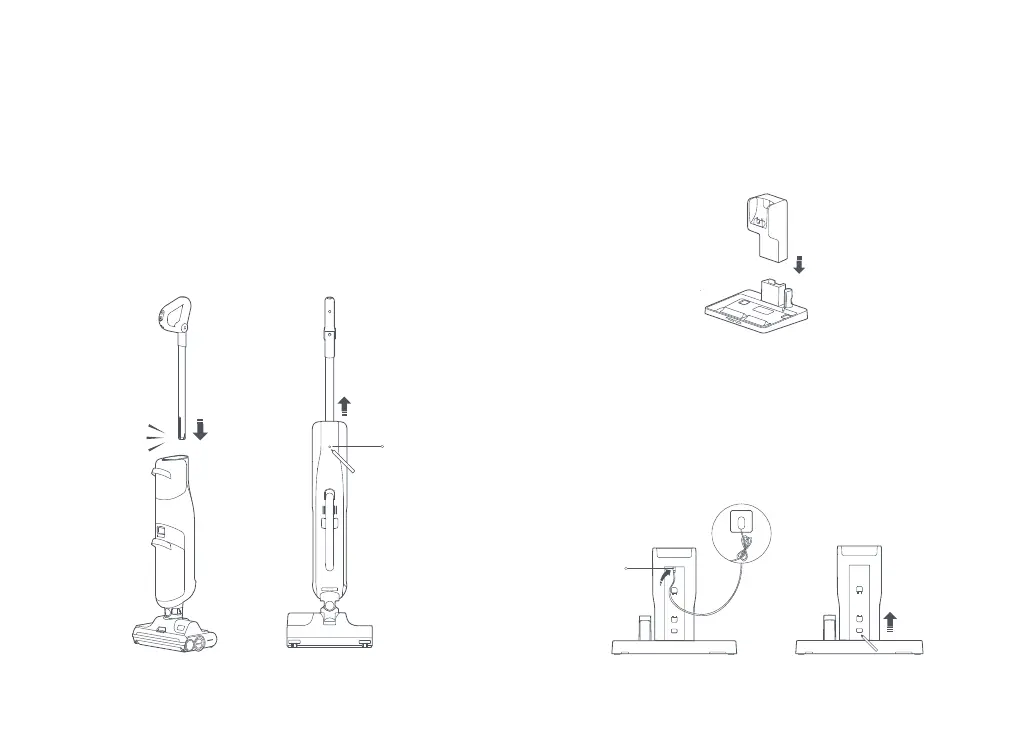
1. Insert the end of the handle into the vacuum body as shown
until it clicks in place. Note that the Power button should face
forwards.
2. To remove the handle, gently pull it while inserting a pin into the
hole on the back of the vacuum body to press the release button.
Setting Up the Vacuum
Click
Press here
2. Connect the power supply into the back of the charging dock and
plug it in. Wrap any excess cord around the cable management pins
on the back of the dock.
3. To disassemble, press the release on the back of the dock and
pull to separate the upper and lower parts.
Charging Dock Installation
1. Connect upper and lower parts of the charging dock as shown,
making sure they are firmly secured.
Insert as indicated
by the arrow


 To Next Page