4 For more information, visit global.irobot.com
EN
Care and maintenance instructions
To keep your robot running at peak performance, perform the procedures
on the following pages.
There are additional instructional videos in the iRobot Home App. If you
notice the robot picking up less debris from your floor, empty the bin, clean
the filter and clean the brushes.
Part Care frequency Replacement
frequency*
Bin Wash bin as needed
Filter Clean once a week (twice
a week if you have a pet).
Do not wash.
Every 2 months
Full Bin Sensor Clean every 2 weeks
Front Caster
Wheel
Clean every 2 weeks Every 12 months
Edge-Sweeping
Brush and
Multi-Surface
Brushes
Clean once a month (twice
a month if you have a pet)
Every 12 months
Sensors and
Charging
Contacts
Clean once a month
Camera Window Clean and inspect once
a month
Care and maintenance
Note: iRobot manufactures various replacement parts and assemblies.
If you think you need a replacement part, please contact iRobot
Customer Care for more information.
*Replacement frequency may vary. Parts should be replaced if there is
visible wear.
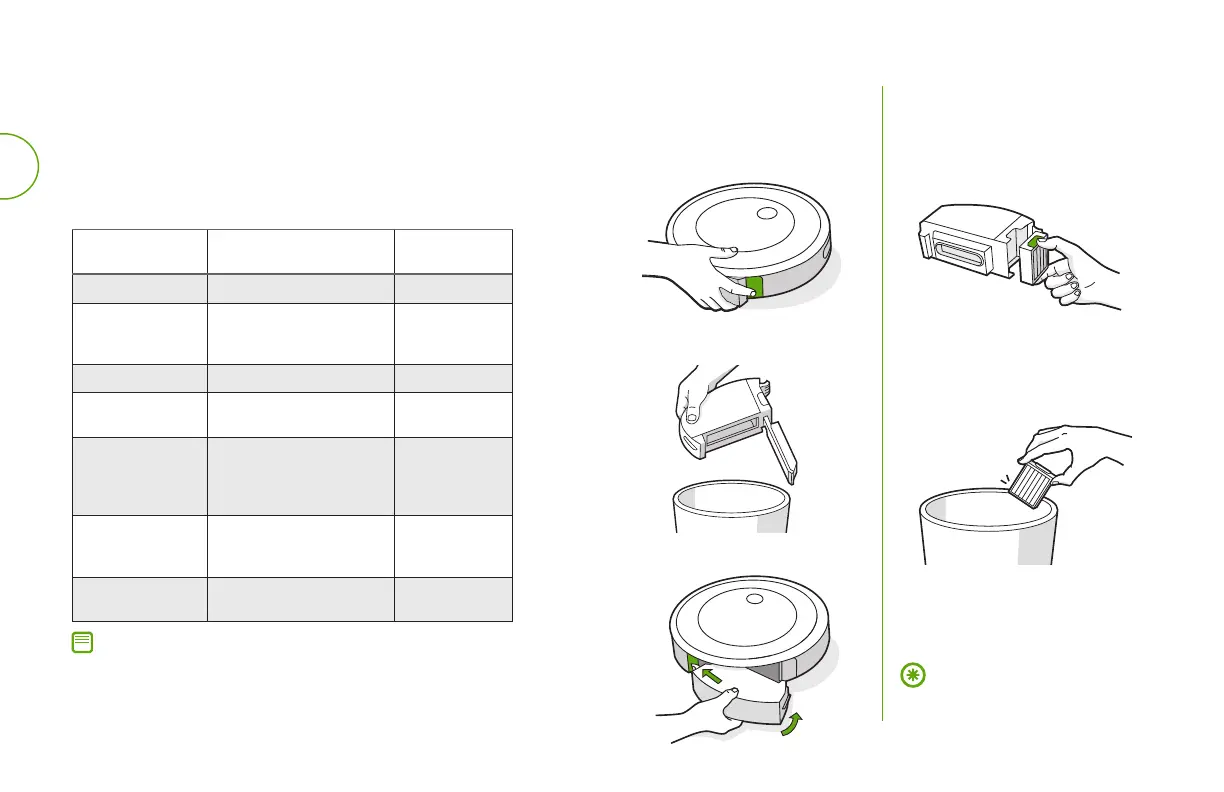
Emptying the bin
Open bin door to empty bin.
Press bin release
button to remove bin.
1
2
Place bin back in the robot.
3
Cleaning the filter
Remove the bin. Remove the
filter by grasping both ends
and pulling out.
Remove debris by tapping
the filter against your rubbish
bin.
Reinsert filter with ridged
grips facing out. Place bin
back in the robot.
1
2
3
Important: The robot will not run if
the filter is not installed correctly.
Replace the filter every two months.


 To Next Page