EasyManua.ls Logo

Robotis DYNAMIXEL XM430-W210 - User Manual

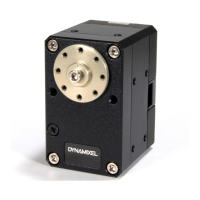
Robotis DYNAMIXEL XM430-W210
34 pages
Print Icon
To Next Page IconTo Next Page
Loading...
2/22/2018 ROBOTIS e-Manual
http://emanual.robotis.com/docs/en/dxl/x/xm430-w210/ 1/34
DYNAMIXEL PLATFORM STEAM SOFTWARE PARTS FAQ
Custom Search
Edit on GitHub
XM430-W210
1. Specifications
Item Specifications
MCU ST CORTEX-M3 (STM32F103C8 @ 72Mhz, 32Bit)
Position Sensor
Contactless absolute encoder (12Bit, 360°)
Maker : ams(www.ams.com), Part No : AS5045
Motor Coreless Motor
Baud Rate 9600 bps ~ 4.5 Mbps
Control
Algorithm
PID control
Degree of
Precision
0.088°
Operating
Modes
Current Control Mode
Velocity Control Mode
Position Control Mode (0° ~ 360°)
Extended Position Control Mode
Current-based Position Control Mode
PWM Control Mode (Voltage Control Mode)
Weight 82g
Dimensions (W x
H x D)
28.5mm x 46.5mm x 34mm
Gear Ratio 212.6 : 1
Stall Torque
2.7N.m @ 11.1V, 2.1A
3.0Nm @ 12.0V, 2.3A
3.7Nm @ 14.8V, 2.7A
XM430-W210
Back to Top ▲
1. Specifications [+]
2. Control Table [+]
3. How to Assemble [+]
4. Maintenance [+]
5. Reference [+]
Question and Answer IconNeed help?

Do you have a question about the Robotis DYNAMIXEL XM430-W210 and is the answer not in the manual?

Summary

Dynamixel XM430-W210 Specifications

Performance Graph

Displays performance characteristics like torque, speed, and current.

Dynamixel Control Table

Control Table Structure and Addressing

Explains the structure, data fields, and addressing within the Control Table.

Control Table Memory Areas (EEPROM vs RAM)

Details the EEPROM and RAM areas of the Control Table and their properties.

Detailed Parameter Descriptions

Describes individual DYNAMIXEL control parameters and their functions.

How to Assemble Dynamixel

Wiring Through Back Case

Instructions for routing cables through the back case for assembly.

Option Frame Assembly

Guides for assembling various option frames to the DYNAMIXEL.

Dynamixel Maintenance Procedures

Horn and Bearing Replacement

Procedures for replacing the horn and bearing set.

Dynamixel Reference and Setup

Quick Start Guide

Prerequisites and initial setup steps for using the DYNAMIXEL.

Connector Pinout and Information

Details on TTL and RS-485 connector pinouts and related components.

Robotis DYNAMIXEL XM430-W210 Specifications

General IconGeneral
BrandRobotis
ModelDYNAMIXEL XM430-W210
CategoryIndustrial Equipment
LanguageEnglish