STANDARD
1 = Left mouse button
2 = Right mouse button
3 = Universal scroll
4 = Tilt left
5 = Tilt right
6 = Scroll up
7 = Scroll down
8 = Key press “R”
9 = Key press “G”
10 = IE forward
11 = IE back
12 = DPI up
13 = DPI down
14 = Easy-Shift[+]™
15 = Profile Button / Cycle Profiles
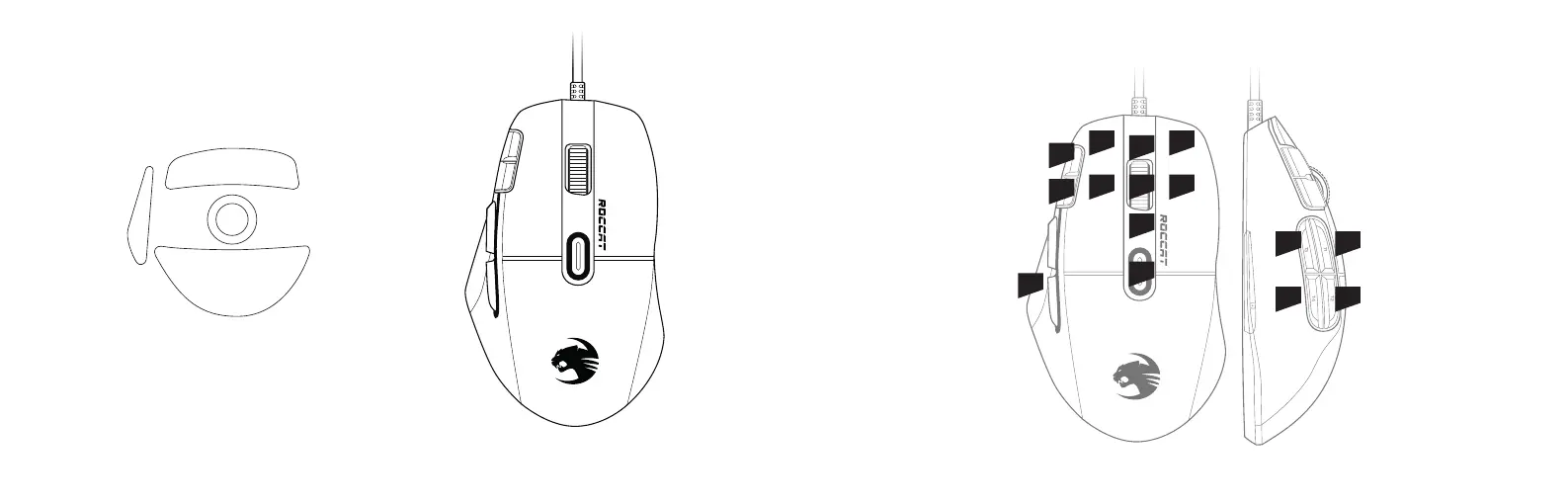
PACKAGE CONTAINS DEFAULT BUTTON ASSIGNMENT
(no driver installed)
Extra set of mouse feet
Kone XP Gaming Mouse
* Please remove the blue protection lm from the mouse feet before use
1 2
108
119
3
7
15
6
4
12
13
14
5
EASY-SHIFT
[
+
]
TM
14+1 = Left mouse button
14+2 = Right mouse button
14+3 = Multimedia play/pause
14+4 = Previous media track
14+5 = Next media track
14+6 = Volume up
14+7 = Volume down
14+8 = Key press “1”
14+9 = Key press “2”
14+10 = Key press “3”
14+11 = Key press “4”
14+12 = Key press “5”
14+13 = Key press “6”
14+14 = Disabled
14+15 = Not assigned
標準模式
1 = 滑鼠左鍵
2 = 滑鼠右鍵
3 = 通用滾輪
4 = 向左翻頁
5 = 向右翻頁
6 = 向上捲動
7 = 向下捲動
8 = 按鍵「R」
9 = 按鍵「G」
10 = 瀏覽器下一頁
11 = 瀏覽器上一頁
12 = DPI 增大
13 = DPI 減小
14 = Easy-Shift 快捷鍵
15 = 設定檔按鈕/循環設定檔
快捷鍵
14+1 = 滑鼠左鍵
14+2 = 滑鼠右鍵
14+3 = 播放/暫停
14+4 = 上一首
14+5 = 下一首
14+6 = 音量增大
14+7 = 音量減小
14+8 = 按鍵「1」
14+9 = 按鍵「2」
14+10 = 按鍵「3」
14+11 = 按鍵「4」
14+12 = 按鍵「5」
14+13 = 按鍵「6」
14+14 = 禁用
14+15 = 禁用
預設按鍵設置
(無安裝軟體)



 To Next Page