EasyManua.ls Logo

Rockford Fosgate PMX-1 - User Manual

Rockford Fosgate PMX-1
12 pages
Print Icon
To Next Page IconTo Next Page
Loading...
PMX-1
OPERATION MANUAL
Installation assistance available at:
600 South Rockford Drive • Tempe, Arizona 85281 United States
Direct: (480) 967-3565 • Toll Free: (800) 669-9899
rockfordfosgate.com
071919 1230-61292-01-B Printed In China
Question and Answer IconNeed help?

Do you have a question about the Rockford Fosgate PMX-1 and is the answer not in the manual?

Summary

Introduction and Safety Information

Safety Warnings and Compliance

Details critical safety warnings, symbols, and FCC compliance statements.

Specifications

Design Features and Controls

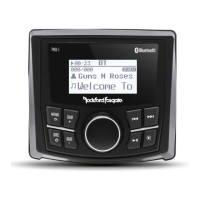
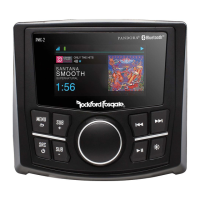
Front Panel Controls Overview

Details the function of the Rotary Encoder, MENU, SRC, SUB, REV/FWD, DIMMER, and PLAY/PAUSE buttons.

Wiring Diagram

Installation and Mounting

Tools and Preparation Guidelines

Lists necessary tools and provides important safety and installation considerations before starting.

Mounting Methods

Explains how to mount the unit using either the mounting plate or the U bracket.

Settings Configuration

Accessing and Navigating Settings

Instructions on how to enter the settings menu and navigate options using the encoder.

Audio and Input Adjustments

Configure BALANCE, FADER, EQ, CROSSOVER, REAR RCA, PUNCH EQ, SOURCE GAIN, and AUX INPUT.

Display and System Options

Adjust VOLTAGE GAUGE, CONTRAST, BRIGHTNESS, BEEP sound, and manage internal amplifier.

Bluetooth and Tuner Settings

Configure BT DEVICE PAIRING, TUNER REGION, and device naming.

Advanced Settings and Basic Operation

Remote, Software, and Reset Procedures

Configuration for REMOTE SETUP, SOFTWARE updates, and FACTORY DEFAULT resets.

Core Controls and Source Selection

Operation of POWER, VOLUME, SUBWOOFER, BRIGHTNESS, and selecting audio sources.

Tuner and Media Operation

FM and AM Band Settings

Managing FM/AM presets, auto store, and local tuning options.

WB Band Settings

Managing WB presets, auto store, and local tuning options.

USB Media Playback

Controls for USB playback including BROWSER, REPEAT, and SHUFFLE.

AUX and Bluetooth Operation

Using AUX input and controlling Bluetooth audio playback.

Functionality Table

Troubleshooting Common Issues

Warranty Information

Overview

The Rockford Fosgate PMX-1 is a compact, full-featured marine source unit designed to provide high-quality audio in challenging environments. It offers a range of connectivity options and user-friendly controls, making it suitable for various marine and powersport applications.

Function Description

The PMX-1 serves as the central control unit for an audio system, allowing users to select audio sources, adjust volume, and fine-tune sound settings. It integrates a tuner for radio reception, USB input for digital media playback, an auxiliary input for external devices, and Bluetooth connectivity for wireless audio streaming. The unit is designed to be robust and withstand the elements commonly encountered in marine environments.

Usage Features

Basic Operation:

The unit is powered ON/OFF by pressing and holding the SRC (Source/Power) button. Volume is adjusted using the rotary encoder, which allows for precise control over the output level (0-40). The display shows the current volume during adjustment. Subwoofer output can be adjusted independently using the dedicated SUB+ and SUB- buttons, with a range of 0-20. The screen brightness can be toggled between two levels using the DIMMER button, optimizing visibility in different lighting conditions.

Source Selection:

Multiple audio sources are available and can be selected by pressing the SRC button. Options include FM Tuner, AM Tuner, WB Tuner (Weather Band), USB, AUX (Auxiliary Input), and Bluetooth. The rotary encoder or repeated presses of the SRC button allow users to cycle through these sources.

Tuner Operation (FM/AM/WB):

For radio listening, the PMX-1 supports FM, AM, and Weather Band frequencies. Stations can be found using AUTO SEEK (press FWD/REV buttons) or MANUAL SEEK (press and hold FWD/REV buttons to tune to the desired frequency). The PLAY/PAUSE button acts as a MUTE function in Tuner mode. Tuner settings are accessed via the MENU button when in Tuner mode. These settings include:

  • Presets: Users can view, add, and remove saved stations across multiple preset groups (e.g., FM1, FM2, FM3 for FM; AM1, AM2 for AM). To add a preset, select the desired station and preset group, then use the rotary encoder to choose a preset number (1-6). Removing presets follows a similar process.
  • Auto Store: This feature automatically scans and saves strong stations to the preset groups until all 1-6 slots are filled for the selected group.
  • Local/Distance Tuning: The LOCAL option (ON/OFF) allows tuning to nearby stations with strong signals. Disabling LOCAL (Distance tuning) enables reception of more distant stations, which is the default setting.
  • Tuner Region: The unit supports various tuner regions (EUROPE, USA, RUSSIA, LATIN, ASIA, JAPAN, MIDEAST, AUSTRALIA), which can be selected to optimize radio reception based on geographical location.

USB Operation:

When a USB flash drive is connected, the PMX-1 allows direct playback and control of audio files. The PLAY/PAUSE button controls playback, while FWD/REV buttons skip tracks. USB-specific settings are accessed via the MENU button:

  • Browser: This feature allows users to navigate and search for tracks or songs by different categories stored on the USB device.
  • Repeat: Options include OFF, ONE (repeat current track), and ALL (repeat all tracks).
  • Shuffle: Options include OFF and ALL (shuffle all tracks).
  • Note: For USB extension cables, only Rockford Fosgate powered extension cables (up to 33 feet/10 meters) are supported. The unit supports USB 2.0, up to 32 GB capacity, 255 folders max, and 999 songs max, with MP3 and WMA audio file compatibility. USB output is 1A.

AUX Operation:

The auxiliary input allows connection of external audio devices. Once connected, the external device controls song/track selection, PLAY/PAUSE, and track skip. The PMX-1 acts as a receiver for the audio signal. The PLAY/PAUSE button acts as a MUTE in AUX mode.

Bluetooth® Operation:

After pairing a Bluetooth-enabled device, the PMX-1 can stream audio wirelessly. The PLAY/PAUSE button controls playback, and FWD/REV buttons skip tracks. Bluetooth-specific settings are accessed via the MENU button:

  • Browser: Similar to USB, this allows searching for tracks by categories (Playlists, Artists, Albums, Genres, Songs, Composers, Audiobooks, Podcasts).
  • Repeat: Options include OFF, ONE, and ALL.
  • Shuffle: Options include OFF and ALL.
  • BT Device Pairing: This menu allows the unit to be set to DISCOVERABLE (ENABLE/DISABLE) for pairing. When enabled, the unit appears as "Rockford PMX" on the external device. The DEVICE option allows renaming the source unit (up to 16 characters) for easier identification during pairing.

System Settings (Accessed via MENU button - press and hold):

  • Balance/Fader: Adjusts the left/right audio balance and front/rear fader output.
  • Audio Settings:
    • 7 Band EQ: Offers preset EQ curves (FLAT, ROCK, CLASSIC, ACOUSTIC, DANCE, ELECTRONIC, HIP-HOP) and a CUSTOM EQ. For custom EQ, the rotary encoder is used to select frequencies and adjust their levels.
    • Crossover: Configures crossover points for Front, Rear, and Subwoofer outputs (60Hz, 80Hz, 120Hz, APF).
    • PEQ (Punch EQ): Adjusts gain output (0-12) with up to +18dB @ 45Hz and +12dB @ 12.5kHz boost.
    • Rear RCA: Configures the rear RCA outputs as LINE OUT or SUBWOOFER.
    • AUX Input: Allows renaming the AUX input and enabling/disabling it.
    • Source Gain: Adjusts input gain for each source (FM, AM, WB, USB, AUX, Bluetooth) from -3dB to +3dB.
    • Internal Amplifier: Toggles the internal amplifier ON/OFF. Set to OFF if using external amplifiers for speakers; set to ON if speakers are powered directly by the source unit.
  • Voltage Gauge: Displays the vehicle's voltage.
  • BEEP: Toggles system beep sounds ON/OFF.
  • Contrast Rate: Adjusts the display contrast (1-10).
  • Brightness: Sets two brightness values (low and high, 1-10) for the display, which can be toggled using the DIMMER button.
  • Remote Setup: Allows pairing and disconnecting a remote, and viewing unit information (model, ID, revision, firmware status).
  • Software: Displays current firmware version and allows for firmware updates.
  • Factory Default: Resets audio and system settings to factory defaults.

Maintenance Features

Installation Considerations:

The manual emphasizes the importance of proper installation to ensure optimal performance and longevity. Key recommendations include:

  • Pre-planning: Carefully plan system layout and wiring routes for accessibility and efficiency.
  • Safety First: Disconnect the battery negative terminal before installation to prevent damage, fire, or injury.
  • Wiring Best Practices:
    • Route RCA cables away from high-current wires.
    • Use high-quality connectors to minimize signal and power loss.
    • Avoid drilling into critical vehicle components (gas tanks, fuel lines, brake lines, electrical wiring).
    • Run wires inside the vehicle for protection.
    • Use grommets to protect wires routed through metal edges.
    • Protect the electrical system with proper fusing; install a fuse holder on the +12V power wire within 18 inches (45.7 cm) of the battery terminal.
    • Ensure good, clean ground connections by scraping paint from metal chassis points. Ground connections should be short and connected to the main body or chassis, not seatbelt bolts.

Troubleshooting:

The manual includes a troubleshooting guide for common issues:

  • Unit doesn't turn on: Check for blown fuses, ensure vehicle ignition is on, verify voltage to the red wire (10.5-16V), and confirm proper grounding.
  • Tuner issues: Check antenna connection, cable integrity, and ensure tuner LOC mode is off in weak signal areas.
  • USB device issues: Verify correct insertion direction, check for broken or damaged connectors/devices, ensure connectors are secure, and confirm MP3/WMA files are properly stored and encoded. Note that USB does not work with Android® or Apple® devices.
  • MP3 playback issues: Ensure MP3 format is compatible and written correctly.

General Maintenance:

The PMX-1 is designed for durability in marine environments, featuring a 2.3" Full Dot Matrix LCD with Gorilla Glass for enhanced protection. While specific cleaning instructions are not detailed, regular cleaning with appropriate marine-safe products is recommended to maintain the unit's appearance and functionality. The unit's zero current draw when turned off helps preserve battery life during storage, and all settings and presets are saved.

Rockford Fosgate PMX-1 Specifications

General IconGeneral
Display2.3" Dot Matrix LCD
IP RatingIPX6
TunerAM/FM
BluetoothYes
USB InputYes
AUX InputYes
Preamp Output Voltage4V
Zones1
Channels4

Related product manuals