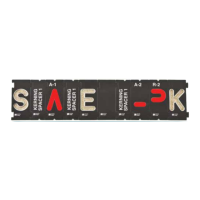
This document provides instructions for the Rockler Interlock Signmaker's Script Font Templates, a system designed for routing custom script lettering into wood workpieces. The templates are used in conjunction with a plunge router and specific accessories to create signs with a flowing, connected script font.
Function Description:
The Rockler Interlock Signmaker's Script Font Templates allow users to create custom signs and lettering in a script font. The system is designed to ensure proper spacing and connection between letters, mimicking the appearance of handwritten script. It involves a multi-stage routing process where different letter and spacer templates are used in sequence. The templates guide the router bit to carve out portions of letters, with spacers filling in for letters that are routed in subsequent passes. This alternating approach ensures that the script letters interlock correctly. The system includes various types of templates: letter templates (both uppercase and lowercase), spacer templates (Cap Spacers, Lowercase End Spacers, Lowercase Mid Spacers, Word Spacers), and Word Anchors. Word Anchors are crucial for maintaining correct letter positioning throughout the template switching process. The system also addresses specific challenges, such as routing words with capital letters in the middle and handling letters with crossmembers like "t" and "j," which require special template sequences and potentially shifting Word Anchors.
Important Technical Specifications:
While specific technical specifications like material composition or precise dimensions of the templates are not detailed in this manual, the instructions emphasize the following:
- Compatibility: The templates are designed to be used ONLY with a plunge router outfitted with a baseplate that can accept the included center guide bushing and retaining ring. Fixed-base routers are explicitly warned against, as their use can lead to damage to the templates, workpiece, and potential injury.
- Router Bit and Guide Bushing: Users must always use the recommended size of router bit and guide bushing for their specific template set. Failure to do so can result in damage to the templates and workpiece.
- Template Size Codes: Each letter template has a corresponding size code (e.g., "LN3," "CAP1") located on its bottom left. These codes are essential for selecting the correct spacer templates, as spacers must match the size code of the letter they are standing in for.
- Word Spacers: The Script Font kit includes four different word spacers, which are selected based on the connection points between words to ensure proper spacing.
Usage Features:
- Online Wizard: Rockler provides a free online Signmaking Wizard (Interlocksign.rockler.com) to assist users in planning their signs. This wizard generates a custom routing plan, including a visual guide to the sequence of templates, proper template placement, and the number of passes required. This plan can be emailed, saved as a PDF, or printed.
- Multi-Stage Routing: The core of the system is its multi-stage routing process. Letters are routed in alternating passes, with spacer templates temporarily occupying the positions of letters to be routed later. This ensures proper interlocking and spacing.
- Template Placement and Security: Templates must be securely fastened to the workpiece, and the workpiece itself must be secured to the work surface. Word Anchors are used to "bookend" and lock templates in place, preventing movement when switching templates.
- Plunge Router Operation: It is critical to allow the plunge mechanism on the router to fully retract the bit at the completion of each letter before moving the router to the next template. This prevents damage to the templates.
- Specific Letter Handling:
- Capital Letters: When a capital letter appears in the middle of a word (e.g., "McGraw"), the word is treated as two separate words, each beginning with a capital letter, affecting spacer selection.
- Crossmember Letters ("t" and "j"): These letters require special attention due to their crossmembers. Two templates are needed for each, and their different widths necessitate specific spacer adjustments. If a "t" or "j" appears in the middle or at the end of a word, the letter before it is routed, then replaced with a crossmember template and corresponding spacers. If a "t" or "j" appears at the beginning of a word or immediately after a capital letter, the crossmember is routed in the last pass, and the left Word Anchor may need to be shifted.
- Practice Recommended: The manual strongly advises practicing the system on scrap material, laying out templates, and tracing with a pencil before making final cuts on the workpiece.
Maintenance Features:
The manual does not explicitly detail maintenance features for the templates themselves. However, general safety warnings and best practices imply:
- Cleanliness: Keeping the work area clean is emphasized, which would extend to keeping the templates free of dust and debris.
- Proper Storage: While not explicitly stated, proper storage of the templates would be necessary to prevent damage and ensure their longevity.
- Regular Checks: Users are advised to always check Rockler.com for the most recent version of instructions and safety warnings, implying an ongoing need to stay informed about product updates or changes that might affect usage or care.
- Tool Maintenance: The manual stresses that all tools used with the product (e.g., router) must have their safety equipment installed and be in proper working order as defined by their owner's manual. This indirectly contributes to the safe and effective use of the templates.

 Need help?

 To Next Page
 General