EasyManua.ls Logo

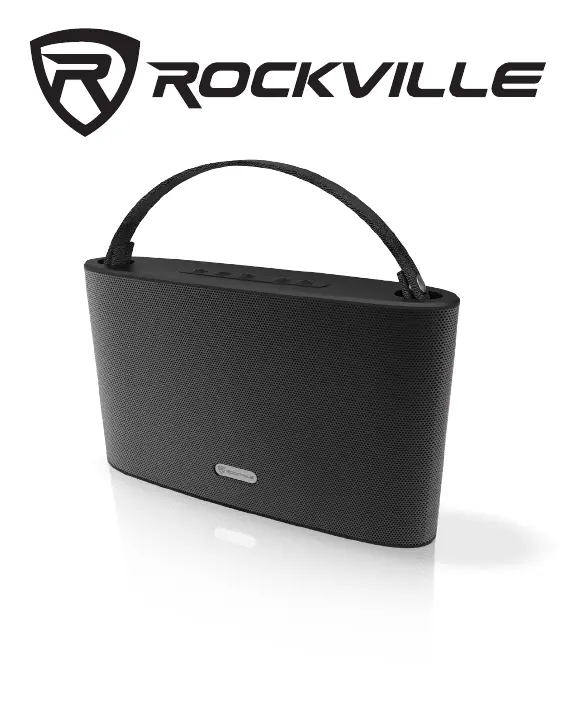
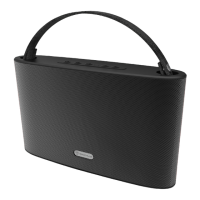
Rockville ROCKWAVE - User Manual

Rockville ROCKWAVE
6 pages
Print Icon
To Next Page IconTo Next Page
Loading...
45 WATT PORTABLE /OUTDOOR
BLUETOOTH SPEAKER w/AUX IN
ROCKWAVE

Questions and Answers

Summary

Product Features

45 Watt Portable;Outdoor Bluetooth Speaker

Details the core capabilities of the Rockville ROCKWAVE speaker, including its power and connectivity.

Extended Battery Life

Provides details on the battery capacity and playback duration at different volume levels.

Charging and Standby Specifications

Outlines the battery standby time and the required charging time for the unit.

Audio Performance

Highlights the speaker's peak and RMS power output, and stereo sound quality.

Design and Portability

Describes the speaker's aesthetic appeal, suitability for various environments, and included carry strap.

Connectivity and Bluetooth

Details Bluetooth sync speed, EDR support, and A2DP streaming range.

Operational Controls and Calls

Explains playback controls and hands-free calling features with a noise-reduction microphone.

Device Compatibility

Lists compatible devices for Bluetooth connection, including smartphones and tablets.

Materials and Inputs

Specifies the construction materials and available input power and audio ports.

Driver Specifications

Details the dual drivers, magnet size, rubber surrounds, and excursion.

Distortion Level

States the maximum allowable distortion for the speaker's audio output.

Included Items and Functions

Included Accessories

Lists all items provided in the package with the Bluetooth speaker.

Control Panel Overview

Identifies and describes the function of each button and indicator on the speaker's control panel.

Operation Modes

Bluetooth Operation

Guides on pairing, music playback, volume control, and call management via Bluetooth.

FM Radio Functionality

Explains how to switch to radio mode, use the antenna, scan stations, and control volume.

USB;SD Card Playback

Instructions for playing music from USB flash drives or SD cards, including format support.

Auxiliary Input

Details on connecting external audio devices using the 3.5mm aux input.

Charging and Troubleshooting

Charging the Unit

Provides instructions on how to charge the speaker and information about the charging indicator LED.

Troubleshooting Common Issues

Offers solutions for problems like no power, Bluetooth pairing failures, playback issues, and poor radio reception.

FCC Compliance Information

Summary

Product Features

45 Watt Portable;Outdoor Bluetooth Speaker

Details the core capabilities of the Rockville ROCKWAVE speaker, including its power and connectivity.

Extended Battery Life

Provides details on the battery capacity and playback duration at different volume levels.

Charging and Standby Specifications

Outlines the battery standby time and the required charging time for the unit.

Audio Performance

Highlights the speaker's peak and RMS power output, and stereo sound quality.

Design and Portability

Describes the speaker's aesthetic appeal, suitability for various environments, and included carry strap.

Connectivity and Bluetooth

Details Bluetooth sync speed, EDR support, and A2DP streaming range.

Operational Controls and Calls

Explains playback controls and hands-free calling features with a noise-reduction microphone.

Device Compatibility

Lists compatible devices for Bluetooth connection, including smartphones and tablets.

Materials and Inputs

Specifies the construction materials and available input power and audio ports.

Driver Specifications

Details the dual drivers, magnet size, rubber surrounds, and excursion.

Distortion Level

States the maximum allowable distortion for the speaker's audio output.

Included Items and Functions

Included Accessories

Lists all items provided in the package with the Bluetooth speaker.

Control Panel Overview

Identifies and describes the function of each button and indicator on the speaker's control panel.

Operation Modes

Bluetooth Operation

Guides on pairing, music playback, volume control, and call management via Bluetooth.

FM Radio Functionality

Explains how to switch to radio mode, use the antenna, scan stations, and control volume.

USB;SD Card Playback

Instructions for playing music from USB flash drives or SD cards, including format support.

Auxiliary Input

Details on connecting external audio devices using the 3.5mm aux input.

Charging and Troubleshooting

Charging the Unit

Provides instructions on how to charge the speaker and information about the charging indicator LED.

Troubleshooting Common Issues

Offers solutions for problems like no power, Bluetooth pairing failures, playback issues, and poor radio reception.

FCC Compliance Information

Rockville ROCKWAVE Specifications

General IconGeneral
BrandRockville
ModelROCKWAVE
TypePortable Bluetooth Speaker
USB InputYes
SD Card InputYes
FM RadioYes
WheelsYes
Impedance4 Ohms
Sensitivity90dB
ColorBlack
Woofer Size8"
BluetoothYes
Microphone InputYes
Aux InputYes
BatteryRechargeable Lithium-ion
Battery LifeUp to 6 hours
HandleYes

Related product manuals