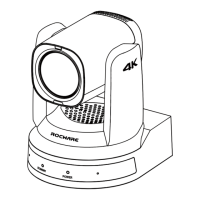
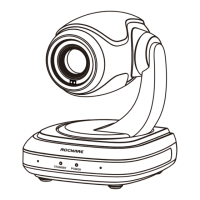
The Rocware RC821U is a 1080P Video Conferencing PTZ Camera designed for high-quality video conferencing applications. It features a full-function USB interface, 1080P Full HD resolution, a wide-angle lens with digital zoom, low illumination capabilities, Power over Ethernet (PoE) support, and remote control options.
Function Description:
The RC821U is a PTZ (Pan-Tilt-Zoom) camera that captures video in 1080P resolution at up to 60 frames per second. It is equipped with a 1/2.8-inch CMOS sensor with 2.07 effective megapixels, ensuring high-quality images. The camera supports multiple video output interfaces simultaneously, including HDMI, USB 3.0, and network, making it versatile for various setups. It also offers dual-stream output (YUY2, MJPEG, H.264) to reduce the host codec pressure. The camera's PTZ functionality allows for precise control over its pan, tilt, and zoom movements, which can be managed remotely via RS232, network, or USB. Its low illumination feature, combined with 2D and 3D noise reduction algorithms, ensures clear images even in challenging lighting conditions, with a high signal-to-noise ratio (SNR) of 55dB. PoE support simplifies installation by allowing power, control, video, and audio to be transmitted over a single network cable.
Important Technical Specifications:
- Video System: 1080P60, 1080P50, 1080P30, 1080P25, 720P60, 720P50
- Sensor: 1/2.8 inch, CMOS, Effective Pixel: 2.07M
- Scanning Mode: Progressive
- Lens: 12x optical zoom, f=3.5mm~42.3mm, F1.8~F2.8
- Digital Zoom: 16x
- Minimum Illumination: 0.5 Lux @ (F1.8, AGC ON)
- Shutter Speed: 1/30s~1/10000s
- White Balance: Auto, Indoor, Outdoor, One Push, Manual, VAR
- Digital Noise Reduction: 2D&3D Digital Noise Reduction
- Signal Noise Ratio: ≥55dB
- Horizontal FOV: 72.5°~6.9°
- Vertical FOV: 44.8°~3.9°
- Pan Angle: ±170°
- Tilt Angle: -30°~+90°
- Pan Speed: 2.7°~35.7°/s
- Tilt Speed: 2.7°~31.5°/s
- Preset Position: 255
- Video Compression: H.264/MJPEG
- Video Stream Resolution (First Stream): 1920x1080, 1280×720, 1024x576, 960x540, 640x480, 640x360
- Video Stream Resolution (Second Stream): 1280×720, 1024x576, 720x576 (50Hz), 720x480 (60Hz), 720x408, 640x360, 480x272, 320x240, 320x180
- Video Bit Rate: 32kbps~20480kbps (First Stream), 32kbps~6144kbps (Second Stream)
- Bit Rate Control: CBR, VBR
- Frame Rate: 50Hz: 1fps~50fps; 60Hz: 1fps~60fps
- Audio Type: AAC
- Audio Bit Rate: 96kbps, 128kbps, 256kbps
- Protocols: TCP/IP, HTTP, RTSP, RTMP(S), ONVIF, DHCP, SRT (MJPEG format not supported), Multicast, etc.
- USB Video Format: YUY2: 1080P60 (max.), H.264 AVC: 1080P60 (max.), MJPEG: 1080P60 (max.)
- Interfaces: 1x NET (10M/100M Adaptive Ethernet Port), 1x USB 3.0 (Type-C), 1x LINE IN (3.5mm Interface), 1x RS232 (8pin Min DIN), 1x HDMI 1.4b
- Power Interface: JEITA type (DC 12V)/USB Type-C (USB 5V)/PoE
- Input Voltage: DC 12V/USB 5V/PoE (802.3af)
- Power Consumption: 12W (max.)
- Dimensions: 142.2 x 151.9 x 177.7 (mm)
- Net Weight: About 1.5Kg
- Operating Temperature: 0°C~40°C
- Storage Temperature: -40°C~60°C
Usage Features:
The RC821U offers a comprehensive set of features for ease of use and flexibility.
- Quick Start: The camera initializes by moving to its limit position and then to a middle position, indicating readiness.
- Remote Control: A dedicated remote control allows users to manage standby mode, set and recall up to 255 preset positions, adjust zoom (slow and fast), control pan/tilt movements, access the OSD menu, enable/disable backlight compensation, and reset pan/tilt self-test. Shortcut sets on the remote enable quick functions like image freeze, OSD language selection (English/Chinese), IP address display, default recovery, camera version check, and inversion setup.
- GUI Settings (OSD Menu): The on-screen display (OSD) menu provides detailed control over camera settings:
- Exposure: Adjusts mode (Auto, Manual, SAE, AAE, Bright), exposure compensation, backlight, gain limit, anti-flicker, meter mode (Average, Center, Smart, Top), iris, shutter speed, and DRC.
- Color: Controls white balance mode (Auto, Indoor, Outdoor, One Push, Manual, VAR), RG/BG tuning, saturation, hue, AWB sensitivity, and color temperature.
- Image: Adjusts luminance, contrast, sharpness, horizontal/vertical flip, B&W mode, gamma, and style.
- P/T/Z: Configures speed by zoom, AF zone (Front, Top, Center, Bottom), AF sensitivity, display info, image freeze, digital zoom, call preset speed, and pre-zoom speed.
- Noise Reduction: Sets 2D and 3D noise reduction levels (Auto, Off, 1-5 for 2D; Auto, Off, 1-8 for 3D).
- Setup: Allows selection of language, video format, USB mode (BULK, ISOC), OSD flip, USB audio, and UVC H264.
- Communication Setup: Configures protocol (Auto, VISCA, PELCO-D, PELCO-P), VISCA/PELCO-D/PELCO-P address, address fix, net mode (Serial, Paral), and baud rate (2400, 4800, 9600, 38400).
- Restore Default: Resets all parameters, including IR remote and VISCA addresses, to factory defaults.
- WEB Settings: The camera can be accessed and controlled via a web interface (default IP: 192.168.100.88).
- Control Camera: Real-time monitoring with video image display and function buttons. Allows manual pan/tilt/zoom/focus control, setting PTZ speeds, and managing up to 255 PTZ presets.
- Video Settings: Configures video format (50Hz/60Hz), encode level (baseline, mainprofile, highprofile), encode codec (H264, MJPEG), resolution for first and second streams, bit rate, frame rate, I key frame interval, bit rate control (CBR/VBR), slice split enable, split mode, and slice size.
- Image Settings: Adjusts brightness, saturation, contrast, sharpness, hue, and flip/mirror functions.
- Audio Settings: Manages audio switch, audio type (AAC), sample rate (48K), bit rate (96K, 128K, 256K), input type (Line in), and ADTS options.
- System Settings: Allows rebooting the system and modifying username/password for admin and guest accounts.
- Network Settings: Configures LAN settings (IP address, subnet mask, gateway, DNS, MAC address), port settings (HTTP, RTSP, TCP, UDP, Sony Visca), RTMP(S) settings (MRL, video/audio enable/disable), SRT settings (SRT port, encryption, password), RTSP/ONVIF authentication, multicast settings (address, port), and NTP settings (time sync, time zone, server address, interval, time show position).
- Device Information: Displays device ID, type, software version, and webware version.
- Download Upgrade Program: Provides an option to download firmware upgrades.
Maintenance Features:
- Safety Precautions: Emphasizes using the standard power adapter, avoiding multiple devices on one adapter, not rotating the camera by hand, ensuring secure installation, maintaining smooth ventilation, and immediately powering off and unplugging if the device smokes, smells, or makes noises. The device is not waterproof and has no user-serviceable parts.
- Troubleshooting: Provides guidance for common issues:
- No Image on Monitor: Check power connection, voltage, power indicator, self-testing, and video cable connections.
- Image Jitters: Ensure stable installation position and absence of vibrating machinery nearby.
- No Video Image in Browser: Recommend using Google, Firefox, or Edge browsers (IE/IE core browsers are not supported).
- Unable to Access through Browser: Verify network access, disconnect/reconnect camera with PC, check IP address, subnet mask, gateway settings, MAC address conflicts, and web port settings.
- Forgot IP Address or Login Password: Default IP is 192.168.100.88, default username is "admin", and default password is "admin".
- Remote Control Not Working: Check/replace batteries, ensure correct camera working mode, and match remote control address key with camera.
- Serial Port Cannot Control: Ensure consistent protocol, address, bit rate, and proper control cable connection.

 Need help?
 General

 To Next Page