19
Operating instructions
For correct operation of the mixing panel, please follow the instructions below.
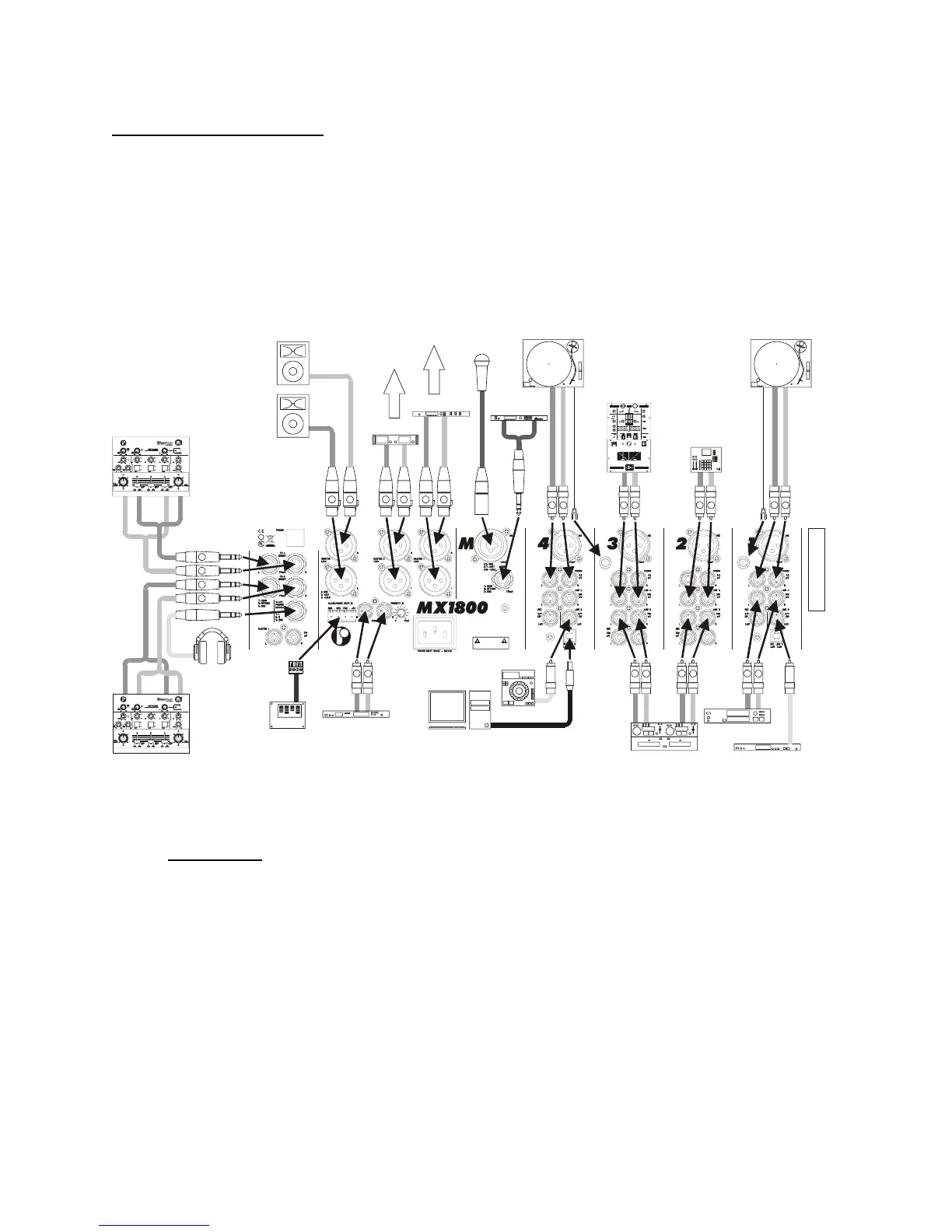
1) Before connecting anything to the mixing panel, be sure all equipment is turned off. Then
connect the different audio sources, amplifiers, effects-units, headphones, etc.. Next step is to
turn on the audio sources and effects-units.
When all these units are in ready state, you can switch on the power switch (A) of the mixing
panel. The power indicators (18) will light up.
After 5 seconds, you can turn on the loudspeaker processors and amplifiers.
R R R
L L L
CTIVE BOOTH
MONITORS
POWER
AMPLIFIER
LOUDSPEAKER
PROCESSOR
TO SECONDARY
SPEAKERS
TO MAIN
AMPLIFIERS
R
R
L
L
EFFECTS MACHINE
EFFECTS MACHINE
RODEC
filtertechnology inside
RE
RODEC
filtertechnology inside
RE
HEADPHONES
R
L
FLASH-CARD
PLAYER
FIRE ALARM
CENTRAL
DJ
MICROPHONE
REVERB
PROCESSOR
MASS STORAGE
PLAYER
PC BASED MUSIC
PLAYER/RECORDER
R
L
PHONO
TURNTABLE
R
L
PHONO
TURNTABLE
R R
L L
PROFESSIONAL
DOUBLE CD PLAYER
DAB RECIEVER
R
L
SUB MIXER
+-
0
+-
0
MAX0
MAX0MAX0
MAX0 MAX0
MAX0
PHONO 2
STRAIGHT
REVERSE
SELECT
LEVEL
LINE 2
PHONO 1
MIC 3
LINE 1
LINE 3
BALANCE
MID HIGHLOW
BALANCE
FX-INSERTFX-INSERT
L
WET
DRY
FX-INSERT MIX
R
PFL
CH1-2
MONO
MODE
PFL MIX
MASTER
2
MASTER
1
-3
-5
POWER
-20
-10
0
-
+
-1
0dB
0dB
+5
+3
+1
CHANNEL 2
INP U T 1 INP U T 2
LEVEL
LEVEL
INPUT
SELECT
LEVEL
EQ HIGH
EQ LOW
PFL
ROUTIN G
MID HIGHLOW
OUTPUTS
0
-
+
0
-
+
EQUALIZEREQUALIZER
SESSION/
AUX IN
CHANNEL 3
MIX L/CH1 MIX R/CH2
VU
SELECT
CH1
CH2
0
-
+
ROUTIN G
MIXCH1 CH2
CHANNEL 1
SELECT
LR
RODEC
CUTCUT
CH2
PFL CH1 - CH2 SELECT
CH1
NORMAL NORMAL
REVERSE REVERSE
R
L
SAMPLER
R
L
DVD-PLAYER
www.rodec.com
RODEC
Made in Belgium
Profes sional
Audio Equipment
WARNING
DISCONNECT POWERCORD
BEFORE OPENING
PS
E
2) Connect the headphones to the headphones JACK connector (31) or (L). Use headphones with
impedance between 32 and 600Ω.
ATTENTION!
Always turn headphones volume to “0” (fully counter clockwise) BEFORE
putting the headphones on your or somebody else her/his ears! Then slowly
raise the volume by turning the volume knob in clockwise direction.
3) Choose with the input select switch (1) the right audio-source.
4) Switch the PFL button (8) in position ON to listen at the desired source. Turn the phones select
button (29) completely to the left and turn the phones volume potentiometer (30) to the desired
position to get the stereo signal on the headphones and the two left VU-meters. The PFL circuit
works as a sum-system, there is a possibility to listen to more sources at the same time. All
these operations have no influence on the output signal! Adjust with the level control (2) the
input signal until the red indicators of the level meters (13) will light up occasionally. Adjust if
necessary the quality of the sound with the equalizer (3).



 To Next Page