31
APPENDIX B – MENUS IN THE DISPLAY WINDOW
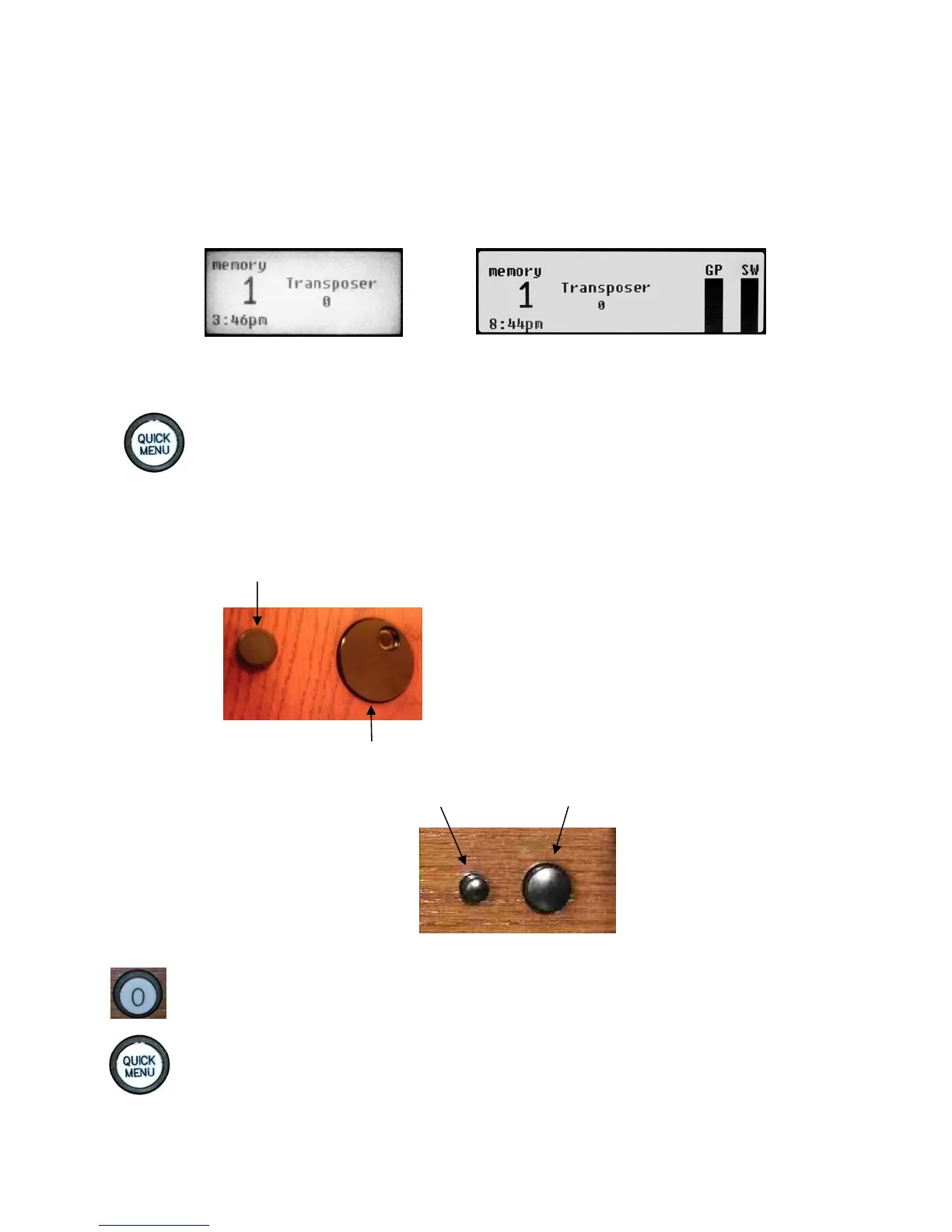
• Depending on organ model, the console display window may appear as:
Masterpiece Organ series display
Allegiant Organ series display
• Here’s how to adjust settings using the menus:
1. Press and release the QUICK MENU thumb piston to access a menu or sub-
menu. (Menus are listed on the next page.)
2. Turn the Select Knob to select a menu item.
3. Press and release the QUICK MENU thumb piston to enter the item.
4. Rotate the Alpha Dial to change the item’s setting.
Select Knob – (the smaller knob) selects (highlights) a menu item
Masterpiece consoles
Alpha Dial – (the larger dial) changes the selected item’s value
On Allegiant models, the Select Knob and Alpha Dial appear as:
Allegiant consoles
Note: to return to the previous menu, press and release 0 (Cancel).
To exit the menus and return to the Transposer 0 screen, press 0 repeatedly.
The ` symbol denotes that pressing the QUICK MENU thumb piston will navigate to a
sub-menu.









 To Next Page