
 Need help?
Do you have a question about the Rodgers Masterpiece and is the answer not in the manual?
Key safety precautions to follow when using the instrument.
Caution regarding potential explosion if lithium battery is incorrectly replaced.
Instructions on the main power switch and grounding requirements for the apparatus.
Guidance on minimizing radio and television interference from the instrument.
Instructions for separate collection of the product in EU countries as defined by regional regulations.
Legal notices, copyright, and contact details for Rodgers Instruments Corporation.
Overview of the organ's features, technology, and the manual's purpose.
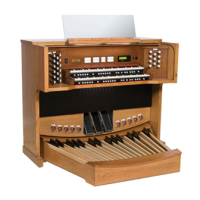
Diagram and labels for the main components of the three-manual console.
Step-by-step guide for powering the organ on and off.
Explanation of the organ's keyboards (manuals) and foot-played keyboard (pedalboard).
Definition of an organ stop and how to activate/deactivate them.
Procedure for activating and deactivating organ stops using drawknobs or tabs.
Explanation of tremulants, their function, and types.
How intermanual couplers connect different divisions of the organ.
Explanation of intramanual couplers that operate within a single division.
Overview of MIDI couplers and available orchestral sounds.
Description of general pistons that affect the entire organ.
Description of divisional pistons that affect a single division.
Procedure for programming new registrations onto pistons.
How to clear registrations using cancel pistons.
Managing and selecting different memory levels for piston registrations.
Controlling multiple divisions with a single expression shoe.
Making Great/Pedal divisions responsive to expression shoes.
Making Great/Pedal divisions unresponsive to expression shoes.
Enclosing the Festival Trumpet and FFF reeds to expression control.
Using melody couplers to play a solo voice on one manual with accompaniment on another.
Adding pedal registration to the lowest note played on the Great manual.
Description of the digital Zimbelstern (bell star) feature.
Using alternate crescendo sequences instead of the standard one.
Overview of the console display and its controls for menus and settings.
Step-by-step instructions for adjusting the organ's internal clock.
Procedure for locking memory levels to prevent accidental changes.
Procedure for unlocking memory levels to allow changes.
How to restore original factory default settings for pistons and memory.
Understanding reversible controls that activate/deactivate functions.
How expression shoes control volume for different divisions.
How the crescendo shoe gradually adds stops for volume increase.
Adjusting the organ's key to suit performance needs.
Further details on tremulants, including types and usage.
Description of the four main families of organ stops: Principals, Flutes, Strings, and Reeds.
Details on Percussion, Orchestral, and Choral stop families.
Explanation of pitch designations (feet) for stops and couplers.
Understanding mutation stops and their fractional pitch designations.
Identifying and understanding mixture stops based on Roman numerals.
Explanation of céleste stops and their undulating sound effect.
Description of the unique Amens/Alleluias stop featuring choir recordings.
Overview of the console display window and how to navigate menus.
Functions for managing USB memory, including folders and files.
Instructions for recording, playing back, and managing songs.
Overview of MIDI couplers and available orchestral sounds.
Using multitrack sequencing with external MIDI sequencers.
Setting master channels for different divisions and MIDI communication.
Managing registrations and bank select for MIDI control.
Adjusting master volume, main volume, and balance for the organ.
Configuring auxiliary inputs, including EQ, gain, and send options.
Adjusting line out signal and stereo/mono mode.
Selecting historical tunings and temperaments for pipe organ emulation.
Emulating pipe organ wind supply behavior and shutter effects on volume.
Customizing tremulant rate and depth for organ stops.
Selecting and accessing alternate voices for tonal variety.
Adjusting room size, wall type, and ambience for acoustic emulation.
Customizing and managing crescendo sequences.
Locking and unlocking Tutti settings to preserve registrations.
Adjusting lamp brightness and pedal-to-great piston coupler.
Setting master tuning and understanding blind control for stops.
Configuring soloing couplers, set clock, time zone, and contrast.
Managing memory banks, including copying, restoring, and deleting.
Accessing and controlling built-in demo songs.
Details on the materials and technology used in performance touch keyboards.
Guidelines for handling and maintaining the organ's keyboards.
Terms and conditions of the 10-year parts warranty for the product.
Limitations and exclusions that apply to the product warranty.
 General
| Brand | Rodgers |
|---|---|
| Model | Masterpiece |
| Category | Musical Instrument |
| Language | English |








 To Next Page