EasyManua.ls Logo

Rodix FEEDER CUBE FC-92 Plus - User Manual

Rodix FEEDER CUBE FC-92 Plus
8 pages
Print Icon
To Next Page IconTo Next Page
Loading...
File No. E183233
4.0
2.0
4.0
4.8
9.0
8.0
8.75
4.5
RODIX INCORPORATED
TOLL FREE (800) 562-1868, FAX (815) 316-4701
E-mail custserve@rodix.com
rodix.com
FEEDER CUBE ®
FC-92
Plus
, P/N 121-000-8450
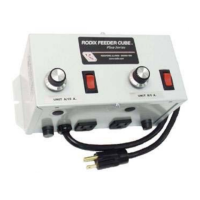
GENERAL PURPOSE MODEL
IMPORTANT: APPLICATION NOTE
Input: 120 VAC, 50/60 HZ.
(Operating range 90-130 VAC)
Double Unit Fuse Sizes:
Unit A 10A, Unit B 5A
Output: 0-120 VAC
Unit A: 100% Duty Cycle 0.6-8A, 80% for 9-10A
Unit B: 100% Duty Cycle 0.6-4A, 80% for 5A
Circuit Boards P/N 24-490 & 24-210
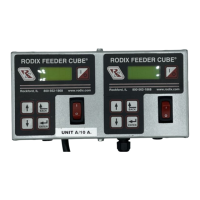
Unit A Information: This unit is based on the FC-90
Plus
Series Part Sensing Feeder Cube®. The On/Off operation of the
output can be controlled with an optional part sensor. For more information on this unit, refer to the enclosed Adjustments
and Set Up pages.
Unit B Information: This unit is based on the FC-40
Plus
Series Feeder Cube®. For more information on this unit, refer
to the enclosed Adjustments and Set Up pages. The Unit B operation is independent of the other unit.
© 2000, 2018 RODIX
INC. FC-92.docx 2/16/2018 Page 1
Question and Answer IconNeed help?

Do you have a question about the Rodix FEEDER CUBE FC-92 Plus and is the answer not in the manual?

Rodix FEEDER CUBE FC-92 Plus Specifications

General IconGeneral
Input Voltage100-240VAC
Input Frequency50/60 Hz
Output Voltage24VDC
ProtectionOverload, Short Circuit, Over Voltage
Operating Temperature-10°C to +50°C
Storage Temperature-20°C to +70°C
Protection ClassIP20

Summary

OFF;ON CONTROL GUIDE

Control Methods

Options for ON/OFF control via low current switch, interlock, or low voltage DC input.

SENSOR OPTION

Connect optic or proximity sensors for automated control of the feeder.

ADJUSTMENTS & SET UP

Pulse Setting & Sensor Installation

Configure pulse mode and install parts sensors for proper operation.

Run Jumper & Output Control

Manage run jumper input and adjust maximum output control for the feeder.

Minimum Output & Control Dial

Set minimum output level and utilize the main control dial for feeder speed.

Time Delays and Soft-Start

Adjust time delays and soft-start for optimal feeder response and startup.

Power Supply and Remote Speed Control

Understand power supply capabilities and methods for remote speed adjustment.

CFR Sensor Installation

Step-by-step guide for mounting and preparing the feeder surface for a CFR sensor.

Gain Selection and Output Connections

Configure CFR gain and understand output connection options for the feeder.

Supplementary Features and Status LEDs

Explore supplementary features and interpret the meaning of status indicator LEDs.

Troubleshooting and Warranty

Guidance for resolving issues and understanding product warranty terms.

FC-40 Plus Series Adjustments

Pulse Setting and Output Limits

Configure pulse mode and limit maximum output for the FC-40 Plus control.

Minimum Output and Control Dial

Set minimum output levels and use the main control dial for feeder speed adjustment.

Soft-Start and Remote Control

Adjust soft-start settings and configure remote ON/OFF control for the FC-40 Plus.

Remote Speed Control and Line Compensation

Implement remote speed control and understand line voltage compensation features.

Output Connections and Supplementary Features

Details on output connections and available supplementary software features.

Troubleshooting and Warranty

Guides for troubleshooting and warranty information for the FC-40 Plus series.

RODIX SOLUTION

Electrical Noise Management

Practices for avoiding electrical noise interference and its symptoms.

Noise Sources & Solutions

Identify common noise generators and implement mitigation strategies.

Related product manuals