© ROHR
3
© ROHR
English
DFX-15 / DFX-40 / DFX-80 / DFX-150
01. Connect the charger to the battery.
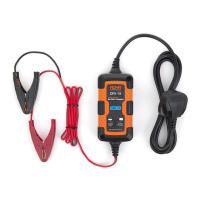
The charger’s output leads have colour-coded battery clamps (red-positive and black-negative).
Connect these directly to the corresponding connectors on the battery posts, positive rst.
02. Connect the charger to a power outlet.
DFX-15 The power indicator light will turn yellow and charging will begin.
DFX-40/80 The LCD panel will light up blue. Press the Mode button to select charging program.
DFX-150 The LCD panel will light up blue. Press the Mode button to select the current. Choose
the battery type.
03. When the battery is charged.
DFX-15 The power indicator light will turn green.
DFX-40/80 The charge indicator bar will be full.
DFX-150 The charge indicator bar will be full.
04. Disconnect from AC power socket.
Quick Start Guide
The following steps describe the quickest method to operate your battery charger. However,
it is essential you fully read this manual to ensure you are familiar with the general safety
features, precautions and functions necessary to operate the product. Failure to do so may
result in injury and damage to equipment and/or your personal items.



 To Next Page