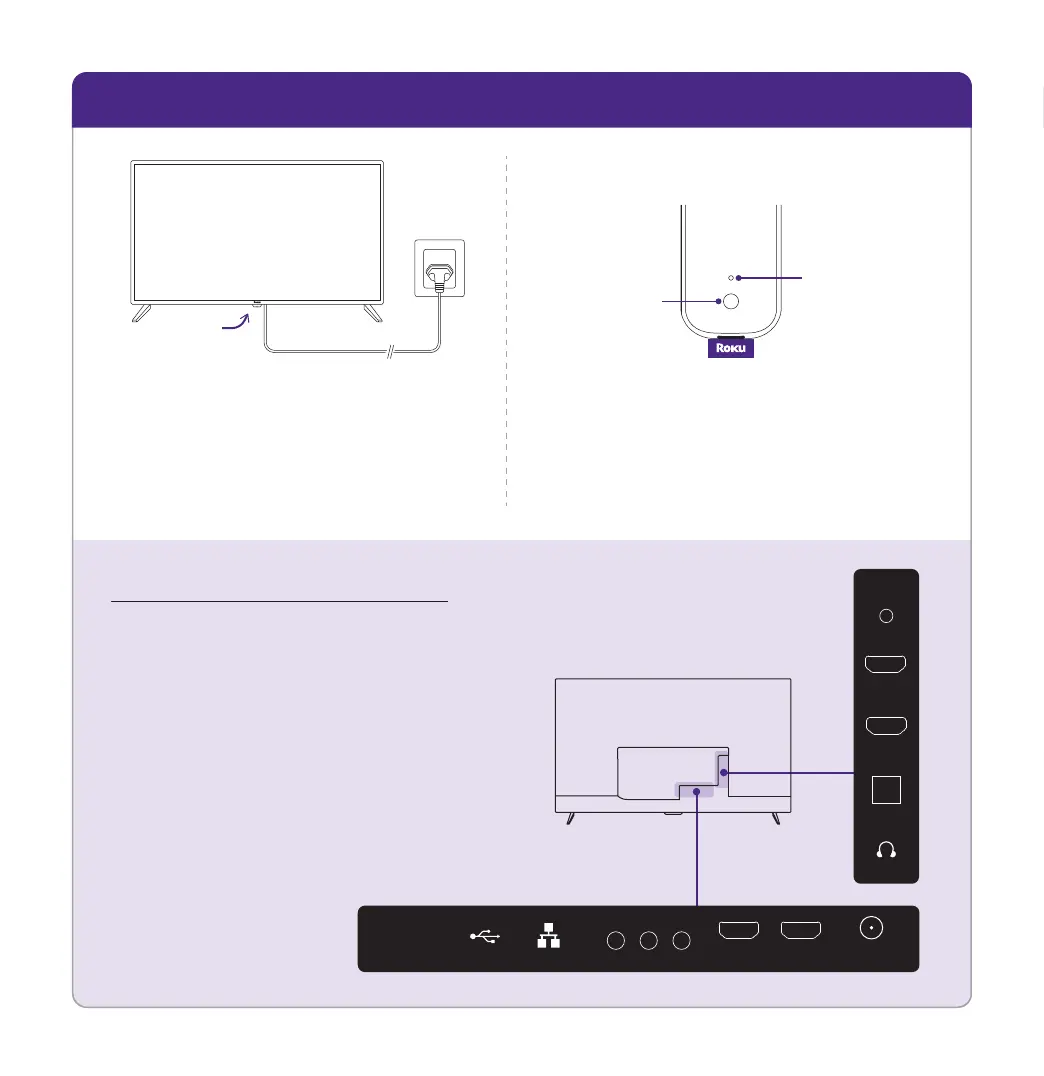
STEP 2: Plug TV in and pair remote
B
A
Connect your TV
Plug your TV into a power outlet.
It should turn on automatically. If
it doesn't, press the power button.
Power
button
Pair your remote
Press and hold the pairing button
for 5 seconds until status light turns
green and starts blinking.
Back of remote
Pairing
button
Status
light
Get to know your TV
Video connections
HDMI - Game consoles, DVD players
Composite - Analog devices, older game consoles
Antenna/Cable - Digital antenna, cable connection
Other connections
USB - Flash drive
Audio connections
HDMI eARC - AV receivers, soundbars (Recommended)
Optical (S/PDIF) - AV receivers, soundbars
Audio Out/Headphone - Wired headphones
Back of TV
OPTICAL
HDMI
1 (eARC)
HDMI
2
RESET
HDMI
3
HDMI
4
USB
ANTENNA/
CABLE
COMPOSITE
VIDEO L R
LAN


 To Next Page