This document is a Quick Start Guide for the Roku Plus Series 4K QLED TV, designed to help users set up and begin using their new television. It covers essential steps from unboxing and physical setup to connecting to the internet and activating the device, along with details on remote features and frequently asked questions.
The Roku Plus Series 4K QLED TV is a smart television designed for streaming and entertainment. Its primary function is to display high-quality video content, leveraging 4K QLED technology for enhanced picture clarity and vibrant colors. As a smart TV, it integrates with the Roku platform, providing access to a vast library of streaming channels, apps, and services. The TV is designed for ease of use, with a focus on intuitive navigation and voice control capabilities.
Usage Features:
The TV offers a range of features to enhance the user experience:
- Streaming Platform: The integrated Roku platform allows users to access a wide variety of streaming services, including popular apps for movies, TV shows, music, and more. The interface is designed to be user-friendly, making it easy to discover and enjoy content.
- 4K QLED Display: The 4K QLED display technology provides a high-resolution picture with improved color accuracy, contrast, and brightness, delivering an immersive viewing experience for movies, sports, and gaming.
- Connectivity Options: The TV is equipped with multiple input and output ports to connect various external devices.
- HDMI Ports: Multiple HDMI ports (including one with eARC for enhanced audio return channel) are available for connecting game consoles, DVD/Blu-ray players, soundbars, and AV receivers.
- Composite Input: A composite input is provided for older analog devices and game consoles, ensuring compatibility with a wider range of legacy equipment.
- Antenna/Cable Input: This port allows connection to a digital antenna for over-the-air broadcasts or a cable connection for traditional TV services.
- Optical (S/PDIF) Output: An optical audio output enables connection to AV receivers and soundbars for high-quality digital audio.
- Audio Out/Headphone Jack: A standard headphone jack allows for private listening with wired headphones.
- USB Port: A USB port is included for connecting flash drives, which can be used for media playback or other compatible functions.
- LAN Port: An Ethernet port provides a wired internet connection, offering stability and potentially faster speeds compared to Wi-Fi.
- Roku Voice Remote Pro: The TV comes with a sophisticated remote control that significantly enhances usability.
- Hands-free Voice Control: Users can issue commands by simply saying "Hey Roku" followed by an instruction, such as playing entertainment, turning the TV on, adjusting volume, or controlling playback. This feature allows for seamless interaction without needing to press buttons.
- Push-to-talk Voice Control: For situations where hands-free voice control is not preferred, the remote also offers a push-to-talk option. Users can press and hold the voice button to activate voice commands.
- Private Listening: The remote includes a headphone jack, allowing users to plug in headphones for private listening. When headphones are connected, the TV's speakers are automatically muted, making it ideal for late-night viewing or shared living spaces.
- Lost Remote Finder: If the remote is misplaced, users can say "Hey Roku, where's my remote?" or press the power button on the TV to trigger an audible signal from the remote, helping them locate it quickly.
- Personal Shortcuts: The remote features customizable shortcut buttons (labeled 1 and 2) that can be programmed to quickly access favorite channels or functions.
- Instant Replay: A dedicated button allows for quick replay of content, useful for catching missed dialogue or action.
- Rechargeable Battery: The Roku Voice Remote Pro is rechargeable, eliminating the need for disposable batteries. It can be charged via a USB cable connected to the TV's USB port or a standard USB wall adapter. The remote's status light indicates charging progress, and the TV will display a message when it's time to recharge.
- Internet Connection: An internet connection is crucial for the TV's smart features. It enables streaming from various channels, downloading software updates, and accessing online content. Both wired (LAN) and wireless (Wi-Fi) connections are supported.
- Account Activation: To unlock the full functionality of the Roku TV, users must activate it by linking it to a Roku account. This process is guided by on-screen instructions and can be completed using a computer or smartphone. Roku emphasizes that it never charges for activation support.
Maintenance Features:
While the guide primarily focuses on setup and usage, some aspects touch upon maintenance implicitly:
- Software Updates: The TV automatically receives software updates over the internet. These updates are essential for maintaining optimal performance, security, and access to new features. A stable internet connection is necessary for these updates to occur seamlessly.
- Remote Charging: The rechargeable Roku Voice Remote Pro requires periodic charging. The guide provides clear instructions on how to charge the remote using the included USB cable, either via the TV's USB port or a wall adapter. The status light and on-screen messages help users monitor the remote's battery level, ensuring it remains functional.
- Physical Setup: The initial setup instructions emphasize placing the TV on a soft, clean surface during stand attachment to prevent scratches or damage. This careful handling contributes to the longevity and appearance of the device.
- Wire Management: The inclusion of a wire management clip suggests a design consideration for keeping cables organized and tidy, which can prevent accidental disconnections or damage to ports.
The Roku Plus Series 4K QLED TV is designed to be a central entertainment hub, offering a rich streaming experience with advanced display technology and user-friendly controls, including innovative voice capabilities and convenient remote features. The quick start guide ensures that users can set up and enjoy their new TV with minimal hassle.

 Need help?
 General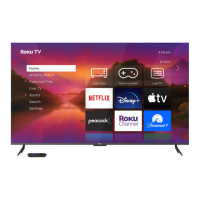

 To Next Page