Hands-free voice
Just say "Hey Roku" and a command to
control your streaming even faster. Play
entertainment, turn your TV on, adjust
the volume, control playback, and more.
Connect your remote to
the USB charging cable
and connect to either:
• the USB port on the
back of your TV
• a wall outlet using a
standard USB adaptor
(like your phone charger)
The status light will stop blinking once your
remote is finished charging. You’ll see a message
on your TV when it’s time to charge again.
Note: To charge your remote while your TV is o,
enable “Fast TV start” in the Power settings menu.
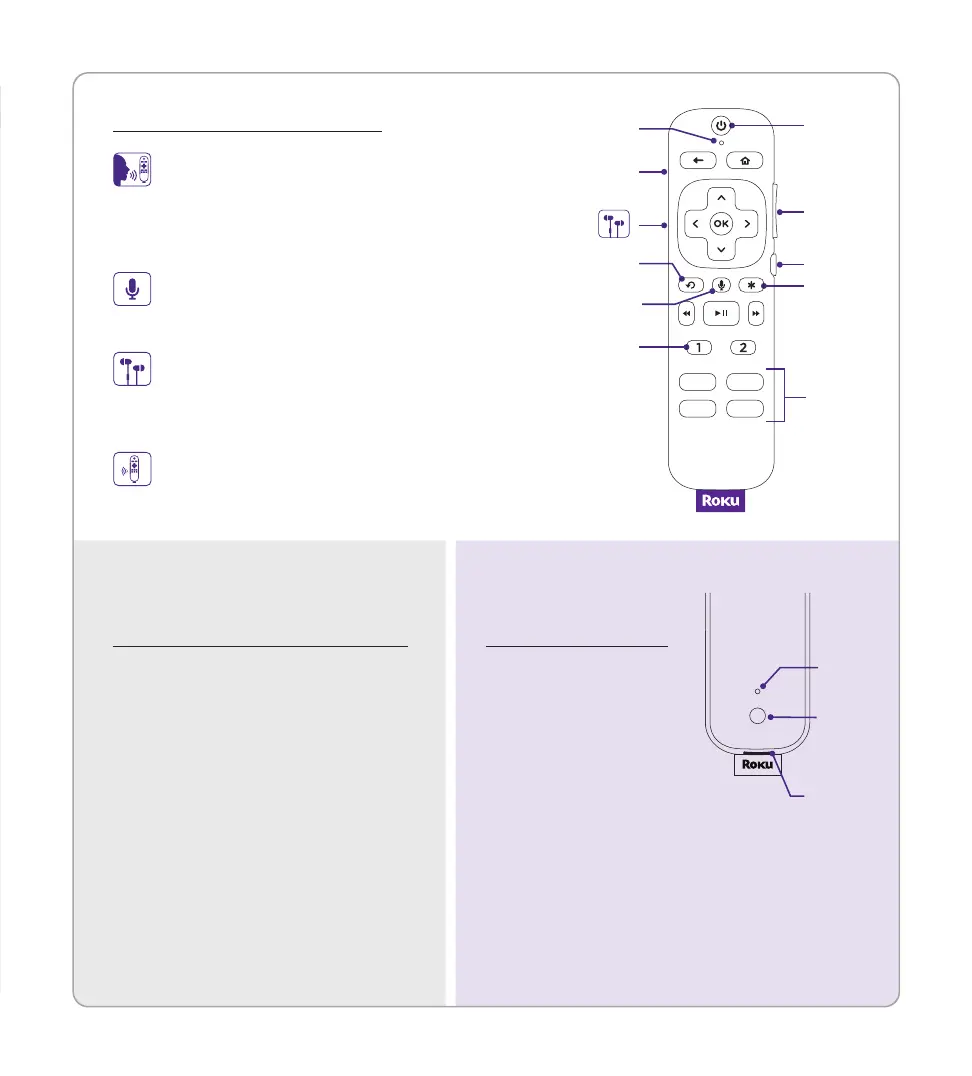
Remote features
Power
Voice
Instant replay
Hands-free
voice on/o
Headphone
jack
Volume
Mute
Options
Personal
shortcuts
Microphone
Channel
shortcuts
Push-to-talk voice
Press and hold the voice button if you
don’t want to use hands-free voice.
Lost remote finder
Say "Hey Roku, where's my remote?"
or press the power button on your TV.
Private listening
Plug headphones into your
remote to use private listening.
Your TV will mute automatically.
Frequently asked
questions
Charging
your remote
Why do I need an internet
connection?
You’ll need an internet connection
to stream your favorite channels
and for automatic software updates.
Why should I enter a payment
method?
Saving a payment method makes
it easy to rent or buy movies,
subscribe to popular channels, and
start free trials in just a click. No
charges will be made without your
authorization.
BACK OF
REMOTE
Pairing
button
Status
light
Charging
port


 To Previous Page