Need help?
Do you have a question about the Roland BRIDGE CAST and is the answer not in the manual?
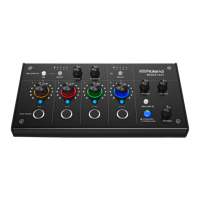
Details the controls and indicators on the top surface of the BRIDGE CAST.
Details the ports and connectors on the rear of the BRIDGE CAST unit.
Step-by-step instructions for installing the BRIDGE CAST app and driver on Windows and macOS.
Instructions for connecting the BRIDGE CAST to a computer for audio and chat.
Guides on setting up audio input/output devices and software on your computer.
Steps for connecting the unit to video game consoles for voice chat and game audio.
Steps for connecting the unit to an iPad or iPhone for voice chat and game audio.
Detailed steps for adjusting microphone input, quality, and effects via the app.
Instructions for using the equalizer to adjust game sound through the BRIDGE CAST app.
Guidance on enhancing voice chat audio quality and clarity using the app.
How to set the mic type and adjust the input gain (sensitivity) for optimal mic performance.
Guidance on setting the mic's input gain to achieve appropriate audio levels.
Step-by-step guide to saving current mic effect configurations as a preset.
How to use the equalizer to shape the tonal character of game audio.
Instructions on how to restore the unit to its original factory settings.
 General
| Frequency range | 44100 - 96000 Hz |
|---|---|
| Product color | Black |
| Rack capacity | - |
| XLR inputs | 1 |
| Maximum input level | 10.5 dBu |
| Input current | 0.9 A |
| DC input voltage | 5 V |
| Power consumption (typical) | - W |
| Cables included | USB Type-C |
 Weight and Dimensions
| Depth | 110 mm |
|---|---|
| Width | 222 mm |
| Height | 70 mm |
| Weight | 450 g |

 To Next Page