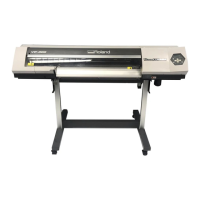
The Roland DPX-3300 is a drafting plotter designed for high-speed and precise drawing. It offers a range of features for efficient and high-quality output, along with various pen options and connectivity.
Function Description
The DPX-3300's primary function is to create drawings on paper using a variety of pens. It supports both absolute and relative coordinate systems for precise plotting. The plotter can be used in conjunction with a computer to execute drawing commands and can also function as a digitizer to output coordinate data. It features intelligent pen functions for automatic pen control, including pen attachment discrimination, pen type discrimination, automatic pen return, and automatic pen-up. The device also includes a buffer for storing drawing data, which can be managed through various commands.
Important Technical Specifications
- Plotting Area: X-axis: 864 mm, Y-axis: 594 mm (ANSI D/ISO A1 size).
- Plotting Speed: 450 mm/sec in all directions.
- Pen Up/Down Speed: 20 times/sec.
- Mechanical Resolution: 0.0125 mm (12.5µm)/step.
- Software Resolution (position where command enables stop): 0.025 mm.
- Distance Accuracy: ±0.2% of traveling distance or ±0.1mm, whichever is larger.
- Repeatability: Below ±0.10mm for same pen, below ±0.25mm for different pen.
- Number of Pens: 8.
- Paper Setting: Electrostatic paper holder.
- Power Consumption: 120W.
- Dimensions (W x D x H): 46-1/12" (W) x 33-7/12" (D) x 6-11/12" (H) (1170 x 852 x 175 mm).
- Weight: 87.2 lbs (40 kg) (Main unit only).
- Operating Temperature: 5°C to 40°C.
- Operating Humidity: 35 to 80% (no dew forming).
- Input/Output Signals (Parallel - Centronics): STROBE (1 bit), DATA (8 bits), BUSY (1 bit), ACK (1 bit), TTL level, asynchronous.
- Input/Output Signals (Serial - RS-232C): Transfer system: asynchronous, full-duplex data communication. Baud rate: 50, 75, 110, 134.5, 150, 200, 300, 600, 1200, 2400, 3600, 4800, 7200, 9600 (selected by Baud rate switch). Stop bit: 1 or 2 bits (selected by DIP switch). Parity check: odd, even, non (selected by DIP switch). Data bits: 7 or 8 bits (selected by DIP switch). Connector: DB-25S.
Usage Features
The DPX-3300 is designed for ease of use with several intelligent features.
- Electrostatic Adsorption: The plotter uses an electrostatic adsorption system to securely hold drawing paper in place, ensuring proper alignment on the drawing board.
- Soft Landing Mechanism: This mechanism ensures smooth pen-up and pen-down actions, protecting the pen tip and significantly reducing operation noise.
- Pen Type Discrimination: The plotter automatically identifies the type of drawing pen in use and adjusts pen speed and force accordingly for optimal drawing quality.
- Automatic Pen Return: Pens are automatically capped when returned to the pen stock, preventing the pen tip from drying. In automatic pen control mode, a pen in use will return to the pen stock if no drawing instruction is received for a specified period.
- X-Y Coordinate Display: An LED display shows X-Y coordinates in 0.1 mm increments, facilitating the setting of drawing positions, scaling ratios, and program debugging.
- Optional Pens: A wide range of optional pens is available, including water-based fiber-tipped, ceramic, water-based ballpoint, pressurized oil-based ballpoint, oil-based fiber-tipped, drawing ink pens (for paper and film), and maintenance-free tubular plotter pens, offering various colors and tip sizes.
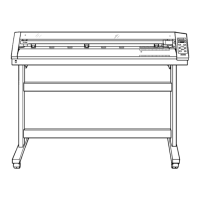
- Dedicated Stands: Two types of dedicated stands with casters ("DPS-30" and "DPS-35") are available, allowing for tilt angle adjustments up to 60° for ergonomic use.
- Control Panel: The control panel features keys for pen selection, scaling points, pause, paper hold, and X-Y coordinate display reset, providing manual control over various plotter functions.
- RD-GL II Command Language: The plotter uses the RD-GL II command language, consisting of 75 commands for initialization, scaling, windowing, pen control, drawing, labeling, and data output/digitization. This allows for flexible programming and integration with computer software.
- Buffer Management: The DPX-3300 includes a 15K-byte buffer (1K-byte I/O buffer, 3072-byte polygon buffer, downloadable character buffer) to store drawing data, reducing computer waiting time. Buffer capacity can be expanded up to 15K bytes when using a Serial Connector.
Maintenance Features
- Pen Cap Replacement: The pen stock is equipped with rubber caps to prevent pen tips from drying. These caps should be changed according to the pen type. Accessory tweezers are provided for secure pen cap replacement.
- Ink Pen Handling: Specific guidelines are provided for handling ink pens, including avoiding exposure of pen tips to air, using dedicated inks, cleaning pen caps, and avoiding strong impacts or severe temperature changes to prevent ink leakage or tip damage.
- Ink Pen Refilling: Instructions are provided for refilling ink pens, including disassembling the pen holder, inserting the pen tip into the holder, and slowly inserting the ink tank.
- Ink Pen Storage: For short-term storage (within an hour), ink pens can remain in the pen stock. For longer periods, pens should be removed, holder A detached, and pen caps placed on the pen tips, storing them upright.
- Washing Ink Pens: Methods for washing ink pens are described, including using a special pen washer or dipping the pen tip in a pen cleaner for stubborn ink stops.
- Troubleshooting: The manual provides a comprehensive troubleshooting guide for common errors, including command errors, device control command errors, communication protocol errors, pen carriage displacement errors, and hardware errors. It also includes self-test functions and checking examples for connection to a computer.

 Need help?




 To Next Page
 General