EasyManua.ls Logo

Roland E-10 - Page 14

Roland E-10
54 pages
Print Icon
To Next Page IconTo Next Page
To Previous Page IconTo Previous Page
Loading...
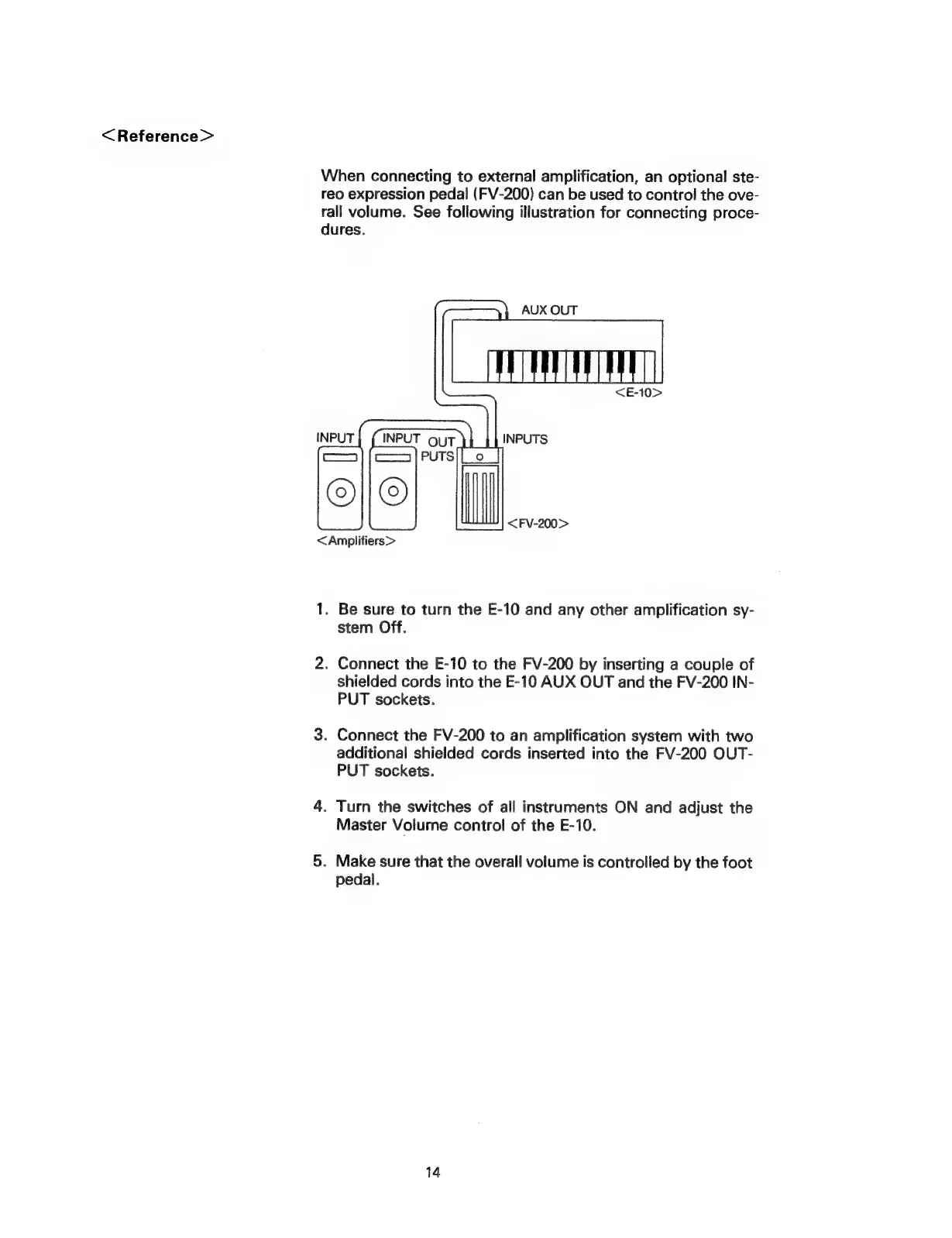
<Reference>
When
connecting
to
external
amplification,
an
optional
ste-
reo
expression
pedal
(FV-200)
can
be
used
to
control
the
ove-
rall
volume.
See
following
illustration
for
connecting
proce-
dures.
AUX
OUT
<Amplifiers>
1.
Be
sure
to
turn
the
E-10
and
any
other
amplification
sy-
stem
Off.
2.
Connect
the
E-10
to
the
FV-200
by
inserting
a
couple
of
shielded
cords
into
the
E-10
AUX
OUT
and
the
FV-200
IN-
PUT
sockets.
3.
Connect
the
FV-200
to
an
amplification
system
with
two
additional
shielded
cords
inserted
into
the
FV-200
OUT-
PUT
sockets.
4.
Turn
the
switches
of
all
instruments
ON
and
adjust
the
Master
Volume
control
of
the
E-10.
5.
Make
sure
that
the
overall
volume
is
controlled
by
the
foot
pedal.
14