EasyManua.ls Logo

Roland E-10 - Page 16

Roland E-10
54 pages
Print Icon
To Next Page IconTo Next Page
To Previous Page IconTo Previous Page
Loading...
SPLIT
The
keyboard
can
also
be
played
in
a
‘Split’
mode.
One
tone
on
the
right-hand
side
of
the
keyboard
and
a
different
tone
for
the
left.
To
‘split’
the
keyboard
press
the
SPLIT
button
.
Split
1
(left)
LED
light.
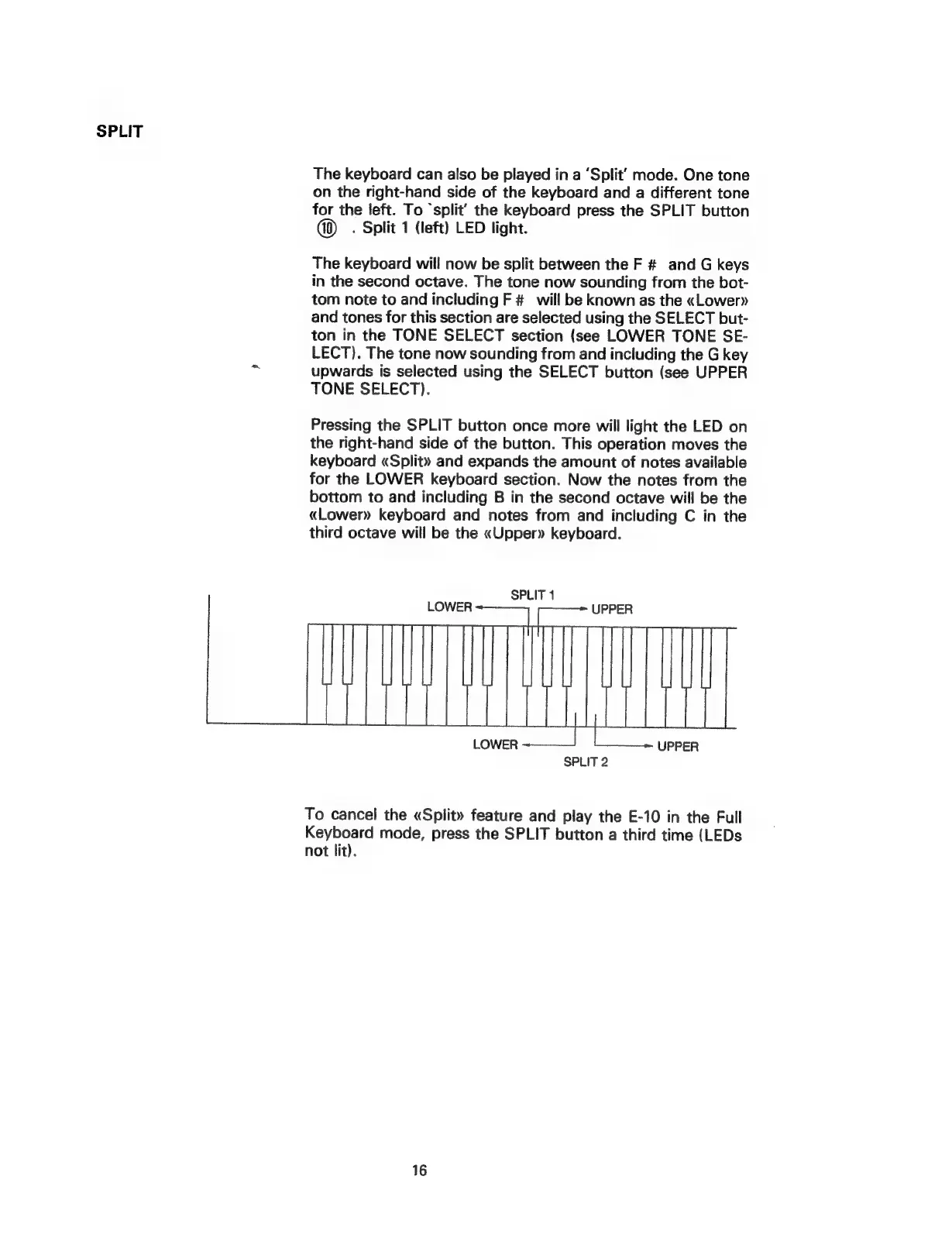
The
keyboard
will
now
be
split
between
the
F
#
and
G
keys
in
the
second
octave.
The
tone
now
sounding
from
the
bot-
tom
note
to
and
including
F
#
will
be
known
as
the
«Lower»
and
tones
for
this
section
are
selected
using
the
SELECT
but-
ton
in
the
TONE
SELECT
section
(see
LOWER
TONE
SE-
LECT).
The
tone
now
sounding
from
and
including
the
G
key
upwards
is
selected
using
the
SELECT
button
(see
UPPER
TONE
SELECT).
Pressing
the
SPLIT
button
once
more
will
light
the
LED
on
the
right-hand
side
of
the
button.
This
operation
moves
the
keyboard
«Split»
and
expands
the
amount
of
notes
available
for
the
LOWER
keyboard
section.
Now
the
notes
from
the
bottom
to
and
including
B
in
the
second
octave
will
be
the
«Lower»
keyboard
and
notes
from
and
including
C
in
the
third
octave
will
be
the
«Upper»
keyboard.
SPLIT
1
SPLIT
2
To
cancel
the
«Split»
feature
and
play
the
E-10
in
the
Full
Keyboard
mode,
press
the
SPLIT
button
a
third
time
(LEDs
not
lit).
16