SuperNATURAL Synth Tone Edit
16
Editing a INTEGRA-7 Synth Tone
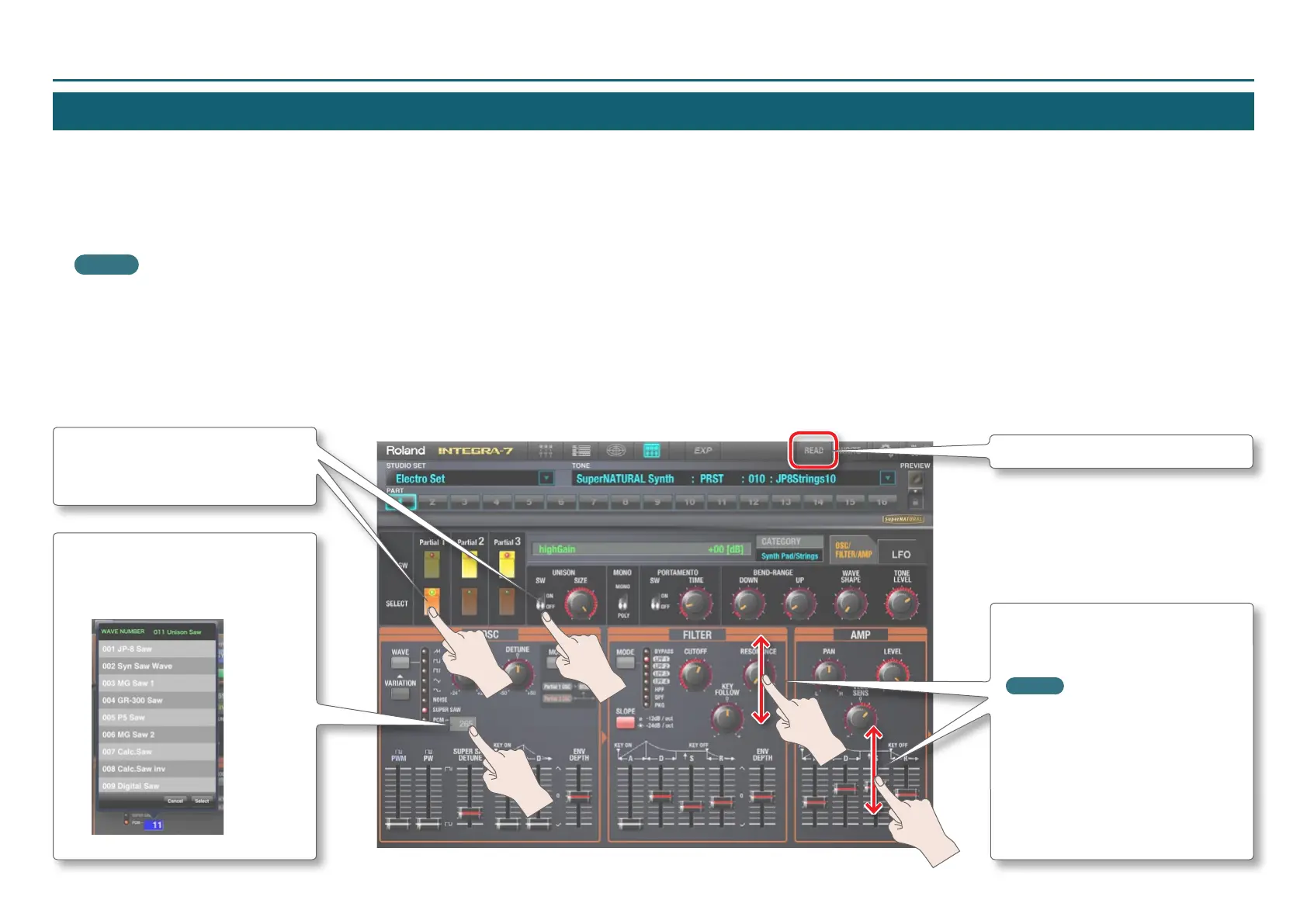
Here’s how to read the settings of a Synth Tone from the INTEGRA-7 into INTEGRA-7 Editor for iPad, and edit those settings.
1. Tap the [READ] button.
The Synth Tone parameters will be sent from the INTEGRA-7 to INTEGRA-7 Editor for iPad. The current Synth Tone parameter settings of the INTEGRA-7 will appear in
INTEGRA-7 Editor for iPad.
MEMO
If you’ve operated the INTEGRA-7 itself, tap the [READ] button. The current state of the INTEGRA-7 will be read into INTEGRA-7 Editor for iPad.
2. Edit the parameters.
The edited parameters will be sent to the INTEGRA-7. Parameter settings are reected on the INTEGRA-7 in real time.
Buttons and switches
Tap a button or switch to change its
setting.
PCM number
If tapped when PCM has been selected
for WAVE, the WAVE NUMBER popup will
appear.
[READ] button
Knobs and sliders
Drag a knob or slider up/down to
change its value.
MEMO
• Make ne adjustments to the value by
dragging to left or right.
• You can reset the value to its initial
state by rapidly tapping three times.



 To Next Page