EasyManua.ls Logo

Roland PK-5A - User Manual

Roland PK-5A
14 pages
Print Icon
To Next Page IconTo Next Page
Loading...
r
PK-5A
Dynamic MIDI Pedal
Owner’s Manual
ENGLISH ENGLISH
ENGLISH ENGLISH
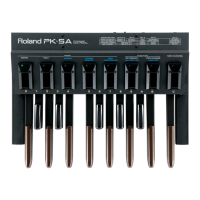
Thank you for purchasing the Roland PK-5A Dynamic MIDI Pedal. The PK-5A is an easy-to-operate pedalboard anyone
can use with the benefit of Roland's superior digital technology.
The PK-5A is a 13-pedal, monophonic/polyphonic, programmable pedalboard with dynamics. The PK-5A contains no
internal sound source.
LEDs provide information and directions to the player while programming the many features of the PK-5A, making
operation quicker and easier.
MIDI connectors are provided for connecting other MIDI devices.
Copyright © 2003 ROLAND EUROPE. All rights reserved. No part of this publication may be reproduced in any form without the written permission of Roland Europe S.p.a.
PK-5A book Page 3 Thursday, July 24, 2003 6:26 PM
Question and Answer IconNeed help?

Do you have a question about the Roland PK-5A and is the answer not in the manual?

Roland PK-5A Specifications

Power IconPower
adapter ACA 220 voltage9V
adapter ACA 240 voltage9V
adapter ACA 120 voltage9V
adapter ACA 100 voltage9V
adapter ACA 220 current300 mA
adapter ACA 240 current100 mA
adapter ACA 120 current200 mA
adapter ACA 100 current150 mA
Weight and Dimensions IconWeight and Dimensions
dimensions425 x 560 x 120 mm
weight8 kg

Summary

PK-5 A Features and Panel Overview

Supplied Accessories

Details the 6x MN1500 alkaline batteries included with the PK-5A.

Panel Description

Identifies and categorizes the controls and connectors on the PK-5A.

Setup, Care, and Important Notes

AC Adapter and General Usage Precautions

Safety and usage guidelines for the AC adapter and general operation.

Unit Care and Connection Guide

Instructions for unit care, environmental considerations, and device connection.

MONO Mode Operation

MONO Mode Introduction and Functions

Explains MONO mode, Octave, and Select functions.

MONO Mode: Advanced Functions

Covers Retrigger, Octaver, Program Change, Bank Select, and MIDI Channel.

POLY, DRUMS, and SOUND EFFECTS Modes

POLY Mode Operation

Explains POLY mode, its functions, and settings.

POLY Mode: Program Change & MIDI Channel

How to manage program changes and select MIDI channels in POLY mode.

DRUMS Mode Operation

Using DRUMS mode, FACTORY SET, and USER SET for drum sounds.

SOUND EFFECTS Mode Operation

Using SOUND EFFECTS mode, FACTORY SET, and USER SET for sound effects.

MIDI Controller, Settings, Troubleshooting & Specs

MIDI Controller Mode Operation

Using MIDI CONTROLLER mode, FACTORY SET, and USER SET for control messages.

Programming MIDI Controller USER SET

Customizing MIDI control change messages for the USER SET.

Default Settings, MIDI Basics, and Troubleshooting

Overview of defaults, MIDI info, care, and troubleshooting.

Technical Specifications

Detailed specifications including dimensions, weight, and options.

Related product manuals