VI. Re-sampling
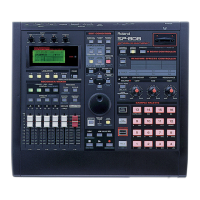
Re-sampling is a term used for combining multiple samples into a single sample or re-recording
samples to another pad while adding effects. By re-sampling, you will be able to play more than
four samples at once because multiple samples can be combined to one pad. Re-sampling with
effects will help make your samples unique and also free up the effects processor to do other
things, like play the analog synthesizer.
Use the following procedure to combine multiple samples into a single sample:
1. Press SAMPLING.
2. CURSOR down to Start/w and rotate the VALUE/TIME dial to select "PAD."
3. Press SAMPLING again to display "Waiting Signal."
4. Select the samples you wish to combine by pressing the appropriate pads. Up to three
samples can be combined at a time and sampling will begin automatically as soon as the first
sample is played.
5. Press SAMPLING again when you are finished.
6. Play the pad to hear the result. Press ENTER/YES to keep the new sample or EXIT/NO to try
again.
Use the following procedure to re-sample an existing sample with effects:
1. Press the FX ON/OFF button so it is lit.
2. Press FX INFO and rotate the VALUE/TIME dial to select the desired effect. Press ENTER/YES
to confirm your selection.
3. Hold SHIFT and press SCRUB until the PAD indicator above the fader is lit.
4. Press the EFFECTS button above the MIC/LINE (PAD) fader so it is lit.
5. Press SAMPLING.
6. CURSOR down to Start/w and rotate the VALUE/TIME dial to select "PAD."
7. CURSOR down to FxLoc and rotate the VALUE/TIME dial to select "SEND/RETURN" or "INS
RECORD" depending on the effect you have chosen.
Note: When (FX PATCH) is selected, the SP-808 will automatically select the routing that is
appropriate for that effect. If you have chosen an INSERT effect, all of the effect buttons
above the faders will light. When a SEND/RETURN effect is selected, only the MIC/LINE
(PAD) effect button will light. This is an easy way to determine the type of effect you have
selected.
8. Press SAMPLING and then play the pad(s) you wish to re-sample with the effect.
9. Press SAMPLING again when finished.
10. Play the pad to check the result. Press ENTER/YES to keep the new sample or EXIT/NO to
try again.
VII. Track Recording
Along with all of these cool sampling features, the SP-808 can function as a four stereo track hard
disk recorder. This allows you to create songs from your samples or to record directly onto a track
from the MIC/LINE, DIGITAL, or AUX input. There are three different types of recording:



 To Next Page
 Loading...