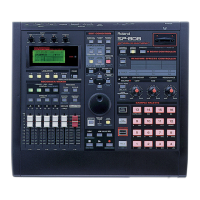
SP-808: Using MIDI Machine Control
MIDI Machine Control permits a master device to control remote functions on connected slave
devices. Use the following procedure to enable MMC (MIDI Machine Control) on the SP-808:
1. Press [SONG/TRACK], then press the down cursor to select "Set Song Param?"
2. Press [ENTER/YES].
3. Press the down cursor to select the "MMC Mode."
4. Rotate the VALUE/TIME dial to select from the following options.
OFF: MMC information is not exchanged.
MASTER: This sets the SP-808 as the MMC master.
SLAVE: This sets the SP-808 as the MMC slave.
5. Press [PLAY] to return to the basic screens.
6. To save the settings, hold down [SHIFT] and press [ENTER/YES] to call up the Save screen and
press [ENTER/YES] to save the song.
SP-808: Switching the MIDI OUT/THRU Connector
On the SP-808, MIDI OUT and MIDI THRU are combined into one connector. Although this
connector is set at the factory to MIDI OUT, it can be changed to a THRU setting. Use the following
procedure to change this setting:
1. Press SYSTEM/DISK.
2. Press CURSOR DOWN to select "Set MIDI Param?"
3. Press ENTER/YES to call up the MIDI settings screen.
4. Press CURSOR DOWN/UP to select "Out/Thru Select."
5. Rotate the VALUE/TIME dial to set either "OUT" or "THRU."
6. Press PLAY to return to the basic screen.
SP-808, SP-808EX: Updating The Operating System Using MIDI Files
The operating system of the SP-808/SP-808EX can be updated by using MIDI files supplied by
Roland. Use the following procedure to update the operating system via MIDI:
1. Connect the MIDI OUT of a MIDI sequencer (computer-based, MC-50MKII, etc.) to the MIDI IN
of the SP-808/SP-808EX.
2. Load the first MIDI file of the update into the sequencer.
3. Hold down the STATUS & EFFECTS buttons for Track A and then power on the SP-808/SP-808EX
to display "MIDI UPDATE - Waiting MIDI . . ."
4. Send the first MIDI file from the sequencer.
5. Repeat step #4 for the remainder of the MIDI files.
6. When all the files have been sent, turn off the SP-808/SP808EX and turn it back on.



 To Next Page
 Loading...