
 Need help?
Do you have a question about the Roland SYSTEM-500 531 and is the answer not in the manual?
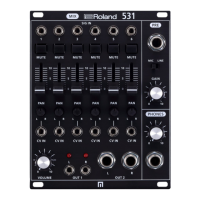
These jacks input the audio signals that will be mixed.
These switches mute (silence) each input.
These sliders adjust the level of the signals that are input from the SIG IN jacks.
These knobs adjust the left/right proportion of volume.
Input a voltage to these jacks if you want to control pan from an external source.
This knob adjusts the volume that is output from OUT1 and OUT2.
These indicate the status of the output signal (unlit when loaded, lit when overloaded).
These are output jacks. The same signal is output from OUT1 and OUT2.
Connect a mic or line-level device here. Mode selection affects CH5 and CH6 output.
This knob adjusts the level of the signal that is input from the PRE SIG IN jack.
Connect headphones here to monitor the mixed signal. The knob adjusts monitor volume.
The Roland SYSTEM-500 531 is a versatile stereo mixer module designed for audio enthusiasts and professionals seeking comprehensive control over their sound. This module integrates six channels of monaural input, a high-quality mic/line preamp, and a dedicated headphone output, making it a central hub for various audio setups. Its design emphasizes flexibility and precision, allowing users to sculpt their sound with a range of intuitive controls.
At its core, the 531 serves as a stereo mixer, capable of blending up to six individual monaural audio signals into a cohesive stereo output. Each of the six input channels, labeled SIG IN 1-6, is equipped with dedicated controls to fine-tune the incoming audio. The module's architecture includes a sophisticated signal path that ensures high-fidelity audio processing from input to output.
The integrated mic/line preamp is a standout feature, offering the flexibility to connect both microphones and line-level devices directly to the mixer. This preamp is designed to provide clean gain, ensuring that signals are boosted without introducing unwanted noise or distortion. The ability to switch between mic and line modes, along with a dedicated PRE GAIN knob, allows for precise level matching, accommodating a wide array of audio sources.
A critical component of the 531's mixing capabilities is its stereo output section. The module provides two main output jacks, OUT1 and OUT2, which deliver the mixed stereo signal. This allows for easy integration with other audio equipment, such as audio interfaces, amplifiers, or other modules in a modular synthesis system. The inclusion of a headphone output with its own volume control further enhances the module's utility, providing a convenient way to monitor the mixed signal directly.
The 531 is designed for intuitive operation, with a clear layout of controls that facilitate quick adjustments and precise sound shaping.
Each of the six monaural input channels (SIG IN 1-6) is the starting point for bringing audio into the mixer. These jacks are standard audio inputs, compatible with a wide range of audio sources such as synthesizers, drum machines, and other modular components.
Adjacent to each input jack is a MUTE SW (Mute Switch). These switches provide instant control over each channel's audio presence in the mix. Engaging a mute switch silences the corresponding input, allowing users to selectively remove channels from the mix without altering their level settings. This is particularly useful during live performances or when troubleshooting a complex patch.
Below the mute switches are the SIG IN level sliders. These sliders are crucial for adjusting the individual volume of each input signal. They allow for precise balancing of the different audio sources, ensuring that no single channel overpowers the others. The smooth travel of the sliders enables nuanced level adjustments, contributing to a well-balanced stereo image.
The PAN knobs for each channel offer control over the stereo positioning of the input signals. By turning a PAN knob, users can position an input signal anywhere between the extreme left and extreme right of the stereo field. This feature is essential for creating depth and spatial separation in a mix, allowing for dynamic soundscapes.
A unique and powerful feature of the 531 is the inclusion of CV IN (Control Voltage Input) jacks for each channel's pan control. These jacks allow external control voltages to modulate the pan position of each channel. This opens up possibilities for dynamic, evolving stereo effects, where the panning can be automated or linked to other modulated parameters within a modular system. For instance, an LFO (Low-Frequency Oscillator) could be patched to a CV IN to create an automatic, sweeping pan effect.
The PRE SIG IN jack is a dedicated input for the mic/line preamp. This input is versatile, accommodating both microphone and line-level signals. The associated MODE SW allows users to select between "MIC" and "LINE" modes. In MIC mode, the input signal is routed to channel 6, providing amplification suitable for microphones. In LINE mode, the L signal is routed to channel 5 and the R signal to channel 6, making it ideal for stereo line-level sources. An important consideration is that if plugs are inserted into SIG IN 5 and 6, those signals take priority, bypassing the preamp's routing to those channels. This intelligent routing ensures flexibility while preventing unwanted signal conflicts.
The PRE GAIN knob works in conjunction with the PRE SIG IN. It adjusts the input level for signals connected to the PRE SIG IN jack, providing essential gain staging for both microphones and line-level devices. Proper use of the PRE GAIN ensures that the signal enters the mixer at an optimal level, preventing clipping and maximizing signal-to-noise ratio.
The main VOLUME knob controls the overall output level of the mixed stereo signal from OUT1 and OUT2. This master volume control allows users to adjust the final loudness of their mix before it reaches subsequent stages in their audio chain.
The module includes output indicators that provide visual feedback on the status of the output signal. These indicators remain unlit when the signal is at a normal level and illuminate when the output signal is overloaded (clipping). This visual cue is invaluable for preventing distortion and maintaining a clean, professional sound.
These are the primary stereo output jacks of the mixer. The same mixed stereo signal is delivered from both OUT1 and OUT2, offering convenient connectivity options for sending the mix to multiple destinations simultaneously.
A dedicated PHONES OUT jack allows users to connect headphones for direct monitoring of the mixed signal. The associated PHONES VOLUME knob provides independent control over the headphone listening level, enabling users to monitor their mix comfortably without affecting the main output level. This is particularly useful for silent practice, detailed mixing, or quick sound checks.
The Roland SYSTEM-500 531 is designed for robust performance within a modular synthesis environment, typically requiring minimal user maintenance beyond standard operational practices.
As with any electronic audio equipment, keeping the module clean is important for its longevity and reliable operation. Dust and debris can accumulate around knobs, sliders, and jacks, potentially affecting their smooth movement or causing intermittent connections. Regularly wiping down the front panel with a soft, dry, lint-free cloth is recommended. Avoid using abrasive cleaners or solvents, as these can damage the panel's finish or the electronic components.
Ensuring that all patch cables are securely connected to the input and output jacks is crucial for stable operation. Loose connections can lead to crackling, signal dropouts, or hum. Periodically checking the tightness of connections and replacing worn or damaged cables will help maintain optimal performance. The jacks themselves are designed for durability, but excessive force or repeated stress on connections should be avoided.
The 531 is a Eurorack module and relies on the Eurorack system's power supply. Ensuring that the power supply is stable and provides adequate current for all connected modules is vital. Fluctuations or insufficient power can lead to unpredictable behavior or damage to the module. While the module itself does not have user-serviceable power components, maintaining a healthy power environment for the entire modular system is a key aspect of its maintenance.
Operating the module within its specified environmental conditions (temperature and humidity) helps prevent premature wear and ensures reliable performance. Extreme temperatures or high humidity can affect electronic components. Storing the module in a dry, temperate environment when not in use is advisable.
As a purely analog module, the 531 does not feature firmware or software that requires updates or maintenance. Its analog design contributes to its immediate and tactile nature, free from digital complexities.
In the event of unexpected behavior, a systematic approach to troubleshooting is recommended. This typically involves:
By adhering to these simple maintenance practices and understanding its operational nuances, users can ensure that their Roland SYSTEM-500 531 mixer module remains a reliable and integral part of their audio setup for years to come. Its robust construction and straightforward design are geared towards enduring the demands of both studio and live environments.
 General
| EQ | No |
|---|---|
| HPF | Yes |
| Pan | Yes |
| Mute | Yes |
| Solo | No |
| Width | 16 HP |
| LFO | 1 LFO |
| Oscillators | No |
| Filter | No |
| Envelope Generator | No |





 To Next Page