Compactline 52 Manual
1. Get to know your camera
5.0 Mega pixels resolution sensor
Digital still camera
Digital video camcorder
Built-in flash Light
8x digital zoom
2.4" TFT color display
Micro SD card support
2 x AAA alkaline batteries
Smile detection
Anti-shaking still capture
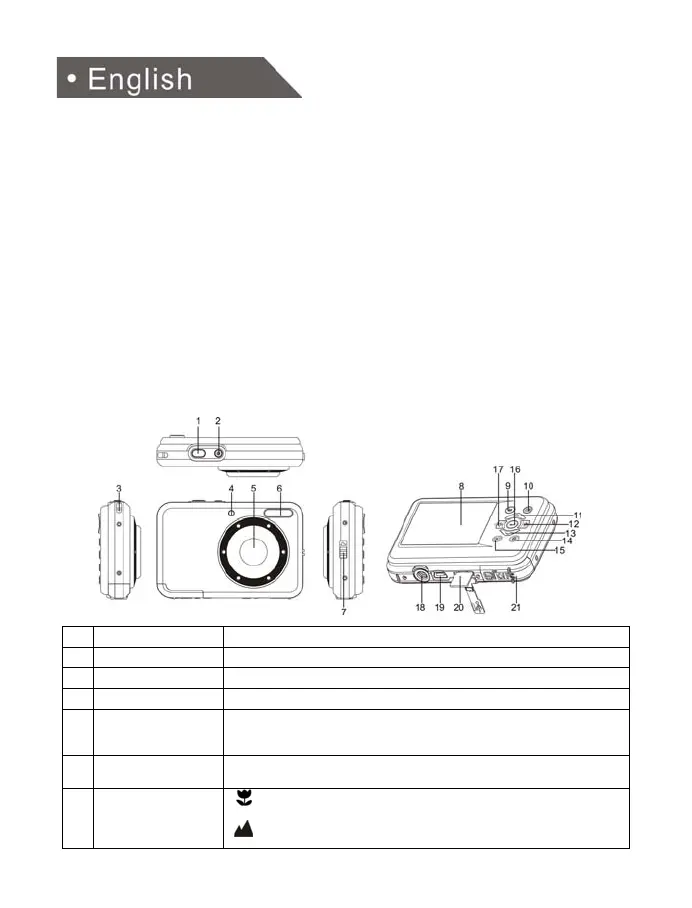
2. Functional parts
1
Shutter Press this button to take photographs.
2
Power on/off button Press this button to turn the camera on, press again to turn it off.
3
Strap hook Hook for assembling the wrist strap to the camera.
4
Busy indicator When the indicator is blinking, the camera is busy
5
Lens
Records the image to be taken.
Note: Keep the lens clean. Dirt and fingerprints will affect the quality
of the picture.
6
Flash light
Use the built-in flash to give the subject extra lighting if it is in dark
surrounding(the best flash distance is recommended within 1.5m).
7
Macro switch
Macro mode: Select this mode to take close-up photographs
(distance 11cm - 18cm).
Normal mode: Select this mode to take photographs from
0.5m - infinity.










 To Next Page