8
LCD screen Display photographs, video clips, camera setting and menu.
9
Mode Press to select PHOTO/VIDEO mode.
10
Menu Press to enter camera setting menu.
11
Up Up & Digital zoom in.
12
Right/Flash light
For RIGHT selection in menu mode.
For flash light function selection in photo mode.
13
Down Down & Digital zoom out.
14
Delete Press to delete the photos/videos in playback mode.
15
Playback Press to enter playback mode.
16
Enter
To start /stop recording a video clip, or to confirm changes in menu
mode.
17
Left / EV±
For LEFT selection in menu mode.
For exposure value set up in photo/video mode.
18
Tripod connector To fix the camera on tripod.
19
USB interface
Via this connection, you can download photographs and video clips
to a computer.
20
Micro SD card slot Micro SD card storage location.
21
Battery
compartment
Compartment for AAA Batteries
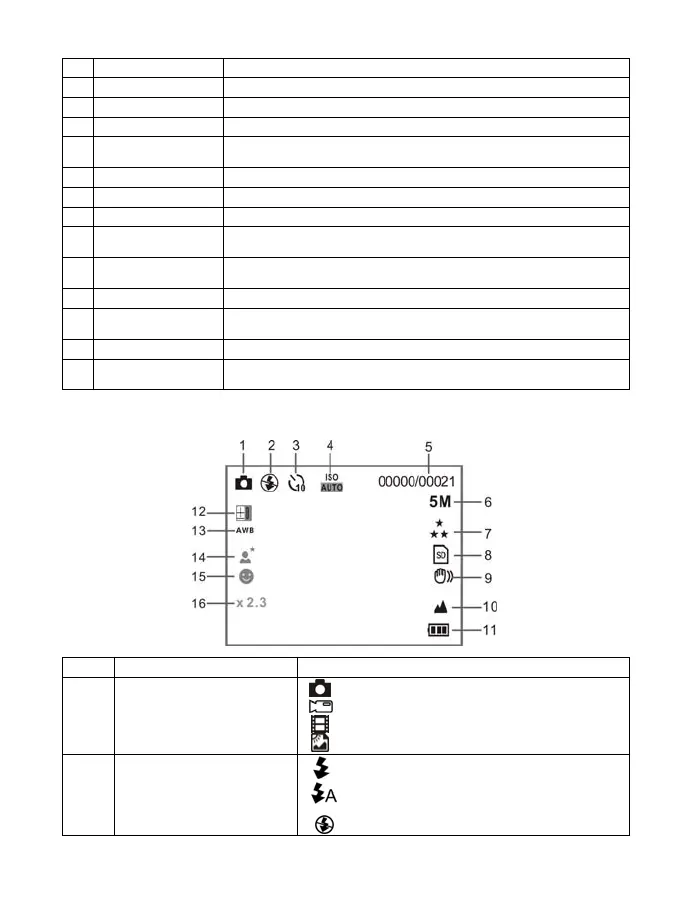
3. Explanation of the status icons
Item Function Description
1
Mode selected
Photographs mode.
Videos capture mode.
Playback VIDEO mode.
Playback PICTURE mode
2
Flash indicator
Forced flash: The flash is on in any
environment.
Auto flash: The camera determines if
flash should be used or not.
No flash: The flash is turned off.










 To Next Page