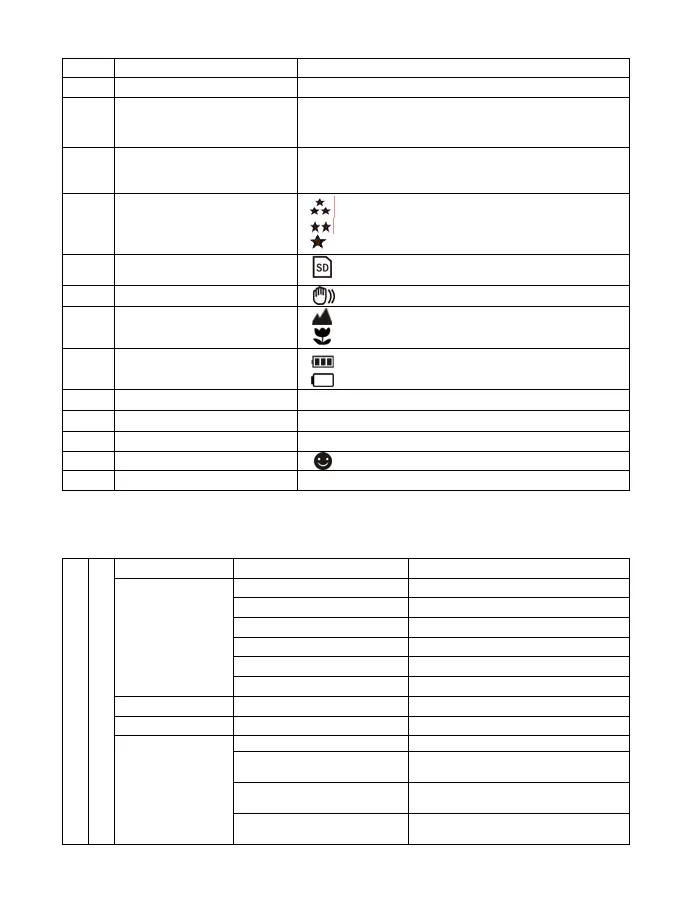
3
Self-timer 10s Timer
4
ISO Sensitivity selection.
5
Photo/Video counter
Photo mode: No. of pictures had been taken.
Video mode: Recording time in second.
Playback mode: No. of pictures or video file.
6
Selected resolution
12M = 4032 x 3024; 8M = 3264x 2448
5M = 2560 x 1920; 3M = 2048 x 1536;
1.3M =1280 x 960; VGA = 640 x 480
7
Picture quality
Super fine.
Fine.
Normal.
8
SD card indication
The SD card is inserted and will be used as
storage for PHOTO and VIDEO
9
Brightness alert
Alert user to hold the camera steadily.
10
Normal/Macro
mode indicator
Normal mode (0.5m – infinity).
Macro mode (11cm – 18cm).
11
Battery indicator
The batteries are full.
The batteries are empty.
12
Exposure value
Show EV±value.
13
White Balance
White balance selection.
14
Scene mode Landscape/Backlight/Night scene/Portrait/Sports
15
Smile detection
On/off
16
Zoom indicator Showing zoom ratio.
4. Details for camera setting
Capture Mode Single / 10s Timer
Single or 10s timer selection
12M pixel resolution 4032 x 3024
8.0M pixel resolution 3264 x 2448
5.0M pixel resolution 2560 x 1920
3.0M pixel resolution 2048 x 1536
1.3M pixel resolution 1280 x 960
Resolution
VGA resolution 640 x 480
Quality Super Fine/Fine/Normal Picture quality setting
Sharpness Strong/Normal/Soft Sharpness setting
Auto Automatic white balance
Daylight
White balance selected for daylight
surrounding
Cloudy
White balance selected for cloudy
surrounding
SET
Still
White balance
Tungsten
White balance selected for tungsten
lighting










 To Next Page